AutoCAD .NET
-
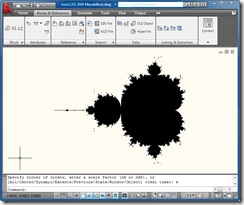
Some of you may remember my interest in fractals from these two previous posts. Well, while researching a problem in F# (related to the conversion of the last post's code to F#), I stumbled across this post from Luke Hoban, which contains some neat, recursive F# code to generate the Mandelbrot set, sending the result to the console as ASCII text. I couldn't resist modifying the code to generate Solids (filled shapes with 3 or 4 sides, as opposed to Solid3d objects) inside AutoCAD. Here's the F# code: #light module Mandelbrot #I @"C:\Program Files\Autodesk\AutoCAD 2009" #r "acdbmgd.dll" #r "acmgd.dll" #nowarn…
-

In the last post we saw how to access some of the 3D modeling functionality introduced in AutoCAD 2007. This post continues that theme, by looking at how to section a Solid3d object programmatically inside AutoCAD. Thanks to Wayne Brill, from DevTech Americas, for providing the original code that inspired this post. Here's the C# code: using Autodesk.AutoCAD.ApplicationServices; using Autodesk.AutoCAD.DatabaseServices; using Autodesk.AutoCAD.EditorInput; using Autodesk.AutoCAD.Runtime; using Autodesk.AutoCAD.Geometry; using System; namespace SolidSection { public class Commands { [CommandMethod("SS")] public void SectionSolid() { Document doc = Application.DocumentManager.MdiActiveDocument; Database…
-

AutoCAD 2007 introduced more advanced solid & surface modeling tools. This post takes a look at how to generate one particular type of surface: a SweptSurface, which is created by sweeping a profile (which could be a region, a planar surface or a curve) through a particular path (which must be a curve). The below C# code shows how to sweep an object along a curved path to create a surface. Our SAP (for SweepAlongPath) command doesn't provide all the options of the standard SWEEP command, as the point is to show how to do this programmatically, not to duplicate…
-
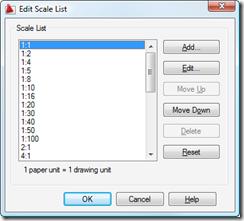
Back in this previous post we looked at some code to add new annotation scales and attach them to textual entities inside AutoCAD. As a comment on that post, someone requested information on how to safely delete annotation scales from a drawing. I (very) speculatively responded, at the time, that it was probably appropriate to use Database.Purge() to make sure there were no dependencies on the scales before erasing them. I've just seen an internal email confirming this, so I thought I'd write it up in a quick post. [As a side not, this is presumably the technique used in…
-
In the original post in this series, we introduced a basic application to number AutoCAD objects, specifically blocks with attributes. In the second post we extended this to make use of a generic numbering system for drawing-resident AutoCAD objects, and in the third post we implemented additional commands to take advantage of this new "kernel". In this post we're going to extend the application in a few ways: firstly we're going to support duplicates, so that the LNS command which parses the current drawing to understand its numbers will support automatic and semi-automatic renumbering of objects with duplicate numbers. In…
-
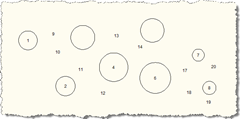
In the last post we introduced some additional features to the original post in this series. In this post we take advantage of - and further extend - those features, by allowing deletion, movement and compaction of the numbered objects. Here's the modified C# code, with changed/new lines in red, and here is the updated source file: 1 using Autodesk.AutoCAD.ApplicationServices; 2 using Autodesk.AutoCAD.Runtime; 3 using Autodesk.AutoCAD.DatabaseServices; 4 using Autodesk.AutoCAD.EditorInput; 5 using Autodesk.AutoCAD.Geometry; 6 using System.Collections.Generic; 7 8 namespace AutoNumberedBubbles 9 { …
-
In the last post we saw some code to perform simple sequential numbering of blocks (reflected in a particular attribute contained in each block). In this next installment we'll extend the code by introducing a NumberedObjectManager class, which will manage the activities related to maintaining the sequence of numbers used by the various blocks. The main code will create an object of this class which will be used extensively in this and the next post by a number of new commands. Here's the updated C# code, with changed & new lines marked with a red line-number. For your convenience here…
-

I had this interesting request come in by email: I have a problem where I have a block I need to insert into several parts of a drawing. The block has three attributes, 1. Point number, 2. Level, and 3. Code. I would like to do the following; 1. be able to select objects in a drawing and have it insert the block and autosnap to circle centres, and auto number each point number attribute.2. be able to manually select points which are automatically numbered.3. it should remember the last point number.4. have the option to renumber points if changes…
-
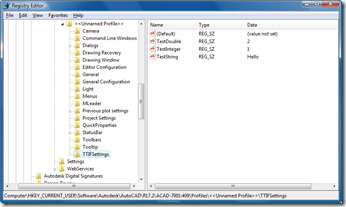
Thanks to Sreekar Devatha, Gopinath Taget & Jeremy Tammik (from DevTech India, Americas and Europe, respectively) for contributing to my knowledge in this area over the last few months (whether they knew they were doing so, or not :-). This post shows how to make use of a handy interface inside AutoCAD to place custom settings in the Registry and how to then read them back. The code is very simple: you simply open up the current profile and then access/modify your hierarchy of setting beneath it. I've used a Registered Developer Symbol (RDS) to prefix the section of the…
-
This question came in recently by email: Is there a way to obtain the object IDs of all the object on a layer? I found the GetAllObjects() method of the Transaction object but it doesn't work. That's right: GetAllObjects() will return the objects accessed via (or added to) the transaction - it has nothing to do with retrieving objects based on any particular property. What you need to do is Editor.SelectAll(), the equivalent of acedSSGet("X") in ObjectARX and (ssget "X") in AutoLISP. You need the version where you pass in a SelectionFilter specifying the layer for which to search. Here's…