AutoCAD .NET
-
This post was inspired by a comment on this previous post, where we looked at some code to select entities on a specific layer. The question was regarding how best to select entities from multiple layers: the selection filtering mechanism inside AutoCAD makes this very easy, and can cope with composition of conditions related to various entity properties. The basic concept is to enclose sets of entity properties for which you wish to filter with tags indicating the composition of the conditions: for "or" you enclose the conditions with "<or" and "or>" and for "and" you use "<and" and "and>".…
-

In the introductory post we first looked at a simple turtle graphics engine for AutoCAD, which was followed up by this series looking at using it to generate fractals (here are parts 1 & 2). This post continues the organic fractal theme, by looking at another fractal found in nature, the humble fern. I found some simple Logo code in a presentation on the web: to fern :size if :size < 4 [stop] fd :size / 25 lt 90 fern :size * .3 rt 90 rt 90 fern :size * .3 lt 90 fern :size * .85 bk :size /…
-

This series start with this initial post, where we looked at an implementation of a simple turtle graphics engine inside AutoCAD, and followed on with this previous post, where we refined the engine and looked at how we could use it to generate complex fractals with relatively little code. In this post we take a further look at fractal generation using the turtle graphic engine, with the particular focus on introducing randomness to generate more realistic, organic forms. On a side note, fractals and the use of randomness in design are two of my favourite topics, so this post is…
-

This topic started in this recent post, where I introduced a simple turtle graphics engine for AutoCAD implemented in C#. My eventual aim is still to implement a subset of the Logo programming language in F#, calling through to this C# engine, but for now I've been side-tracked: I'm simply having too much fun with the engine itself and exploring the possibilities of turtle graphics inside AutoCAD - especially around the use of recursive algorithms to generate fractals. This post and the next (and maybe more, depending on how much fun I continue to have) will be devoted to recursive…
-
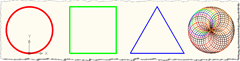
Like many thirty-something Brits (and possible non-Brits, for all I know) my earliest introduction to the world of graphics programming was via a language called Logo running on the BBC Microcomputer. This machine and its educational software were commonplace in UK schools in the 1980s, and I have clear memories of staying late at primary school (which I suppose means I was somewhere between 8 and 10) to fool around with BBC BASIC. With a friend I used to try to write text-based adventures ("you are in a cave, there are exits North, South, East and West" - you know…
-
A question came up recently in an internal discussion and I thought I'd share it as it proved so illuminating. If I have an object of a type which implements IDisposable, is it good practice to explicitly dispose it (whether via the using statement or calling Dispose() explicitly)? The quick(ish) answer is: Yes it is, but sometimes you might choose not to as the increase in code simplicity outweighs the benefits derived from manually disposing of the objects. So, naturally, the devil is in the detail. Let's take a look at the three scenarios where you're likely to be working…
-
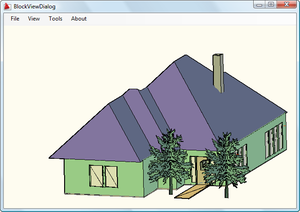
Fenton Webb, from DevTech Americas, has been beavering away on a .NET port of the ObjectARX BlockView sample (found on the ObjectARX SDK under samples/graphics/BlockView). Thanks, Fents! 🙂 Here is the C# source project for Visual Studio 2005. To build it you will almost certainly need to remap the acdbmgd.dll and acmgd.dll assembly references in the project. One important note: if you load this project and try to view the BlockViewDialog in the Visual Studio Designer, the Visual Studio application will almost certainly crash. This is because the Designer is attempting to load into the dialog the GsPreviewCtrl component which…
-
This post was inspired by a recent email from Sreekar Devatha, who is just about to leave DevTech India to work in one of our Engineering teams in Singapore (all the best on your new adventure, Sreekar! :-). It shows how to perform a programmatic zoom in .NET, whether to a window or to an entity. The .NET API in AutoCAD doesn't expose a handy "ZoomWindow" method, but there are a few options open that use officially supported APIs: Create a ViewTableRecord and set it as the current view (the classic ObjectARX technique, as described in this DevNote on the…
-

In this earlier post we saw some C# code that creates 2D, 3D or "live" section geometry in AutoCAD 2007 or higher. I mentioned at the end of the post that I was curious to see how equivalent F# code compared with this C# source, especially in the area of array concatenation. Well, it turns out that there's still a little pain, just different pain (more like a sharp pain that's over quickly, rather than a dull, nagging ache :-). Here's the F# code: #light module SolidSection // Import managed assemblies #I @"C:\Program Files\Autodesk\AutoCAD 2009" #r "acdbmgd.dll" #r "acmgd.dll" open…
-
Back when I joined Autodesk in 1995, I worked in European Developer Support with one of the most talented programmers I've met, Markus Kraus. One of Markus' contributions to the R13 ARX SDK (or maybe it was R14?) was a sample called pretranslate, which remained on the SDK up until ObjectARX 2008, under samples/editor/mfcsamps/pretranslate (it was removed from the 2009 SDK when we archived a number of aging samples). Anyway, with AutoCAD 2009 the API that makes this sample possible has been added to the .NET API, so in homage to Markus' original sample (which I have fond memories of…