Training
-
The organizers of AU are asking people to vote on the sessions they'd most like to attend at this year's conference. The sessions being presented by my team are not part of that list, so here they are, in case any of you completing the survey were wondering about them. I should mention that at this stage the below sessions are still subject to change. Platforms (AutoCAD, RealDWG, AutoCAD OEM, DWF) Product API Title AutoCAD All AutoCAD APIs: The Right Tool for the Job AutoCAD .NET AutoCAD .NET Basics AutoCAD .NET AutoCAD .NET: A Tour AutoCAD .NET AutoCAD .NET: Developing…
-
The ADN team delivered around 50 classes at AU 2007, and we're currently planning on delivering around the same number at AU 2008. (A quick note on the classes I'll be delivering: I'm planning to deliver a class on programming AutoCAD with F#, as well as delivering the "There's more to DWG than AutoCAD®" and "Enriching your DWF™" classes from last year.) Joseph Wurcher, manager of AU Program Development and author of BLAUG, asked me to pass on the below "last call for presenters" to this blog's readership. Two words: submissions deadline. If you're considering joining our outstanding slate of…
-
I've mentioned before how much I appreciate the content on MSDN's Channel 9. For those of you who are familiar with C# 1.0, but haven't yet taken the time to dive into the language features introduced since then, I strongly recommend the "whirlwind" series posted on Channel 9. Here's a quick description of what these whirlwinds are all about: Whirlwinds are bite-sized webcasts, each is shorter than 15 minutes. You can start anywhere in the series to learn about the parts you're most interested in. Here are links to the individual whirlwinds: What's new in C# 2 Whirlwind 1 -…
-
My team has been working very hard on some recordings of introductory presentations around our APIs. Here is the first batch of recordings we've just posted as part of our DevTV series (the idea being these are recordings that are "produced", while our webcast recordings are somewhat raw): Introduction to AutoCAD .NET Programming view download (148 MB) Introduction to Inventor Programming view download (51.7 MB) Introduction to Revit Programming view download (64.3 MB) Introduction to Civil 3D Programming view download (27.3 MB) Introduction to MapGuide Enterprise Programming view download (37.4 MB) Enjoy! 🙂 Update For those of you looking to…
-
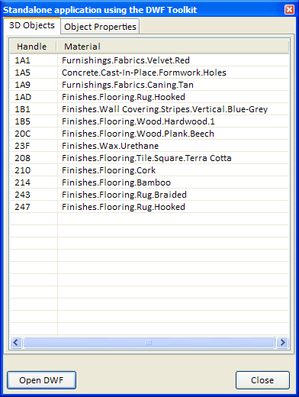
[This post continues from part 1 of this series. The source for the below applications is available here: DWF Toolkit application source, Design Review application source & Freewheel application source.] Mining the data with the DWF Toolkit Now we're going to look at using the DWF Toolkit – the freely available, cross platform toolkit for creating and reading DWF files – to extract the "identity" and "material" metadata associated with our geometry. The DWF Toolkit is a C++ toolkit, so we have two components to our project: A C++ DLL that uses the DWF Toolkit to read a DWF, storing…
-
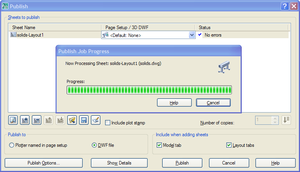
Introduction This session focuses on technologies that can be used to view and access DWF content downstream from Autodesk's design products. Yesterday's session focused on DWG – we're going to take the model containing 3D solids that we created during that session and publish it to DWF, adding custom metadata. We can then look at how to harness this data in lightweight applications, whether to access it non-graphically or to view it. Firstly, why are we using 3D solids in this example? The choice was somewhat arbitrary – the point is really to demonstrate the ability to access properties of…
-
The recording of the October 4 session from the AutoCAD Development Masterclass series, "AutoCAD: 10 easy ways to crash your AutoCAD addin", has been posted here. I will let you know as soon as the recording of the October 18 webcast, "AutoCAD: .NET for LISP Programmers", has been posted. Enjoy! 🙂
-
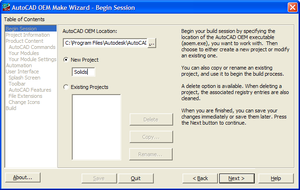
[This post continues from part 1 and part 2 of this series.] Building a full editing product using AutoCAD OEM Now we're going to take our AutoCAD .NET module from the beginning of the session and build a complete CAD package around it. AutoCAD OEM allows you to build a custom-branded version of AutoCAD, with the subset of AutoCAD's own features and additional functionality you choose to build in. A key feature of AutoCAD OEM is its security layer, which will stop any module being loaded that has not been built in by design. By limiting its extensibility – and…
-
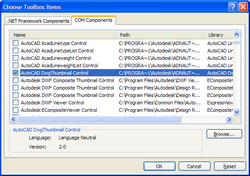
[This post continues from the last post, which I've been back and modified slightly since it was posted.] Using the DWG Thumbnail in a simple application Thumbnail images, when they exist inside a drawing, live in a predictable place at the beginning of the file. This makes it possible for a module – such as an ActiveX control – to extract the thumbnail information when pointed at a DWG file and generate an image from it. All done without the need for RealDWG (which also does this, but with a much heavier runtime component). A number of 3rd party tools…
-
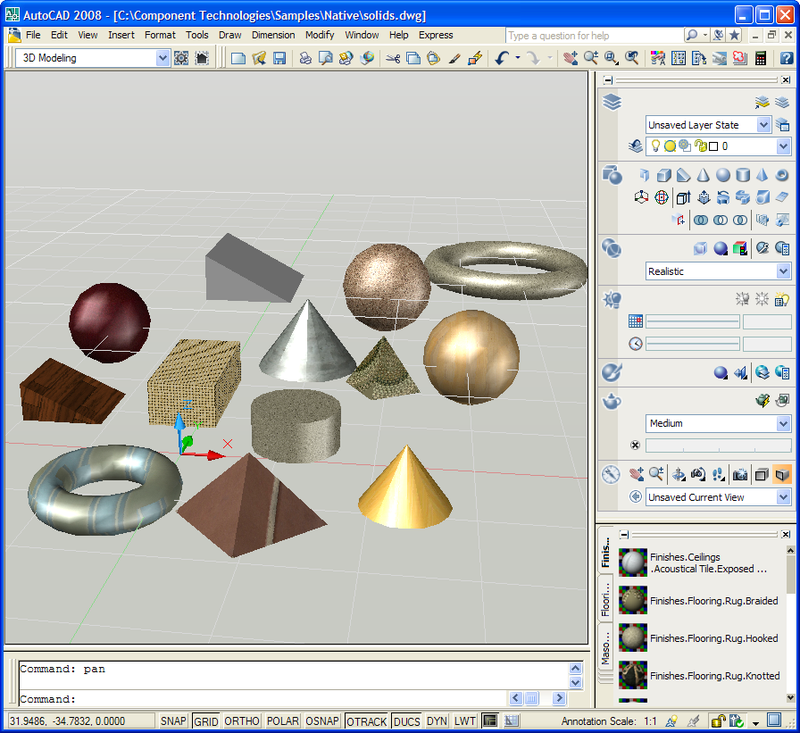
[As mentioned in the last post, I'll be publishing chunks of the handouts for my AU classes via this blog over the coming weeks] Introduction This session focuses on downstream technologies that can be used to access DWG content outside of AutoCAD-based products. We're going to start by creating a basic model inside AutoCAD comprised of 3D solid objects, and then look at a simple AutoCAD .NET application to access information about those solids. We will then take the same code and build a non-graphical (in terms of geometry - it does, after all, have a GUI) application around it…