Modifying an AutoCAD object’s state via a dynamic property defined using .NET

I've been meaning to get to this one for a while. This post takes the OPM .NET implementation and shows how to use it to allow modification of data persisted with an object: in this case we're going to use the XData in which we store the "pipe radius" for the AutoCAD 2010 overrule sample we've recently been developing.

To start with, I needed to migrate the OPM .NET module to work with AutoCAD 2010, which meant installing Visual Studio 2008 SP1. Other than that the code migrated very easily, and the project (with the built asdkOPMNetExt.dll assembly) can be found here. I recommend placing the module in AutoCAD's main program folder and having it demand-load on AutoCAD startup (if you choose to use it).

[A quick comment on that, as I know some people dislike doing this... it's highly recommended to place your .NET assemblies in AutoCAD's main program folder: you will avoid a whole category of subtle problems by doing so. You needn't feel it's dangerous as long as you prefix the filename of each of your modules with your Registered Developer Symbol (RDS).]

Here's the C# code to add to our overrule application:

using Autodesk.AutoCAD.ApplicationServices;

using Autodesk.AutoCAD.DatabaseServices;

using Autodesk.AutoCAD.Runtime;

using Autodesk.AutoCAD.Windows.OPM;

using Autodesk.AutoCAD.Interop.Common;

using System.Runtime.InteropServices;

using System.Reflection;

using System;

using DrawOverrules;


namespace PropertyEditing

{

  #region Our Custom Property

  [

    Guid("E64CAA14-EA92-46ea-82D6-420FA873F16F"),

    ProgId("OverruleSample.PipeRadius.1"),

    ClassInterface(ClassInterfaceType.None),

    ComDefaultInterface(typeof(IDynamicProperty2)),

    ComVisible(true)

  ]

  public class CustomProp : IDynamicProperty2

  {

    private IDynamicPropertyNotify2 m_pSink = null;


    // Unique property ID


    public void GetGUID(out Guid propGUID)

    {

      propGUID =

        new Guid("F60AE3DA-0373-4d24-82D2-B2646517ABCB");

    }


    // Property display name


    public void GetDisplayName(out string szName)

    {

      szName = "Pipe radius";

    }


    // Show/Hide property in the OPM, for this object instance


    public void IsPropertyEnabled(object pUnk, out int bEnabled)

    {

      bEnabled = 1;

    }


    // Is property showing but disabled


    public void IsPropertyReadOnly(out int bReadonly)

    {

      bReadonly = 0;

    }


    // Get the property description string


    public void GetDescription(out string szName)

    {

      szName =

        "Radius of the pipe profile applied to this linear entity.";

    }


    // OPM will typically display these in an edit field

    // optional: meta data representing property type name,

    // ex. ACAD_ANGLE


    public void GetCurrentValueName(out string szName)

    {

      throw new System.NotImplementedException();

    }


    // What is the property type, ex. VT_R8


    public void GetCurrentValueType(out ushort varType)

    {

      // The Property Inspector supports the following data

      // types for dynamic properties:

      // VT_I2, VT_I4, VT_R4, VT_R8,VT_BSTR, VT_BOOL

      // and VT_USERDEFINED.


      varType = 4; // VT_R4?

    }


    // Get the property value, passes the specific object

    // we need the property value for.


    public void GetCurrentValueData(object pUnk, ref object pVarData)

    {

      // Get the value and return it to AutoCAD


      AcadObject obj = pUnk as AcadObject;

      if (obj != null)

      {

        Document doc =

          Application.DocumentManager.MdiActiveDocument;

        Transaction tr =

          doc.TransactionManager.StartTransaction();

        using (tr)

        {

          DBObject o =

            tr.GetObject(

              new ObjectId((IntPtr)obj.ObjectID),

              OpenMode.ForRead

            );

          pVarData =

            PipeDrawOverrule.PipeRadiusForObject(o);

        }

      }

      else

        pVarData = 0.0;

    }


    // Set the property value, passes the specific object we

    // want to set the property value for


    public void SetCurrentValueData(object pUnk, object varData)

    {

      // Save the value returned to you


      AcadObject obj = pUnk as AcadObject;

      if (obj != null)

      {

        Document doc =

          Application.DocumentManager.MdiActiveDocument;

        DocumentLock dl =

          doc.LockDocument(

            DocumentLockMode.ProtectedAutoWrite,

            null, null, true

          );       

        using (dl)

        {

          Transaction tr =

            doc.TransactionManager.StartTransaction();

          using (tr)

          {

            DBObject o =

              tr.GetObject(

                new ObjectId((IntPtr)obj.ObjectID),

                OpenMode.ForWrite

              );

            PipeDrawOverrule.SetPipeRadiusOnObject(

              tr, o, (float)varData

            );

            tr.Commit();

          }

        }

      }

    }


    // OPM passes its implementation of IDynamicPropertyNotify, you

    // cache it and call it to inform OPM your property has changed


    public void Connect(object pSink)

    {

      m_pSink = (IDynamicPropertyNotify2)pSink;

    }


    public void Disconnect()

    {

      m_pSink = null;

    }

  }

  #endregion


  #region Application Entry Point

  public class MyEntryPoint : IExtensionApplication

  {

    protected internal CustomProp custProp = null;


    public void Initialize()

    {

      Assembly.LoadFrom("asdkOPMNetExt.dll");


      // Add the Dynamic Property to Lines and Circles

      // (might add it at the Entity level, instead)


      Dictionary classDict = SystemObjects.ClassDictionary;

      RXClass lineDesc = (RXClass)classDict.At("AcDbLine");

      RXClass cirDesc = (RXClass)classDict.At("AcDbCircle");

      custProp = new CustomProp();

      IPropertyManager2 pPropMan =

        (IPropertyManager2)xOPM.xGET_OPMPROPERTY_MANAGER(lineDesc);

      pPropMan.AddProperty((object)custProp);

      pPropMan =

        (IPropertyManager2)xOPM.xGET_OPMPROPERTY_MANAGER(cirDesc);

      pPropMan.AddProperty((object)custProp);

    }


    public void Terminate()

    {

      // Remove the Dynamic Property


      Dictionary classDict = SystemObjects.ClassDictionary;

      RXClass lineDesc = (RXClass)classDict.At("AcDbLine");

      RXClass cirDesc = (RXClass)classDict.At("AcDbCircle");

      IPropertyManager2 pPropMan =

        (IPropertyManager2)xOPM.xGET_OPMPROPERTY_MANAGER(lineDesc);

      pPropMan.RemoveProperty((object)custProp);

      pPropMan =

        (IPropertyManager2)xOPM.xGET_OPMPROPERTY_MANAGER(cirDesc);

      pPropMan.RemoveProperty((object)custProp);

      custProp = null;

    }

  }

  #endregion

}

Some comments on the implementation:

  • GetCurrentValueData() and SetCurrentValueData() both have to open the object to access it's .NET protocol
    • We might also have used COM to access the XData, but this approach reuses previously-developed code
    • To modify the object we need to lock the current document
      • We use the ProtectedAutoWrite locking mode for this, so that all our property edits are grouped into a single undo group
        • We use the "protected" version of the locking mode as there's a lock needed elsewhere, probably in the drawing code. If we use the standard AutoWrite lock we get an eLockViolation message
    • We're using a new transaction for each read/modification
      • This feels like overkill, but then as we're in an UI-bound operation it's unlikely to have a perceived performance impact
  • We're also using the static protocol from the DrawOverrule class for the XData retrieval/setting
    • With hindsight this probably should live in its own helper class, which is the original way I had it :-S 🙂

Here's a model we're going to modify using the Properties Palette:
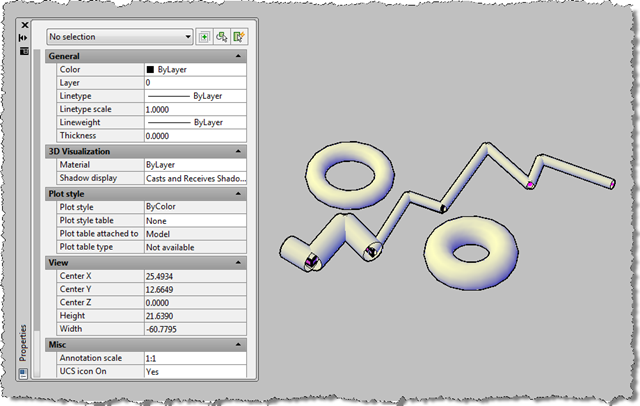
Our overruled objects with different radii

Now we select one of our overruled objects – a circle – and see it's new dynamic property:
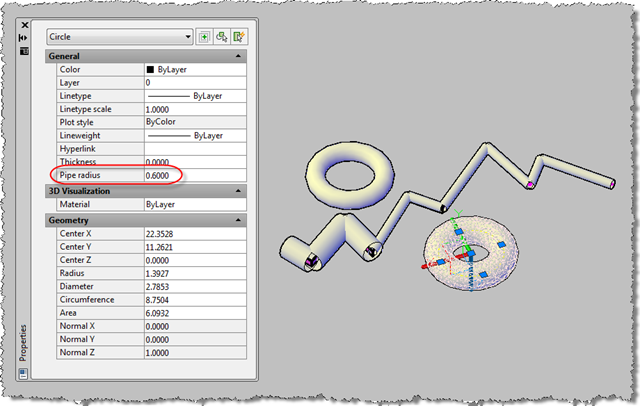
Dynamic property of one overruled object

When we select all our objects, we see the property varies:
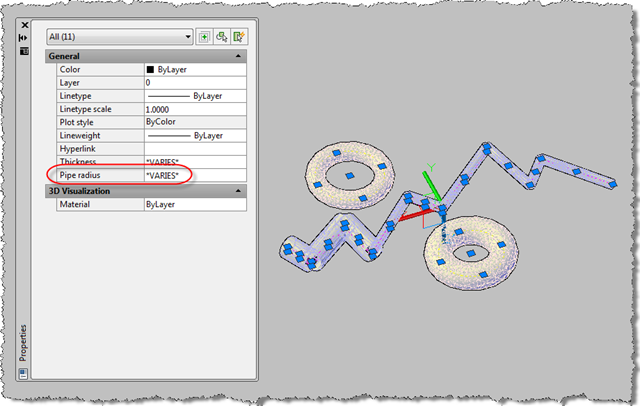
Dynamic property of our varying overruled objects

Now we modify the property to be the same for all our objects:
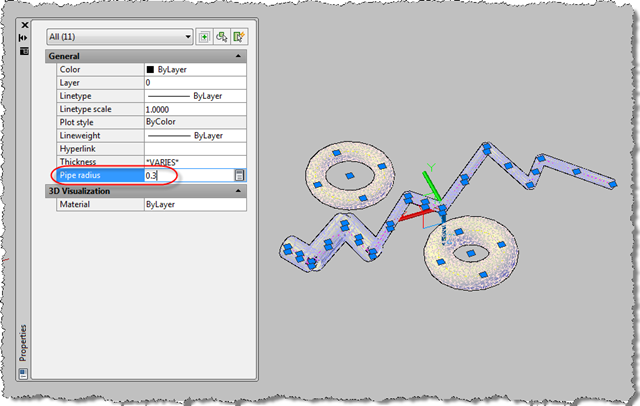
Modifying the dynamic property on our varying overruled objects

And we can see the result of our modification:
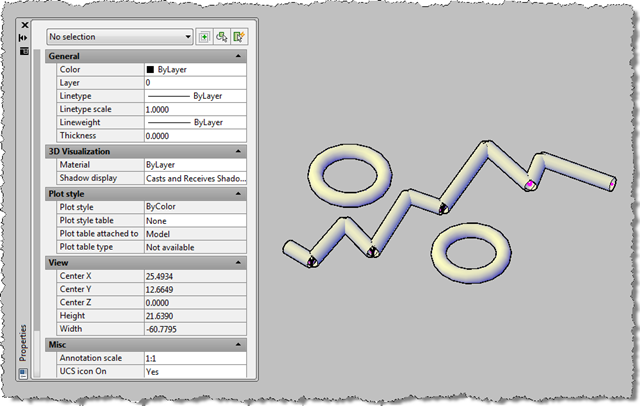
The result of our dynamic property modification

You can see that the property currently isn't categorised: as mentioned previously, we would have to implement ICategorizedProperty in our OPM .NET module for this to be possible. Which I will attempt, one day.

  1. Fernando Malard Avatar
    Fernando Malard

    Kean,

    Suppose I have a custom entity and want to use the same approach you did here to expose some of its properties to appear at the OPM dialog. My questions are:

    1) Can I do this without implemeting the Overrule?

    2) Can I implement an Overrule to my custom entity without a .NET Wrapper and then expose its properties through OPM?

    3) Do I need to implement (.NET Wrapper + Overrule) for my custom entity to use OPM?

    4) How do you evaluate the complexity of this approach when compared to the COM wrapper for OPM?

    Great post!
    Thanks.

  2. Kean Walmsley Avatar

    Fernando,

    1) Absolutely. This example is actually completely independent of the overrule sample - it was just a nice way to show the results of modifying the XData. And you clearly don't need an overrule for a custom entity, as you can change the code directly (overrules are more for objects for which you don't have source access).

    2) See above - not sure this is needed. If you use C++ to implement your dynamic properties you should be able to call your custom entity's protocol without COM or .NET in the way (I suppose).

    3) No, you don't. This is really just for people who don't have custom entities in C++.

    4) The two approaches are really for different situations. If you have your own custom entity, you probably just want to expose a COM wrapper and leave it at that. If you're overruling standard entities then you would probably go with an approach such as this one.

    I hope this clarifies,

    Kean

  3. Adri Groeneveld Avatar
    Adri Groeneveld

    Kean,

    Thank you for this post. I always wanted to create a OPM property like a direction boolean of a polyline(clockwise) or properties for my application StagCAD http://www.stagcad.com). I will try this using VB.net.

    Thanks again.

    Adri

  4. There is a problem with GetCurrentValueData:

    I have a custom object wrapped with .NET.
    A simple declaration in GetCurrentValueData without any assignment e.g.
    Wrap.MyLine ml;
    causes that GetCurrentValueData will not be called anymore ?!?
    I would like to do something like
    Wrap.MyLine ml = (Wrap.Myline) obj;
    pVarData = ml.GetVersion();

    Mark

  5. Kean Walmsley Avatar

    Mark -

    It's impossible to say what's going wrong (for me, at least) without seeing more of your code.

    I don't provide support when it's not directly related to my posts, so I suggest sending a reproducible to the ADN team (if you're a member) or otherwise trying one of the discussion groups (which one will depend on whether your code is primarily ObjectARX or .NET).

    Kean

  6. Kean,

    I took the GetCurrentValuData routine as you posted it. Of course you cannot give individual support, but I thought there might be a general (known) restriction which forbids using a .NET object.

    Mark

  7. Kean Walmsley Avatar

    Mark,

    We're accessing standard AutoCAD entities(lines and circles, but we could easily support other entity types) via .NET wrappers in the above example, so there's nothing conceptually different, unless you've implemented your wrapper in a different way.

    Regards,

    Kean

  8. Hi Kean,

    Thanks for the post. I created a docking palette followed by your past post by VB.net. I want that palette show Xdata of the seleted object. Load the palette first, show xdata when I select 1 object
    I have no idea how to archive it, please give me some advice

    thanks so much

  9. Kean Walmsley Avatar

    Hi yaqi,

    This post more-or-less does just that (although it only shows one piece of xdata), so I'm afraid I can't see how I'm going to help you.

    Kean

  10. During testing the property stuff with my custom object I found out the following things:
    1. If your DBX and your .NET-wrapper are not in sync strange things will happen, but you get no information on the cause.
    2. The COM-stuff preceding CustomProp is not necessary, it works without it.
    3. If was not able to translate the example from C# to VB.NET. I get a System.TypeloadException without further details, but C# works 🙂

    Thanks again Kean, your blog is a great knowledge database.

    Mark

  11. Mike Tuersley Avatar

    Thanks Kean! This article came in handy at an opportune moment. FTR, it translates fine to VB.NET - I had to check 😉

  12. Mohammad Afghari Avatar

    That property always shows in General group is there any way to create a custom group and then add that property subset of that group?

  13. You'd need to use (and probably add support for in OPM .NET) ICategorizeProperties.

    Kean

  14. Is the a way to do it without OPM .NET module?

  15. You might use C++ directly, but otherwise (at the time of writing) there are no other options I know of.

    Kean

  16. Bad. As I understand it - for each version of AutoCAD we need to do their version of the COM server 🙁

  17. The 2010 version linked to from this post should work for 2011 and 2012, too.

    Kean

  18. Strange. I'm trying your code and it didn't work. Maybe i make a mistake. Need to trying again.
    I have one more question - is there any way to make and register our own entity without using C++?

    Sorry for my bad english 🙂

  19. No, there is not (although the need to create custom entities has been greatly reduced by the availability of the Overrule API).

    Kean

  20. Danny Polkinhorn Avatar

    Kean,

    In paragraph 3, you recommend placing our assemblies in the same folder as AutoCAD. Can you explain further why that is, or point me to another resource? Searches haven't pulled up anything (or I'm not searching for the right terms).

    I would prefer that I install into another folder so I can control permissions on the folder and allow users to update their own assemblies via logon scripts. I would prefer not to enable those permissions on the AutoCAD folder so that users aren't modifying standard AutoCAD files. I guess I'm wondering what the gotchas are for loading from another folder.

    Thanks in advance,
    -Danny

  21. Danny,

    Yes - our Engineering team strongly recommends placing .NET DLLs in the same folder as the AutoCAD EXE (prefixing the module name with your Registered Developer Symbol).

    There's some background here:

    keanw.com/2009/11/updated-version-of-screenshot-now-available.html

    People do use other folders to host their modules, but doing so tends to run the risk of hitting subtle (and often hard to diagnose) issues. Hence the recommendation.

    Cheers,

    Kean

  22. Kean,

    I'm sorry, but I can not use your sample

    what I'm doing:

    download le sample
    copiing the 2 dll's in the autocad main folder
    adding 2 demand-load in the registry (1 for each dll , using the hkcu\...\applications

    fire Autocad

    insert a line , and look-at the properties

    the radius line do not appair.

    What am I doing wrong ?

    Can you help me ?

    Autocad is a 2011 french version

    regards

    Luc

  23. Luc,

    It should work in 2011 as it does in 2010.

    You might try using Process Monitor (the successor to RegMon and FileMon), to see whether acad.exe is finding the DLLs properly.

    Otherwise I suggest submitting the information (including a .reg of that section of the Registry) to ADN, for someone in my team to investigate.

    Regards,

    Kean

  24. Hi Kean,

    I have the same problem as Luc. I think it might have something to do with the asdkOPNetExt.dll download.

    I attempted to NETLOAD the asdkOPMNetExt.dll file as a test, but I got the following error message in both AutoCAD 2011 and 2012:

    C:\Program Files\Autodesk\AutoCAD 2012 - English\asdkOPMNetExt.dll is incompatible with this version
    of AutoCAD.

    I tried to compile the C++ project in VS 2010 but no luck. Unfortunately I don't know to fix C++ compile errors.

    Any idea on why it's not working?

    Art

  25. Hi Art,

    I see the same thing on my x64 system (while it works well on my Win32 machine).

    The app is currently 32-bit only (until someone takes the time to migrate it). Could that be the issue?

    I'll also reply to Luc, as I agree it's likely he may well be hitting the same problem as you.

    Regards,

    Kean

  26. After looking at this some more (see below for my reply to Art's comment)... could it be you're running on 64-bit Windows?

    Kean

  27. Aha! Yes I am running 64.

    I hear you guys love doing migration work... it's fun yes!? 🙂

  28. 🙂

    I personally don't enjoy it very much, but that's not really the issue - it's more about a lack of bandwidth for unplanned activities, at the moment.

    I'll see if I can find someone to look into it, at some point, but otherwise you might try posting the project to the ObjectARX discussion group and asking if anyone there is up for it.

    Kean

  29. I am migrating this code to AutoCAD 2013. I am getting a eLockViolation when I edit the custom property.

    I am using the protectedoautowrite document lock just as AutoCAD 2012.

    Any advice?

    David

  30. Kean Walmsley Avatar

    Hi David,

    If you're an ADN member, I suggest submitting the issue via the ADN site. Otherwise, let me know and I'll ping the ADN team myself (I assume this is regarding a port of the core asdkOPMNetExt.dll module).

    Regards,

    Kean

  31. Your Migration to AutoCAD 2013 solved my problem. Thanks, David

  32. Thanks to Cyrille Fauvel for updating the project to make it work with AutoCAD 2016 x64.

    You can find the source here:

    https://github.com/cyrillef...

    And a release build here:

    https://github.com/cyrillef...

    Kean

  33. Clarence Pollard Avatar
    Clarence Pollard

    Has anyone had success getting the project to work in AutoCAD 2018? I used Cyrille's implementation to get it to work in 2016 but I'm getting "could not load assembly" errors when I'm trying to make the call out to get the PropertyManager

    IPropertyManager2 pPropMan =
    (IPropertyManager2)xOPM.xGET_OPMPROPERTY_MANAGER(lineDesc);

Leave a Reply to Art Cancel reply

Your email address will not be published. Required fields are marked *