AutoCAD
-
During the first two parts of this series we looked at different techniques for creating polylines programmatically in AutoCAD (while allowing the user to select the various vertices). In this post look at the most advanced technique yet, the use of a "Jig". A Jig is a special construct in AutoCAD that hosts an object - in our case a polyline - and feeds user input information into this object, which then determines what graphics gets displayed. This is especially useful when dealing with complex objects, such as polylines with arc segments. We're going to start with a fairly basic…
-
During the first part of this series, we looked at ways to drive the PLINE command while retaining (or regaining) the thread of execution in your application. During this and the next post (yes, I've decided to spread the series a little thinner 🙂 we're going to look at how to completely replace the user-interface to the polyline command, a very useful technique in certain situations. This post focuses on the simple use of GetPoint() to request vertex information from the user; the next post will look at a more advanced technique, the Jig. Even the "simple" user-interface implemented in…
-
I received this interesting question through by email over the weekend: "How can I ask AutoCAD to let the user to draw a Polyline (just like the user pushed Polyline button) and then just after finishing drawing get the ObjectID of that entity? Is it possible?" This is a fun one, as there are a number of different approaches to take. I'm going to outline (or just go ahead and implement, depending on the complexity) the various possibilities – taking the first two today and the others in (a) subsequent post(s). The idea is to define our own command, say…
-
A discussion in the comments on this previous entry seemed worthy of turning into a post. The problem appears to be that when you load a partial CUI file into AutoCAD, by default the various resources (pull-down menus, toolbars) are not displayed. This snippet of code shows you how to both load a CUI file into AutoCAD and then loop through the toolbars in your menu-group, making them all visible. You could extend it fairly easily to add the pull-down menus contained in the CUI by using mg.Menus.InsertMenuInMenuBar(). I'm choosing to leave that as an exercise for the reader mainly…
-
Thanks to Viru Aithal from the DevTech team in India team for this idea (he reminded me of this technique in a recent ADN support request he handled). A quick disclaimer: the technique shown in this entry could really confuse your users, if implemented with inadequate care. Please use it for good, not evil. I talked at some length in previous posts about MDI in AutoCAD, and how various commands lock documents when they need to work on them. When commands try to lock (or unlock) a document, an event gets fired. You can respond to this event in your…
-
Thanks to Fernando Malard for suggesting part of this topic in response to an issue he submitted through ADN support. Windows applications that make use of the .NET Framework can be configured via a ".config" XML file found in their executable's main directory (for more specifics, please see this MSDN article). In AutoCAD's case, this file is called acad.exe.config, and is found in c:\Program Files\AutoCAD 2007 (for instance). The default contents of this file for AutoCAD 2007 are: <configuration> <startup> <!--We always use the latest version of the framework installed on the computer. If you are having problems then…
-
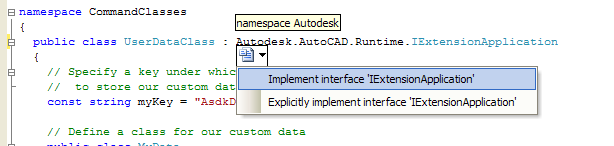
A colleague of mine in one of our Engineering teams just shared this tip that I'm in turn sharing with you... I was implementing an override of the abstract class Autodesk.AutoCAD.DatabaseServices.DwgFiler, which has about 40 abstract functions that have to be overridden. Since there are no header files in C#, I couldn't just cut and paste all the signatures as a template, like I would in C++. As I was manually typing in each signature, I noticed that Intellisense was keeping track of which signatures I had already accounted for. I thought… if it can do that, why can't it…
-
This entry completes the series of posts about per-document data. Here are the previous entries: Some background to AutoCAD's MDI implementation and per-document dataPer-document data in ObjectARXPer-document data in AutoCAD .NET applications - Part 1 Document.UserData Now let's take a look at a second technique in .NET for storing transient (non-persisted) data with an AutoCAD document, the UserData property. The managed framework for AutoCAD associates a hash table with each document, which can be accessed using the UserData property. Hash tables are a great way to store and access data quickly: each object you store in a hash table is…
-
The last few posts have focused on the history of MDI in AutoCAD and how to store per-document data in ObjectARX applications. Now let's take a look at what can be done for AutoCAD .NET applications... There are two main approaches for storing per-document data in managed applications loaded into AutoCAD – I'll take a look at the first in this entry and tackle the second technique next time. Define commands as instance members of a class In managed applications you can declare instance or static methods. Static methods are those specified as "static" in C# or "Shared" in VB.NET.…
-
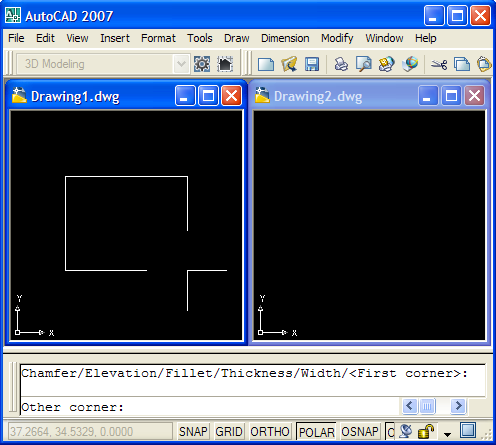
As discussed in the previous post, AutoCAD is now largely an MDI application, and this can have an impact on the design of applications. Let's talk about the theoretical issue with migrating applications into a multiple-document environment. We used to highlight this nicely, back when we first started talking about MDI in AutoCAD 2000. We demonstrated a simple ObjectARX application that defined an alternative RECTANGLE command. The code used in the demo can still be found in the ObjectARX SDK, under samples\editor\rect. The original command - as defined in the badrectang.cpp file – makes use of static member variables to…