Blocks
-
In the last post we saw some code to perform simple sequential numbering of blocks (reflected in a particular attribute contained in each block). In this next installment we'll extend the code by introducing a NumberedObjectManager class, which will manage the activities related to maintaining the sequence of numbers used by the various blocks. The main code will create an object of this class which will be used extensively in this and the next post by a number of new commands. Here's the updated C# code, with changed & new lines marked with a red line-number. For your convenience here…
-

I had this interesting request come in by email: I have a problem where I have a block I need to insert into several parts of a drawing. The block has three attributes, 1. Point number, 2. Level, and 3. Code. I would like to do the following; 1. be able to select objects in a drawing and have it insert the block and autosnap to circle centres, and auto number each point number attribute.2. be able to manually select points which are automatically numbered.3. it should remember the last point number.4. have the option to renumber points if changes…
-
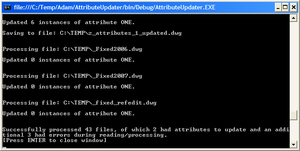
This post finally takes the code last shown in this previous post, migrating it to use RealDWG to update a folder of DWGs without the need for AutoCAD to be installed on the system. A big thanks to Adam Nagy, a member of DevTech working from our Prague office, who turned around my request to convert the code to work with RealDWG in a matter of hours (if not minutes). Firstly I need to make it clear that this code will not run without both RealDWG installed (I'm using RealDWG 2007, as the file format didn't change between 2007 and…
-
In the last post we looked at some code to search the current drawing for a particular attribute and update its value. In this post - as promised - we're going to look at how to extend this application to work on a folder of drawings, updating those that contain the attribute and saving them to a new filename. Rather than implement a fancy, graphical user interface, I've stuck with my approach of using the command-line for input and output. If you wish to implement your own UI, please do - it's really easy using .NET. I get the occasional…
-
This suggestion came up in reference to this previous post about using side databases. The request is to be able to open a number of DWG files and modify a particular attribute, saving the files back. Rather than jumping in and solving both problems in one post, we'll start today with the problem of updating the attribute and then in the next post we'll look at some code we can use to process a folder of DWGs, opening, updating and saving each one. I'll probably then go one step further and look at the steps needed to extract this code…
-
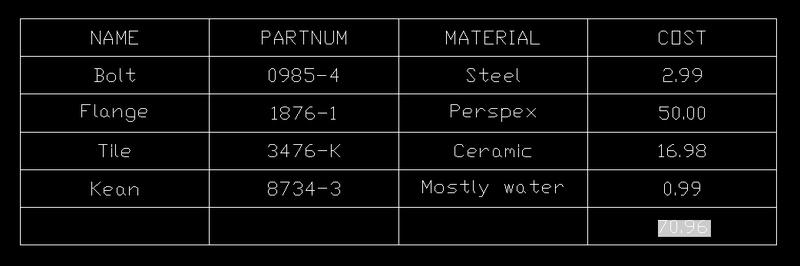
In the last post we looked at some code to create a table of attribute values for a particular block. In this post we'll extend that code and show how to use a formula to create a total of those values. Below is the C# code. I've numbered the lines, and those in red are new since the last post. The complete source file can be downloaded here. Firstly, a quick breakdown of the changes: Lines 60-81 deal with user input, and the forcing of the decision to "embed" rather than "link", if we're performing the total (table formulae do…
-
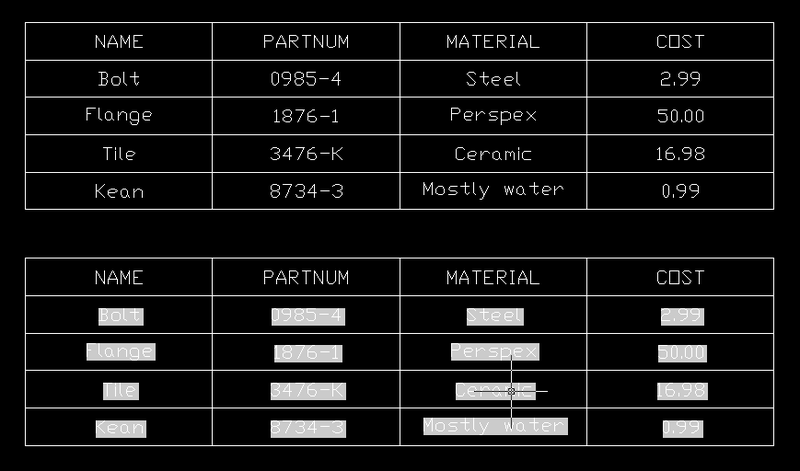
This post was inspired by suggestions from a few different people (you know who you are! :-). I'm going to take it in two parts: this post will focus on creating a table automatically that lists the values of attribute references included in block references in the modelspace that point to a particular block table record selected by the user. Phew. The next post will add some functionality to create a "total" of one of the columns in the table we create, by using a table formula that performs a sum of the appropriate cells. The below code is actually…
-
It's been a hectic week, between one thing and another, and I don't expect it to get better anytime soon: apart from anything else, my wife is due to give birth any day to our second child. We're both excited - and admittedly a little anxious - about it, and our 2 year-old seems to be feeding of that, which means none of us have ended getting much sleep of late. All good preparation, I suppose. 🙂 So I decided the path of least resistance for getting a blog entry out today was to look through some of the responses…
-
I didn't spend as much time as would have liked talking about the code in the previous topic (it was getting late on Friday night when I posted it). Here is a breakdown of the important function calls. The first major thing we do in the code is to declare and instantiate a new Database object. This is the object that will represent our in-memory drawing (our side database). The information in this drawing will be accessible to us, but not loaded in AutoCAD's editor. Database sourceDb = new Database(false, true); Very importantly, the first argument (buildDefaultDrawing) is false. You…
-
We're going to use a "side database" - a drawing that is loaded in memory, but not into the AutoCAD editor - to import the blocks from another drawing into the one active in the editor. Here's some C# code. The inline comments describe what is being done along the way. Incidentally, the code could very easily be converted into a RealDWG application that works outside of AutoCAD (we would simply need to change the destDb from the MdiActiveDocument's Database to the HostApplicationServices' WorkingDatabase, and use a different user interface for getting/presenting strings from/to the user). using System; using Autodesk.AutoCAD;…