Blocks
-
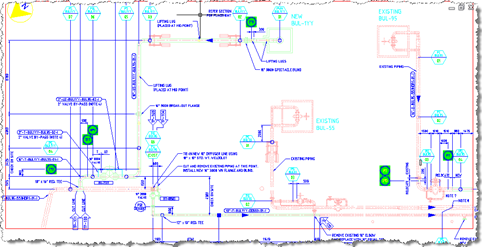
This is a nice sample provided by Stephen Preston, who manages DevTech's Americas team. Stephen has put this together in anticipation of his upcoming AU class on the overrule API introduced in AutoCAD 2010. [I know the final class list has not yet been announced, but Stephen is co-owner of the Customization & Programming track at this year's AU and presumably has the inside skinny on the selected classes. Which means he has a head-start on preparing his material, lucky fellow. :-)] The sample allows the user to enter a text string that it uses to highlight any block containing…
-

This post extends the last one which looked at a basic implementation to allow AutoCAD's standard OFFSET command to work on the contents of external references. I haven't flagged the specific changes, but the old code (which is almost identical to that in the last post) starts with the Initialize() function. The previous example created geometry on a temporary layer that exists only as long as the source xref is attached: detaching the xref generally caused dangling layer references. This post evolves the approach and provides a choice to the user (via the XOFFSETLAYER command): to either create the geometry…
-

This was a fun little project: to enable AutoCAD's OFFSET command to work on the contents of external references (xrefs), something I'm told is a long-standing end-user wishlist request. AutoCAD's .NET API provides some very interesting events that make this possible without the need for us to implement our own OFFSET command. We can simply respond to the selection event and replace the selected object (the xref itself) with either an item contained in the xref or a clone of it that has been placed in the current space. I ended up using the latter approach: the former worked fine…
-
Thanks, once again, to Philippe Leefsma, a DevTech engineer based in Prague, for contributing the code for this post. While researching an issue he was working on Philippe stumbled across a comment on this previous post where I more-or-less said jigging attributes wasn't possible. Ahem. Anyway, Philippe decided to – quite rightly – prove me wrong, and the result is today's post. 🙂 It turns out that the trick to jigging a block with attributes is to add the block reference to the database prior to running the jig. I'd been coming at this from another direction – working out…
-
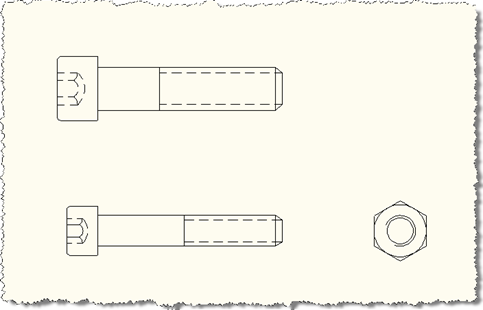
In the last post we looked at some code that essentially dumped out the dynamic properties of dynamic blocks to the command-line. In this post we take it a step further and capture the properties from one dynamic block reference and attempt to apply them to another. We're going to apply slightly different logic, depending on the situation... If the block references refer to the same dynamic block definition (i.e. their DynamicBlockTableRecord property contains the same ObjectId) then we'll assume they have the same dynamic properties in the same order. So we'll go through and attempt to copy the property…
-
This is one of those funny scenarios... I was just thinking about what to do for my next post - whether to dive into some new features of AutoCAD 2010 (which I will do soon, I promise! 🙂 or whether to choose something from my ever-increasing to-do list, when I received two emails. One was from our old friend Fernando Malard, suggesting a topic for a blog post, and the other was from Philippe Leefsma, a member of our DevTech team in Europe, in response to an ADN members question. It provided some code that could eventually form the basis…
-
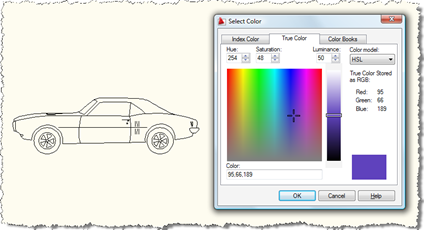
Here's a question that came in to us, recently: How can I show the AutoCAD color dialog from .NET? I need to allow the user to select a block, show the AutoCAD color dialog and apply the selected color to the contents of the selected block. A new member of DevTech Americas - Augusto Gonçalves, who's based in our São Paulo office - answered with the following code (which I've modified slightly, mostly to follow this blog's coding conventions). Thanks, Augusto! By the way, these previous posts may also be useful to those interested in this topic. Here's the C#…
-

In response to these recent posts, I received a comment from Nick: By any chance would it be possible to provide an example to prevent a user from using the EXPLODE command for a given block name? I delved into the ADN knowledgebase and came across this helpful ObjectARX DevNote, which I used to create a .NET module to address the above question. Here's the C# code, which should contain enough comments to make it self-explanatory: using Autodesk.AutoCAD.ApplicationServices; using Autodesk.AutoCAD.DatabaseServices; using Autodesk.AutoCAD.EditorInput; using Autodesk.AutoCAD.Runtime; namespace ExplosionPrevention { public class Commands { private Document _doc; private Database…
-
In the original post in this series, we introduced a basic application to number AutoCAD objects, specifically blocks with attributes. In the second post we extended this to make use of a generic numbering system for drawing-resident AutoCAD objects, and in the third post we implemented additional commands to take advantage of this new "kernel". In this post we're going to extend the application in a few ways: firstly we're going to support duplicates, so that the LNS command which parses the current drawing to understand its numbers will support automatic and semi-automatic renumbering of objects with duplicate numbers. In…
-
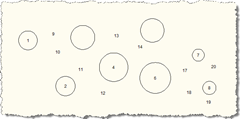
In the last post we introduced some additional features to the original post in this series. In this post we take advantage of - and further extend - those features, by allowing deletion, movement and compaction of the numbered objects. Here's the modified C# code, with changed/new lines in red, and here is the updated source file: 1 using Autodesk.AutoCAD.ApplicationServices; 2 using Autodesk.AutoCAD.Runtime; 3 using Autodesk.AutoCAD.DatabaseServices; 4 using Autodesk.AutoCAD.EditorInput; 5 using Autodesk.AutoCAD.Geometry; 6 using System.Collections.Generic; 7 8 namespace AutoNumberedBubbles 9 { …