Core Console
-
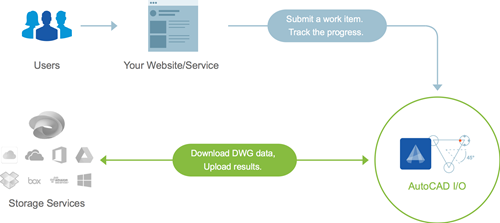
The AutoCAD I/O team has deployed version 2 of their API. For specific information on what's new, check this page. As I'll be talking about AutoCAD I/O at AU 2015, I thought it important to get to grips with the new version and understand how it differs from v1. I went ahead and updated Jigsawify.com to make use of the new API, so I'll add my own commentary below on the changes that have been introduced. As a reminder, the full source code for Jigsawify.com is available on GitHub. To check out the specific migration changes, see this comparison…
-

The nostalgia is strong in this one. (In both this post and this blogger, in case you're wondering.) It started with my 20th anniversary at Autodesk, but it got worse, last weekend, when I travelled to the UK to celebrate the 50th anniversary of the University of Kent (where I studied, back in the day, about halfway through its history). I'd coordinated with a couple of close friends, so we descended on Canterbury from Switzerland, Connecticut and Windsor, and joined a thousand or so alumni for a really fun, celebratory weekend, revisiting old haunts and sharing old memories. Doubling down…
-

The title of this post is probably a bit misleading: I'm not actually going to show how this works, today, but I do intend to plot a path for addressing this topic over the coming weeks. I was spurred on by a tweet I received a couple of hours ago: @keanw Dear kean, I've been looking into AutoCAD I/O and it looks like it may only execute "scripts"; so no .NET API calls or LISP? — Cyborg (@CyborgEvilHam) May 13, 2015 The short answer to this is "yes, it's absolutely possible!". But readers of this blog are clearly interested in…
-
This request came in a few weeks ago regarding the source code for the recently posted DGN clean-up tool: Would you modify the tool so that it can be processed by the equivalent figure ObjectDBX (of course for AutoCAD, not RealDWG)? I would like to give the Database object to the function, and the tool would have to process them in batch (a tool for loading drawings on my side). It seemed like a reasonable enough request, so I spent some time putting together a version of the code that can be used on non-editor resident drawings. I changed the…
-
This post contains the second part of the handout for my Windows 8-related session at AU 2012 (here's the first part). Here's the accompanying source project for the MetroCAD application, which has now been upgraded to work on the shipping version of Windows 8. What can be done with AutoCAD? Something that's being promoted by Microsoft to developers of "heavyweight" desktop apps is the idea of a companion app. These are essentially Windows Store apps that complement desktop apps such as AutoCAD. We're going to see one such companion app in this session: an app called MetroCAD that is basically…
-
After seeing the feedback regarding this interesting feature in AutoCAD 2013, I decided to do a little detective work to establish which commands could be called from inside the AutoCAD 2013 Core Console. I hope this proves to be of use to at least some of the many people I expect to take advantage of this tool. Before I go into the details on generating the list – and then look at the list itself – it's worth mentioning some additional background regarding this feature. I certainly see the Core Console as being extremely useful to many people, but it…
-
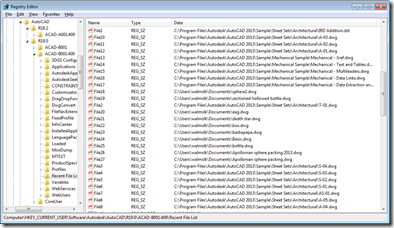
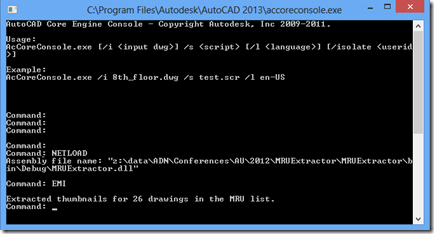
Inspired by the Windows 8 conference I attended on Monday, I've decided to build my first Metro-style application which scrolls through AutoCAD's Most-Recently-Used (MRU) drawing list. I now have a barebones installation of the Windows 8 Consumer Preview + VS11 Beta inside a Parallels VM on my Mac, but rather than installing AutoCAD into that, I decided to write a simple exporter on my existing Windows 7 machine (which now has AutoCAD 2013 installed) to generate the data for my Metro-style application. Let's start by looking at what file-oriented MRU data AutoCAD stores, and where. At the end of each…
-
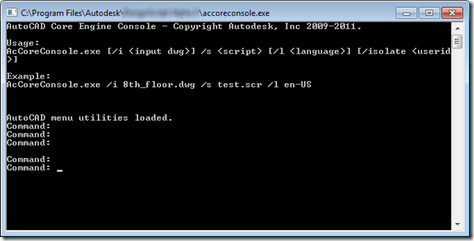
In the first of this week's posts on the new, developer-oriented features in AutoCAD 2013, we're going to take a look at the AutoCAD Core Console. I predict that this one feature alone is going to be worth its weight in gold to many customers and developers. Picture this: a stripped down version of AutoCAD – but only from a UI perspective – that can be executed from a standard Command Prompt. We're talking about a version with almost all the capabilities of full AutoCAD – with the ability to load certain applications and execute scripts – but launches in…