PaaS
-

In last week's post on the winner of the "dashboard" competition, I suggested I'd follow up with a post we could all use to gather suggestions for using AutoCAD I/O. This is that post. Here are some potential Activities (or uses of the AutoCAD I/O service) that the AutoCAD I/O team brainstormed during a recent internal discussion: Translation e.g. DWG to PDF or image formats, or the other direction Object property extraction Block attribute extraction CAD standards reporting/enforcement Drawing cleanup Audit/recovery service Anti-malware service Some of these are a little nebulous or speculative – particularly in the latter half of…
-
Thanks to all of you who contributed responses to last week's "guess the dashboard" competition. I had a lot of fun seeing the responses roll in! I didn't actually expect anyone to get the "right" answer – as the service the dashboard is monitoring hadn't been announced publicly, at the time – but I was impressed by the Autodesk employees who used their knowledge to try and get a free t-shirt – that's the kind of initiative that helped build this company into what it is today ;-). With 20-20 hindsight I probably should have specifically excluded Autodeskers from participating.…
-

I nearly named this post "Creating a stereoscopic viewer for Google Cardboard using the Autodesk 360 viewer – Part 4", leading on from the series introduction and then parts 1, 2 & 3. But then I decided this topic deserved it's very own title. 🙂 The seed for this post was sown during the VR Hackathon, at the beginning of which I had an inspiring chat with Theo Armour. Not only does Theo have a name worthy of a gladiator – and it turns out there is a list of gladiator names on the Internet, just one more reason I…
-
This is really interesting news I've been waiting to share for a while, now. And of course it's the answer to the question I posed in my last post (this is the service the dashboard has been monitoring). Once I get back home to Switzerland I'll go through the various comments on the post and LinkedIn, to see who wins the prize. 🙂 The AutoCAD team has been working hard on a cloud-based batch-processing framework that works with AutoCAD data. The current name for the service is the AutoCAD I/O API – Beta. The service is powered by AcCore, the…
-
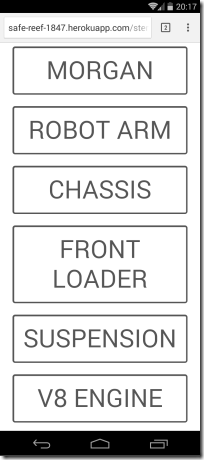
After introducing the topic, showing a basic stereoscopic viewer using the Autodesk 360 viewer and then adding full-screen and device-tilt navigation, today we're going to extend our UI to allow viewing of multiple models. Firstly it's worth pointing out that for models to be accessible by the viewer that makes use of my client credentials, I also need to upload that content with the same credentials. You can follow the procedure in this previous post to see how you do that, although I believe the ADN team has created some samples that help simplify the process, too. Once you have…
-
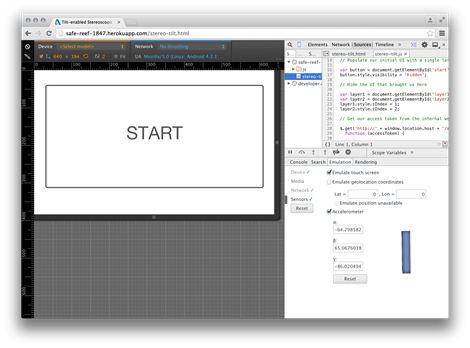
I'm heading out the door in a few minutes to take the train to Zurich and a (thankfully direct) flight from there to San Francisco. I'll have time on the flight to write up the next part in the series, so all will be in place for this weekend's VR Hackathon. In today's post we're going to extend the implementation we saw yesterday (and introduced on Monday) by adding full-screen viewing and device-tilt navigation. Full-screen mode is easy: I borrowed some code from here that works well, the only thing to keep in mind is that the API can only…
-
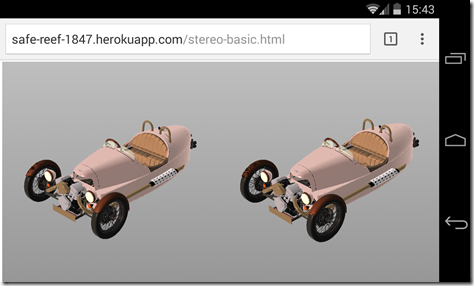
After yesterday's introduction to this series of posts, today we're going to dive into some specifics, implementing a basic, web-based, stereoscopic viewer. While this series of posts is really about using Google Cardboard to view Autodesk 360 models in 3D (an interesting topic, I hope you'll agree ;-), it's also about how easily you can use the Autodesk 360 viewer to power Google Cardboard: we'll see it's a straightforward way to get 3D content into a visualization system that's really all about 3D. Let's start with some basics. We clearly need two views in our web-page, one for each eye.…
-
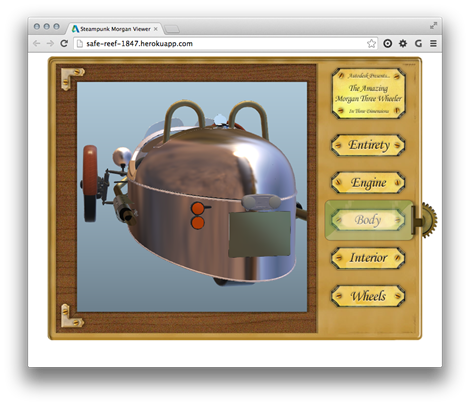
In the last post we saw the process for getting content uploaded to Autodesk storage and translated into the format required by the Autodesk 360 viewer. In this post we're going to show the steps to take that data and embed it in a "simple" HTML page. (Any complex capability in this page it's due to the UI code that Dan Wellman kindly allowed me to borrow for the sample: otherwise what it does is very simple indeed.) There are, of course, more complex samples that the ADN team has developed to demonstrate the richness of the new View &…
-
Over the next few posts we're going to take a look at the steps needed to build the Steampunk Morgan Viewer, my first sample using Autodesk's new View & Data API. In today's post we're going to look at the steps needed to host content to be served up to instances of the viewer. In a subsequent post we'll look at the client-side implementation, connecting to and streaming down content and controlling how it gets viewed. So let's start with some basics. The first thing you need to do when working with the new View & Data API is to…
-
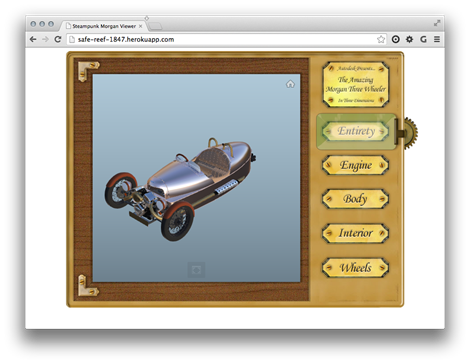
As mentioned last week, I've been having fun with Fusion 360 to prepare a model to be displayed in the new Autodesk 360 viewer. The sample is now ready to view, although I'm not yet quite ready to post the code directly here, mainly because the API isn't yet publicly usable. Here's the app for you to take for a spin, as it were. The Autodesk 360 Viewing & Data API is currently being piloted by a few key partners, and hopefully we'll soon be broadening the scope to allow others to get involved (we first have to iron out…