Visual Studio
-
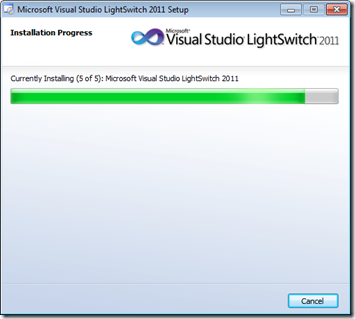
Just released: a streamlined version of Visual Studio focused on developing data-centric business applications. Visual Studio LightSwitch is basically a set of templates/Wizards and runtime components that help you build and deploy applications for creating, editing and querying business data. The tool either installs on top of VS2010 or presumably installs its own Visual Studio shell, if you don't already have it installed (I do, although I'm guessing the target audience for this tool generally would not). From a runtime perspective, LightSwitch relies heavily on Silverlight, which it uses to provide a rich UI based on your data model (without…
-
I've been planning to look at it for ages – and have certainly mentioned it before – but other things have kept on cropping up. Well last Thursday, on my train trip back from Wallisellen (the home of Microsoft Switzerland), I finally managed to take the plunge and start working with the Async CTP for Visual Studio 2010. I'd been in Wallisellen to attend an MSDN TechTalk presentation by Stephen Toub, Principal Architect on Microsoft's Parallel Computing Platform team. I've followed Stephen via his blog – and the Parallel Programming with .NET blog – for a long time, and thought…
-
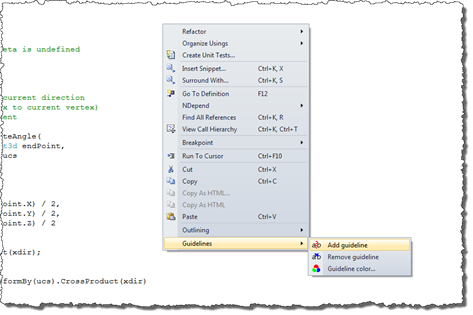
And yes, I do mean that literally. 🙂 Since starting this blog, 5 years ago – and even more in the last 2 years, since starting to develop and edit our Plugins of the Month for Autodesk Labs – I've been checking every line of code I've written to make sure it doesn't exceed 70 characters in length (the magic number for fitting my blog's width). It's become close to automatic – in the sense I rarely write lines that exceed this length and therefore need adjusting – but the process I use is still quite manual: I check the…
-
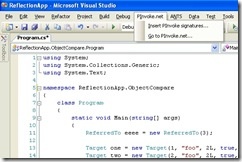
The topic of P/Invoke came up this morning in a discussion with Stephen Preston and Viru Aithal. Stephen mentioned a couple of interesting P/Invoke-related tools he'd stumbled upon, and Viru pointed me at an interesting technique he'd used for P/Invoking unmanaged member functions. In this post I'll present the tools, in a later post I'll show Viru's code. The first tool is the PInvoke Visual Studio Add-in from Red Gate Software (the UK-based provider of various development tools, including Reflector Pro). It appears to be a Visual Studio Add-in for VS2003 and 2005 (I can't see an update for VS2008…
-
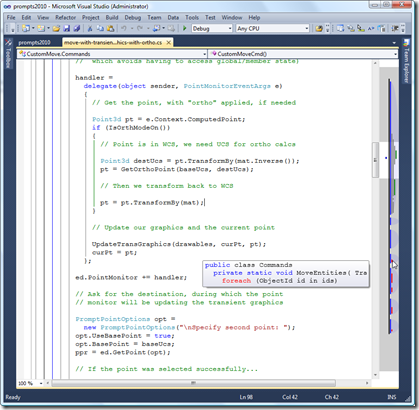
Despite having worked for some time with a number of language features previewed for VS2008 and properly released in VS2010 (F# being a prime example), I've finally gotten around to installing VS2010 as my main .NET code development environment. To make sure I could get code across properly into my blog, I was able to get my favourite source code copying tool, CopySourceAsHTML, working in Visual Studio 2010. And thanks to tips from Ewen Wallace and Scott McFarlane, I upgraded my use of RockScroll to switch across to AllMargins (which includes the particularly handy OverviewMargin tool, as seen at the…
-
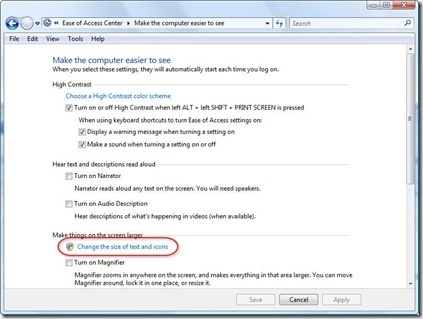
This topic isn't at all specific to AutoCAD – in fact it was encountered by Adam Nagy with the recent Plugin of the Month he developed for Revit – but it seemed something people might hit. Thanks to Adam for proposing this topic and providing the information to share with everyone. 🙂 In recent versions of Windows – at least with Vista and Windows 7, but perhaps versions before that – it's possible for the user to adjust DPI Scaling options on their system as part of the usability/accessibility options. This can cause issues with how your dialogs are displayed,…
-
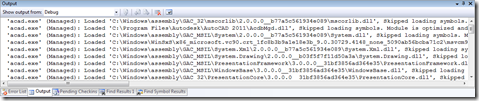
Thanks for George Varghese and Albert Szilvasy from the AutoCAD Engineering team for this helpful tip (culled from an internal email discussion). If you've ever wondered how to reduce the noise AutoCAD makes in Visual Studio's output window while debugging – at least since AutoCAD 2009, when we integrated WPF for user-interface components such as the ribbon – then this post will be of help to you. Here's the window we're talking about, which fills with messages from the application being debugged (in this case AutoCAD, whose acad.exe needs to be listed in the Debug properties under Start external program):…
-
Yesterday my two sons – who are now 6 and 4, both great ages – managed to get me to sit (several times, of course) on a whoopee cushion. Which brought back many fond memories of my brother and I playing similar tricks at around that age. What amazed me most was how the technology has advanced: this latest generation of cushion self-inflates! A simple enough innovation – the rubber now contains a small hole and a sponge – but in many ways revolutionary. Ah, if only I had a time machine I could make a small (but very noisy)…
-
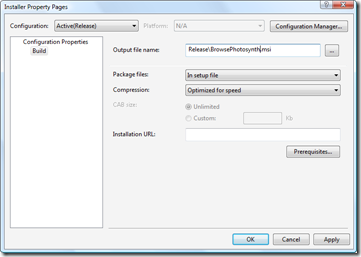
In the first part in this series, we looked at getting our basic installer to install files and in the second part we focused on checking and modifying the Registry. In this part we're going to finish up our installer by tweaking the user interface. Let's get started with some fundamentals: the name of the MSI file itself. This can be modified via the Installer project's property page (which I pulled up by right-clicking the project in the Solution Explorer and selecting "Properties"): A pretty simple one, but one that's worth making, nonetheless. Let's go ahead and spruce up our…
-
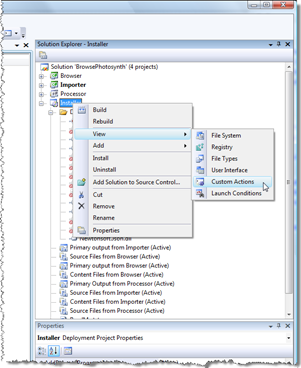
In the last post we created a basic installer to deploy our product files and source into a user-specified location. In this post we'll look at the Registry-related activities that need to happen from our installer. One of the files we added to the install project was the RegDL executable. We're going to add some custom actions which use this executable to create/remove our demand-loading Registry entries on install/uninstall. The advantage of this approach is that we don't need to duplicate information in an installation script that's already stored in our .NET assemblies: RegDL queries an assembly programmatically for its…