AutoCAD .NET
-
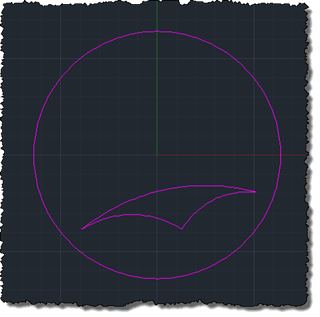
As mentioned in the last post, today's post looks at how to draw hyperbolic geometry using the Poincaré disk model inside AutoCAD. This is an interesting exercise, but probably won't ultimately help us with the hyperbolic tessellations we're aiming to create: it's interesting as it will end up with us having a mechanism for mapping hyperbolic geometry onto an arbitrary circle inside AutoCAD, but as we're probably going to end up creating straight-lined segments for the polygons we use to create our pattern, it's mostly an exercise (and will probably be largely irrelevant to our end result). The tough part…
-

A regular follower of this blog and someone I now consider a friend through our online interactions, Alex Fielder, recently laid down the gauntlet for the topic of the coming series of posts. He started with Twitter… … and then moved on to The Swamp (which he thankfully also brought to my attention using Twitter). Alex has become interested in an area that I can see becoming increasingly relevant: given the fact that 3D printing is an additive, rather than subtractive or mold-based, process, shouldn't we take advantage of this fact to optimise the composition of an object's internal structure?…
-
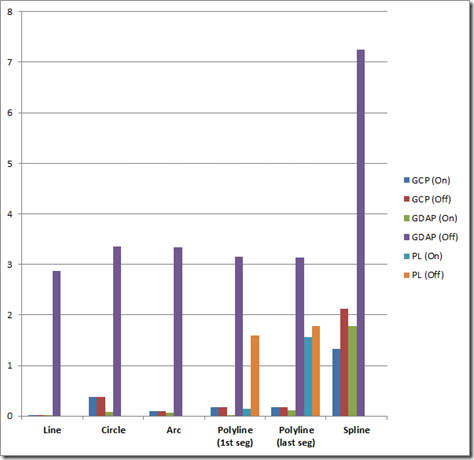
A couple of recent posts have covered different ways of checking whether a point is on a curve. This post looks at a rudimentary way of profiling the relative performance of these various methods, in order to determine the best approach to use, in general. There are various performance profiling technologies available on the market, but given the specificity of the cases we wanted to test and compare, I rolled my own very simple approach. Nothing at all earth-shattering, just a helper function that will call one of our methods (passed in as a delegate with a specific signature) a…
-
One great thing about having an engaged blog readership is that people catch issues quickly (which helps keep me honest :-). When I posted late on a Friday night (under self-imposed pressure to get a third post up in a four-day first week back after the holidays), I suspected I'd missed something. I even checked the protocol I expected to contain the function I knew had to be there, but obviously not thoroughly enough. Anyway, all this to say that there's a better, more general approach to finding whether a point is on a polyline, the subject of the last…
-
Occasionally I come across a topic that I'm sure I've addressed in a previous post, but for the life of me I can't track it down. The code in a recent response by Balaji Ramamoorthy, from the DevTech India team, fits firmly into this category: it shows how to iterate through a polyline's segments, testing whether a point is on the polyline. I did some refactoring of Balaji's code to extract it into a helper function (although not an extension method, which people who use them may prefer), but otherwise this C# code is basically his. using Autodesk.AutoCAD.ApplicationServices; using Autodesk.AutoCAD.DatabaseServices;…
-

Thanks to Matt Stein, Senior User Experience Manager in the AutoCAD team, for giving me permission to publish the following information. In this previous post, we can see how it's possible to display our own contextual ribbon tabs inside AutoCAD during custom operations. To help make applications consistent with AutoCAD, here are some guidelines around colours to be used contextual ribbon tabs (the "Theme" attribute you should set in your custom ribbon tab's XAML file): If it is an annotation object: Purple Anything to do with blocks: Yellow Anything to do with underlays or references (except blocks): Cyan Text editor…
-
The implementation in this recent post to display a "Help!" message to the screen was well received by the person requesting it, but they ended up also wanting a command to display a message in the case that the user has help to offer other members of the class. Which basically meant a great opportunity to refactor the previous implementation, so that it could be used more generally. 🙂 Here's the updated C# code which now implements a generalised "flash message" capability that is used by both the original HELPME and the new HELPYOU commands: using Autodesk.AutoCAD.ApplicationServices; using Autodesk.AutoCAD.Runtime; using…
-
Thanks, once again, to Scott McFarlane for working his magic and finding a simple way to make an approach work that I'd convinced myself wasn't workable. (He took the implementation in my last post and adjusted it to work via a non-static event – something I had tried to do myself, but had somehow failed… I can probably blame it on post-DevDays fatigue… time for a week off, indeed. 🙂 Here's the adjusted PaletteSet2 implementation, with the event no longer defined as static and the trigger happening via an instance rather than being fired statically: using Autodesk.AutoCAD.ApplicationServices; using Autodesk.AutoCAD.Runtime; using…
-
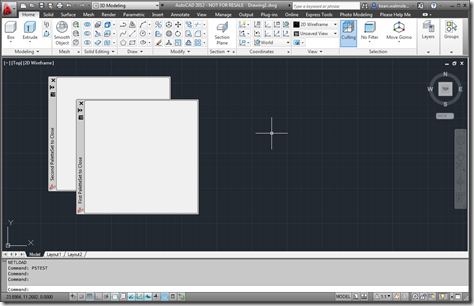
In the last post, we saw some code that provided a relatively crude mechanism for finding out when a particular custom palette set gets closed by the user. In this post, we encapsulate this technique in a new class – which I've called PaletteSet2, for the want of a better name – that can be used to apply it to a number of custom palette sets at once. Here's the C# code for the new PaletteSet2 implementation: using Autodesk.AutoCAD.ApplicationServices; using Autodesk.AutoCAD.Runtime; using Autodesk.AutoCAD.Windows; using System; [assembly: CommandClass(typeof(PaletteSet2))] namespace Autodesk.AutoCAD.Windows { public class PaletteSet2 : PaletteSet {…
-
I've just come back from the last of the European DevDays in the UK. It was fun being back in my home country so close to Christmas, and the event itself seemed to go well. It was great to catch up with some developers I've known since my early years at Autodesk, some of whom stayed on for dinner and then the DevLab we held yesterday in the brand new office Autodesk Ltd. has just moved into in Farnborough. A really interesting question came up during the DevLab, and it's one that has been asked before: how do you respond…