AutoCAD .NET
-

Thanks to Balaji Ramamoorthy, from DevTech India, for the basis of this post (some code he provided in a recent reply to an ADN member). The original question came from someone who wanted to stop text objects from being highlighted when selected. I've extended the mechanism to make it a little more flexible: it now maintains a list of object types (their DXF names) of objects that should not be highlighted, when selected. Balaji implemented a HighlightOverrule to control the highlighting. This doesn't stop the objects from actually being selected, however: in the next post I'll add some additional code…
-
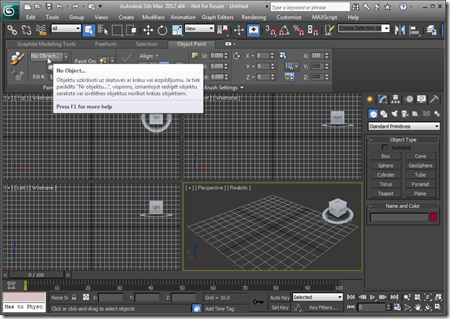
After adding Revit and then Inventor support to the original AutoCAD application, it made sense to go ahead and include support for 3ds Max. Here's a solution supporting these four products (and their verticals). And I can now confirm that a version of this application will be September's Plugin of the Month on Autodesk Labs. You may have noticed a lot of UI consistency introduced across these Autodesk products, in recent years, mainly due to a coordinated push from our product teams for a more consistent user experience. An internal acronym was used for the project driving consistency across these…
-
I'm now back from a nice, long weekend celebrating the Swiss National Day (August 1st) and our 10th wedding anniversary (which isn't until November, but who wants to hold a party then? ;-). So, getting back into the saddle, here's a question that came in recently by email: I'm using P/Invoke to call a function which is different on x86 and x64. How to code such entry point addresses dynamically, so one does not have to compile two separate versions, one for x86, and one for x64? While the answer can be found a previous post, it seemed worth calling…
-
As you're probably mostly aware, many of our 2012 products use .NET 4 as standard. This has proven "interesting" (i.e. challenging) when it comes to loading – for example – plugin DLLs downloaded from the web, due to .NET's updated security model. Our ADN Plugins of the Month on Autodesk Labs are a prime example: most were posted prior to AutoCAD 2012 shipping, but when downloaded locally and NETLOADed into AutoCAD 2012, very often a security error gets reported: Cannot load assembly. Error details: System.IO.FileLoadException: Could not load file or assembly 'file:///C:\Program Files\Autodesk\AutoCAD 2012 – English\ADNPlugin-QRCodes.dll' or one of its…
-
Once again, it turned out to be pretty straightforward to add Inventor support to our TransTips application. We now have a single solution which builds plugins for AutoCAD, Inventor and Revit. The plugins share a common translation and caching engine as well as a WPF graphical user interface for selecting languages. Here's a demonstration of the various plugins in action: I've fixed the right-to-left issue highlighted in the video, incidentally. The next steps are to implement an in-product editing capability and then perhaps to support 3ds Max. One great aspect of this project is that I'm getting to learn a…
-
A quick update, today. Last week Jeremy posted a migrated version of the TransTips plug-in for AutoCAD, this time working inside Revit. Thanks to the shared use of AdWindows.dll in both products, this was actually really easy. After this initial version, it made sense to refactor the code to have a core, shared file (not necessarily a separate DLL component – sharing source can give many benefits for smaller projects, such as this) used to build plugin DLLs for both AutoCAD and Revit. Here's the result: a single solution which will build TransTips DLLs for AutoCAD and Revit (including built…
-

In addition to posting the transcripts, we've now posted recordings of the recent DevTV series on AutoCAD .NET for you to download and watch. You'll find them on the AutoCAD .NET Developer Center, under the Samples and Documentation section (see the image on the right, if you have trouble finding them). If you'd prefer to watch them online, here are direct links to the sessions: Introduction and Sessions Overview Getting Started User Input Database Fundamentals Database Events, PaletteSet Dictionaries, Containers, Type Identification, Casting InputPoint Monitor Jigs User Interface elements We hope you've found these sessions useful. We'd certainly appreciate your…
-
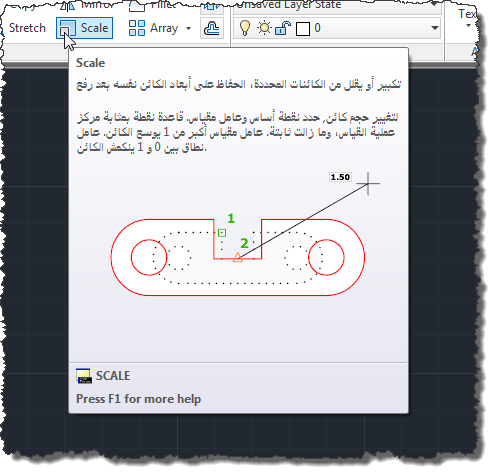
In this previous post we introduced a technique for automatically translating AutoCAD's tooltips into one of 35 different languages via an online translation service. To improve the process at various levels – rendering it more efficient and enabling the possibility of local editing and crowdsourced localization – this post introduces caching of the translation results to a set of local XML files. A few comments on the implementation changes: There's now a TRANSTIPSSRC command, which allows you to set the source language (using a similar UI to the target language). This is useful if you're working on non-English AutoCAD (our…
-
I'll be delivering a Facecast on AutoCAD Customization next Tuesday, July 19th 2011 at 5pm CET / 8am PST. If you'd like to attend, please RSVP via this Facebook page. The timing on the page seems to be for 3 hours, but I've been told the session will last around 30 minutes. I'll embed a viewer onto the Facecast – for people to watch live and after the fact – inside a blog post on Tuesday, so you can also just come here, then. If you need some help working out the time of the session in your location, I…
-
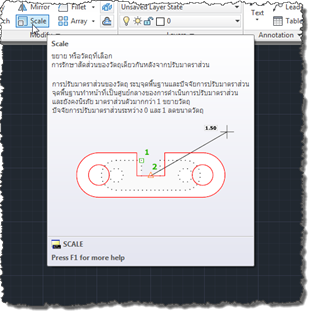
One of the great benefits I have from working in our Neuchâtel office is my proximity to a great many talented members of Autodesk's Worldwide Localization team, who are responsible for translating most of our products into various languages. Over the last few months, I've been working even more closely than usual with that team, mainly looking at ways Autodesk might broaden the ability to localize our software. A couple of hot topics are of particular interest, these days, in the world of localization: machine translation and crowdsourcing. The implementation I'll be showing over the next few posts actually hits…