AutoCAD .NET
-
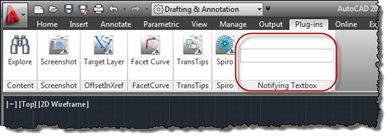
This is a really cool little sample put together by Philippe Leefsma, from our DevTech team in Europe, with the help of George Varghese from the AutoCAD Engineering team. Thanks, Philippe and George! 🙂 This question came up, recently: an ADN member wanted to be able to add an editable textbox to the ribbon inside AutoCAD and then be notified of the data entered into it, as well as being notified when the control gained and lost focus. Here's some simple C# code that does just this: using Autodesk.AutoCAD.ApplicationServices; using Autodesk.AutoCAD.EditorInput; using Autodesk.AutoCAD.Runtime; using Autodesk.Windows; using System.Windows.Controls; using System.Windows.Input; using…
-
All last week we focused on Autodesk Exchange, looking at the steps needed for preparing, submitting and re-submitting your app for inclusion on the Apps tab. I won't dwell too much more on the topic, but did just want to give some quick, high-level tips for people thinking about posting apps for inclusion on Autodesk Exchange. (My thanks to Stephen Preston – who has been intimately involved in the Apps tab since its inception – for helping brainstorm some of these items.) 1. Focus on software quality We do test the applications submitted to us before posting them on Autodesk…
-
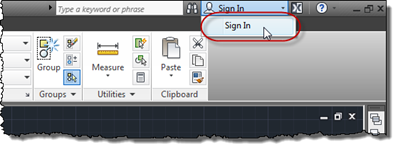
In the last post, we saw the steps involved in preparing an AutoCAD application for posting to the Autodesk Exchange store. In this post, we'll step through the submission process. Let's start with some basics: posting to Autodesk Exchange currently happens from within the AutoCAD product, which means you'll need AutoCAD 2012 installed (and running) to submit your product. Step 1 – sign into (or up for and then into) Autodesk Exchange. Within AutoCAD 2012, sign in to Autodesk Exchange. If you're not already in possession of an Autodesk ID, click on the link to create one. If you have…
-
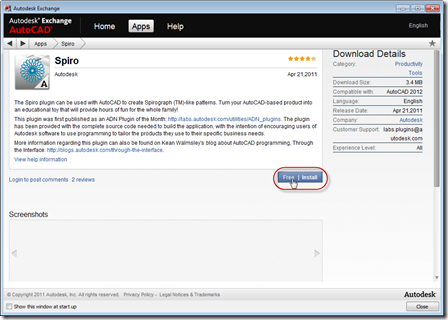
Back when we were first creating the Exchange Store, I went through the process of preparing several of our Plugins of the Month for posting to Autodesk Exchange. After a break of several months, I've now gone back and readied September's plugin (TransTips, now on Autodesk Labs) for posting, also. It seemed to make sense to spend a couple of posts documenting the process I followed – which should complement the DevTV sessions already posted on the Autodesk Exchange Apps Developer Center: Autodesk Exchange Apps User Experience Autoloader Format Explained Creating a Partial CUI This initial post focuses on preparing…
-
Starting next week – and for 8 weeks – Wayne Brill, from DevTech Americas, will be delivering free online AutoCAD .NET training. To register – yes, for free – go to our API Training page and select "Schedule", then scroll down to "AutoCAD .NET", "English", "Webcast", "Sep 08 2011" and click "Register" at the far right of the item. This training is a live-delivered version of Wayne's excellent series of DevTV sessions posted previously (with transcripts). This is likely to appeal to those of you who like knowing there's a warm body at the other end of their webcast link…
-
In the 2010 release, we introduced 2D geometric constraints to AutoCAD. The feature was implemented using AutoCAD's low-level – and very powerful – Associative Framework, which has subsequently been used to implement features such as parametric surfaces in AutoCAD 2011 (more information on that here). Our initial API implementation for creating and accessing geometric constraints (which you can find out more about via the DevTV session linked to from this previous post) in many ways reflects the low-level nature of the underlying framework: it was unfortunately just a bit too complicated for most mortals to get to grips with. Philippe…
-
Actually, I wish that were true. I'm planning on taking some time off in October, but that seems a long way off, at this stage. What I've actually been doing is working with some REST-based APIs: firstly, I've been finishing up work on September's Plugin of the Month, TransTips for AutoCAD, Revit, Inventor, & 3ds Max (to be posted on Autodesk Labs in the next few days). TransTips makes use of the REST API for Bing Translator, to automatically translate tooltips in various products. Secondly, perhaps more excitingly, I've been coding against a possible future web service API for Project Photofly.…
-
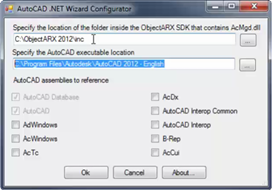
Visual C# Express and Visual Basic Express can be used successfully to build .NET applications for AutoCAD: in fact many developers use these tools to do so. One long-standing issue with using these tools with AutoCAD relates to debugging: the ability to debug using an external application is not directly exposed via the user interface Visual C#/Basic Express, which – as AutoCAD implements a plug-in hosting framework for .NET Class Libraries (or DLLs) – makes life complicated. The workaround for addressing this issue has been documented in this previous post and also on the ADN web-site, but thankfully this manual…
-
The class catalog for Autodesk University 2011 is now available to preview in advance of the conference registration opening up on August 30th. Here are the sessions I'm either presenting or hosting: CP3840 Integrating Microsoft® Kinect™ with AutoCAD® Lecture Nov 30, 3:15pm CP4459-U AutoCAD® .NET Development: Tools and Best Practices Unconf-erence Dec 1, 1:15pm I'm also honoured to be co-presenting the following session with the famous (and famously lowercase) dave espinosa-aguilar: CP4717 Unlimited AutoCAD® Scripting for Everyone Lecture Nov 29, 5:00pm And I'm part of the panel for the following sessions: CP2149 AutoCAD® APIs: Meet the Experts Stephen Preston Panel…
-

In the last post, we looked at how to stop entities from being highlighted during selection. This post looks at how to stop entities from being selected at all. Thanks again to Balaji Ramamoorthy for providing the underlying technique shown in today's code. The basic scenario we're using is similar to the last post – we maintain a list of DXF names for the classes we want to stop from being selected – but it could easily be adapted to using different criteria for removing objects from the selection: an example being the use of a similar (although admittedly not…