AutoCAD .NET
-
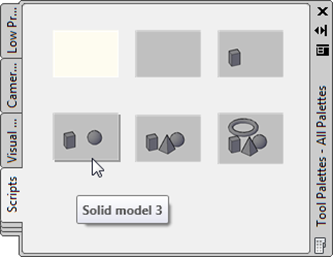
This post carries directly on from the last one, which implemented a rudimentary "Quick SaveAs" capability in AutoCAD. Much of the explanation behind the design of today's code is there, so please do read it first (if you haven't already). Today we're taking the code further by automatically creating an item on a tool palette with the thumbnail of the recently-saved drawing which, when used, will run a script created when we saved the drawing. Here's the updated code with the new or modified lines in red. You can download the C# source file from here. 1 using Autodesk.AutoCAD.ApplicationServices;…
-
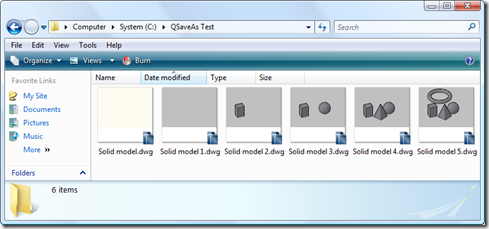
I had a fun request, earlier in the week, that I thought worth turning into a couple of blog posts. The problem itself is quite specific, but some of the techniques shown – especially in the second of the two posts – seemed worth sharing. The basic request was this: to implement a "quick SaveAs" command which will – the first time it's run – ask for a file location and name and will then – each time it's called subsequently – simply save the current drawing into the same folder with a filename based on the original with a…
-
Sorry for the late notice on this one… I'd have posted sooner but for having taken some time off, last week, to take the family to Disneyland Paris. Now I just need a few more days of vacation to recover. :-S 🙂 Tomorrow there's a free webcast showing how to migrate your VBA code to use VBA.NET. The content focuses primarily on the use of COM Interop to quickly get your VBA code working from VB.NET, building on the DevTV session mentioned previously and using its accompanying migration tool. The session will be taking place at 8am Pacific/10am Eastern/4pm in…
-
Thanks to all those who provided feedback on this recent post. I really appreciate people taking the time to provide feedback – both positive and negative – as I want to ensure this tool is used by more than just a few AutoCAD users. Today's version extends the last one to include a few more "Settings": Existing settings Output Allows the user to choose whether the captured image is copied to the clipboard or saved to a raster file Background Allows the user to force the background colour to white Hopefully useful for people using a non-quite background but want…
-
Next week Fenton Webb, from DevTech Americas, will be presenting a free webcast on the 3D capabilities of AutoCAD's APIs. Here's Fenton's synopsis: "If your product has always been 2D and you are now considering moving to 3D or if you are simply interested in finding out about the different API's that are available to program AutoCAD in 3D then come join this webcast. We'll give a brief overview history of 3D in AutoCAD along with some code demonstrations of some API's in operation. Also, don't forget that included at the end is a Q and A section allowing you…
-
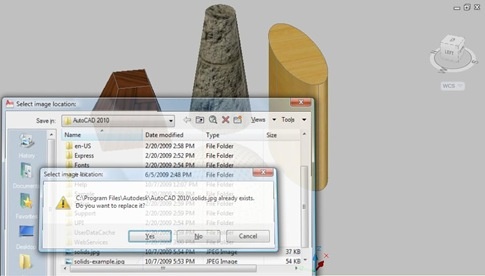
Thanks to all who provided input on this last post, where I asked for guidance on how best to design the command-line interface for the Screenshot application, the proposed Plugin of the Month for November. The current code is based largely on this previous post, but may end up being extended - in time - to include better 3D support via the technique shown here. Here are some design choices that came out of the comments on the last post: From Fred Dickinson A separate "Settings" option, allowing us to use a sub-menu for our application settings From MJohnston Display…
-
I'm currently thinking about using the code from this previous post as a basis for November's Plugin of the Month. This simple AutoCAD application would provide three main capabilities: Take a screenshot of the entire AutoCAD application window Take a screenshot of the current drawing window Take a screenshot of a user-specified section of the current drawing Each of these options would result in a bitmap being either saved to file or placed on the clipboard. The thing I'm chewing on, right now, is how best to design the command interface for these operations. It occurred to me that this…
-

I'm this week's "expert" over on the AutoCAD Exchange: I don't know whether people visiting that site will be interested in asking programming-related questions, but as I'm routinely re-directing support questions I receive by email or as blog comments across to the ADN site or to our discussion groups, I thought I'd point this blog's readership at the chance to get questions answered without me wriggling out of them. 🙂 Go on – ask me a question!
-
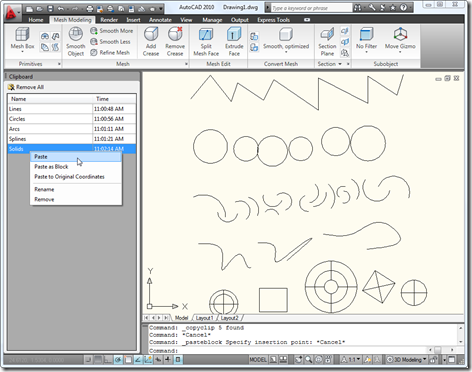
As Scott is leaving on a well-deserved sabbatical, he has gone ahead and posted our next Plugin of the Month a few days ahead of schedule. Here's a link to Scott's post announcing the tool. This is a very cool little application developed by Mark Dubbelaar from Australia. Mark has been drafting/designing with AutoCAD for the last 10+ years and, during this time, has used a variety of programming languages to customize AutoCAD: LISP, VBA and now VB.NET. Mark was inspired by the "clipboard ring" functionality that used to be in Microsoft Office (at least I say "used to be"…
-
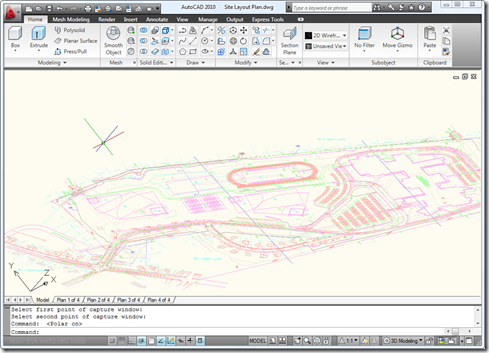
Following on from this recent post – and inspired by a question we received recently from a developer – I decided to extend the previous code to allow a user to select a portion of a drawing they would like to save to a file or place on the clipboard. This is actually a really useful tool for me when I'm writing this blog, so there was certainly a degree of self-interest involved. 🙂 The technique shown in today's post is actually pretty handy for other situations: it's quite common to want to transform a point from drawing coordinates (which…