AutoCAD .NET
-

You may or may not be aware that my team, DevTech, writes and publishes DevNotes on the ADN website, answers support questions submitted by ADN members using a tool we call DevHelp Online, records DevTV sessions, participates in events known as DevLabs, talks about our upcoming products at DevDays and delivers API training. (Seems like we need to get the branding police to work on that last one. 🙂 So, in keeping with our theme we have started a new activity… I'm proud (and not unamused, which is putting it mildly) to announce our first DevCast. Recorded recently by Stephen…
-
A big thank you to Jim Cameron from Dematic for providing the code for this post, and to Wayne Brill from DevTech Americas who helped him on his way via ADN support. I've made a few changes of my own to the code, but the concept is very much Jim's. Jim recently had a frustrating problem with a VLX application he wrote that depends – via (vl-arx-import) – on a .NET module. It turns out the module was not being demand-loaded properly, but this took some time to diagnose. In the past Jim used (arx) from LISP to detect the…
-
I received this question by email from Vito Lee: I am trying to write an event handler function in C# and can use your expertise. I am trying to display an alert box whenever a user erases a specific block in a drawing. Which event handler would be best for this situation? This one is interesting, because it's quite a general problem and there are a few ways to solve it. To start with, let's generalise the problem description to cover watching for editing operations on drawing objects. We're indeed going to solve the specific problem stated above – albeit…
-

This is a minor pet peeve of mine that I felt like sharing. Feel free to post a comment if you agree, disagree or have your own pet coding peeve to share with other readers of this blog. I quite often see .NET code that tests for the value of a Boolean to see whether it's true or false: if (booleanVariable == true) { … } or If isBooleanFunction() = False Then … End If Now while not strictly incorrect, this style is, at least, redundant: a Boolean is by nature true or false, and testing for equality…
-
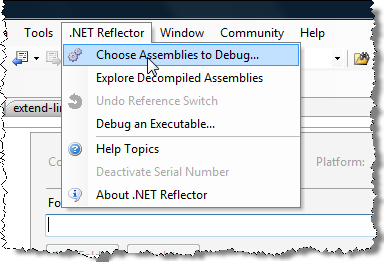
In the first post in this series we looked at the basic (and free) capabilities of the upcoming version 6 of .NET Reflector. Today we'll look at the "Pro" capabilities, which integrate decompilation with debugging of 3rd party assemblies. To get started, we should see a new ".NET Reflector" toolbar inside our Visual Studio installation. On it, we should see a "Choose Assemblies to Debug…" option: This option launches an analysis of our currently open solution, to understand the assemblies that have been referenced inside it: One very important thing to note: for Reflector to work, you must have assembly…
-
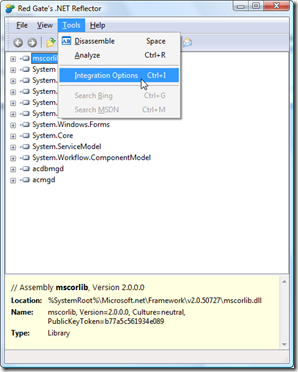
As many of you will know, by now, I'm a big fan of Reflector. I've used it for quite some time, since its early days as a piece of freeware developed by Lutz Roeder, and overall it's proven to be an extremely valuable tool. When a UK-based company, Red Gate Software, acquired the Reflector technology back in 2008, I was curious as to their strategy for monetizing it (and it seems I wasn't alone in speculating on the direction the tool would take as a commercial offering). Well, that's now starting to become clear with the Beta release of .NET…
-

Thanks to Stephen Preston from DevTech Americas for the code that originally inspired this post. A nice little one to start the week. We're going to ask the user to select a bunch of lines and we'll then go through and edit each one, extending it in both directions by a quarter of its original length. The code shows a couple of interesting techniques: aside from extending the lines themselves we also use a SelectionFilter in combination with a PromptSelectionOptions object to restrict the selection process from selecting anything but lines (and to give a customized experience by changing the…
-
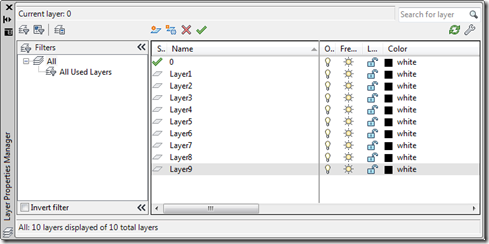
As a comment on this previous post, MikeR posted this request: Hi Kean, I'm the one that instigated this original question about group filters. That part is working fine and I can also set the active group filter in the file. Now I need to make parent & child filters. How can I add child filters to an existing parent filter at the root? Thanks, Mike The below code is an update of that shown previously, the main addition being the CNLG command to create a nested layer group. I also took the chance to fix a minor bug (I…
-
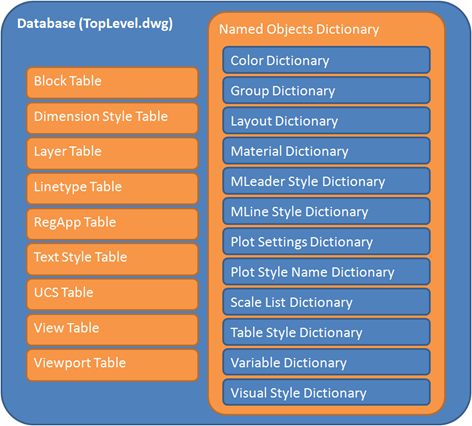
In the last post we looked at some code to define a block and insert it into the model-space of an AutoCAD drawing. Today we're going to look at creating a group. Before we dive into the code, it's worth taking a quick look at the difference between a block and a group, to understand the differences between these two container/aggregator objects. I know that much of this information is available elsewhere, but hey – I'm on a roll, so I request your forbearance. Let's start with looking at the top-level structure of an AutoCAD Database (which is equivalent to…
-
This post – and its sister post, which will cover creating a group – are further topics I would expect to have already covered in this blog at some point, or perhaps to see covered by the AutoCAD .NET Developer's Guide (and I'm sure they will be in a future incarnation of it). So thanks to Adam Nagy, from DevTech EMEA, for suggesting these topics. It's nice to go back to basics once in a while (although this means I do have to beg the patience of the readers out there who know this stuff inside out). So, here's some…