AutoCAD .NET
-
In response to September's Plugin of the Month - which Shaan has very kindly posted about over on Between the Lines – a few people have requested enhancements to the OffsetInXref tool. Two came up, in particular: The ability to offset the contents of blocks, not just xrefs The ability to enable the XLINE command's offset functionality to work with xrefs (and blocks) The changes to enable these enhancements are very minor, which is always a pleasant surprise. Well, in the first case it isn't much of a surprise: xrefs are actually just a special kind of block, so we…
-
I know, I know... I said I'd be posting on IronRuby, but yet again I got distracted <sigh>. Back to that next week, I promise. The good news is that, once again, I managed to get distracted by something pretty cool. 🙂 Earlier in the week I'd stumbled across an article mentioning the Bing API (currently in version 2.0), which allows you to perform programmatic web searches using various web-service related technologies, such as REST, JSON & SOAP. I played around with that, for a while, importing the Bing web service into different versions of Visual Studio (both of which…
-
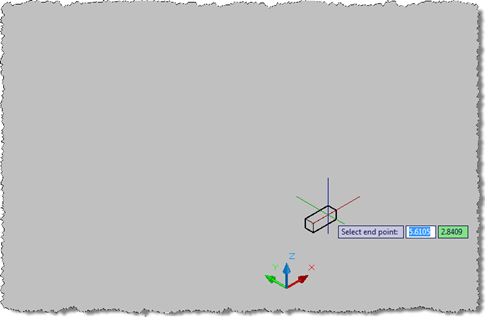
Back in April I posted an IronRuby sample that I had hoped would cause AutoCAD to jig a box in 3D, just like its IronPython counterpart. The sample didn't work with IronRuby 0.3, but recently David Blackmon got in touch to let me know he had a version of the code working with IronRuby 0.9. Now that I've started preparing for my upcoming AU class, AutoCAD® .NET: Developing for AutoCAD® Using IronPython and IronRuby, I decided to take a closer look at the update to IronRuby and more specifically at the changes to the code David made to get it…
-

As mentioned a few months ago, we've been working on a project wizard for AutoCAD .NET development. The official version of this tool is now available via the AutoCAD Developer Center (a direct link to the download can be found here). We incorporated a number of enhancement requests received from people working with the previous, draft version, but I don't have an exhaustive list of the updates, unfortunately. If you provided feedback, thank you for taking the time to do so, and hopefully the issue you faced has been addressed in this updated version (and please do let us know,…
-
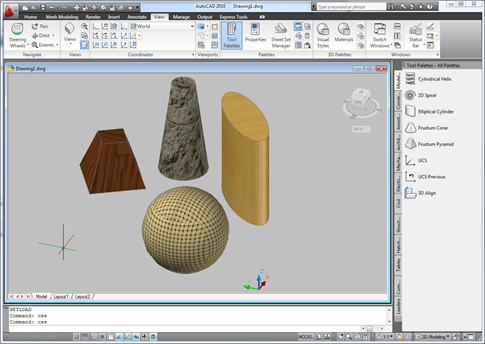
I received a comment on this previous post: Hi Kean, I tried to develop a routine based on this post but I found 2 things that I'd like to solve if possible. Your routine is just not usable for larger drawings (takes way to long). Also, your routine does not work properly in paper space. Please, don't get me wrong, I appreciate all the work you've put into this blog. I just desperately need to come up with a solution for snapshots that work on large drawings, that work in paper/model space and that use the current viewstyle settings (except…
-
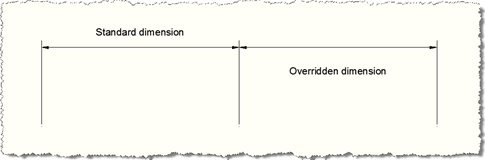
A request came in by email during last week's vacation: I have been looking around to find a way about creating Dimension Style Overrides, but have not really had any success at anything yet. I have created program in which I do create several dimension styles, but I just keep getting lost with the overrides. This seemed like a really good topic to cover, so this post contains some simple code that to create a dimension style and two nearly-identical linear dimensions: both use our newly-created dimension style but the second of the two also contains some Dimension Style Overrides,…
-
As announced on Scott Sheppard's blog, It's Alive in the Lab, you can now find the inaugural ADN Plugin of the Month available for download on Autodesk Labs. I introduced the concept a little over a month ago – thanks to all of you who responded! – and we've decided to get things started with OffsetInXref, an AutoCAD plugin allowing you to offset geometry contained in external references without first having to explode them. The code for this plugin can be found in these previous posts on this blog, as well as with the plugin download itself. The inspiration for…
-
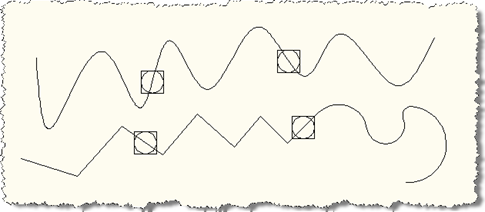
In the most recent part of this series, we looked at one possible mechanism to allow points to be moved along a network of curves, extending the first part in this series, which focused on the case of a point on a single curve. This post is going to focus on something slightly different: it's going to look at making the points added to a particular curve be associative to that curve – i.e. travel along with it as the curve is moved – and in the process we're going to adjust the way we link between our objects, by…
-
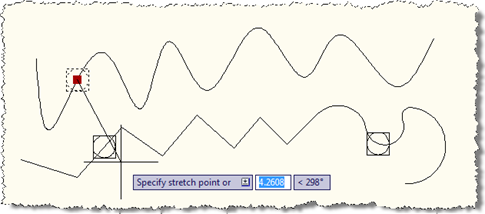
In the last post we looked at some code to create a point on a curve, and make sure it stays on that curve when edited. In this post we're extending that code (albeit slightly) to work with a network of curves: the idea is that any curve which has a point created on it becomes a candidate for any point to snap onto as it moves around. This could clearly be extended to provided a better way of specifying the curves forming the network, of course. Here's the updated C# code, with the modified/new lines in red (the full…
-
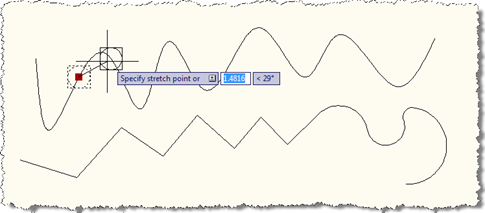
Over the weekend I put together a little prototype to prove a concept for an internal project I'm working on. The idea was to force a point onto a curve (meaning anything inheriting from Curve in AutoCAD, such as Arc, Circle, Ellipse, Leader, Line, Polyline, Polyline2d, Polyline3d, Ray, Spline, Xline…), so that when the point is moved it snaps onto the curve to which it's assigned. The solution I've put together is far from being complete – which is partly why I'm planning on making this a series, so I can flesh it out a little further in further posts…