AutoCAD .NET
-
As you're by now probably aware, the 2011 family of our products is now shipping. I'll have lots to say on AutoCAD 2011's new API features over the coming weeks/months, but for now here's a quick post on the items from the most recent API Wishlist Survey that we delivered in this release (the items we've addressed in some way are in bold below): .NET API for Property Palette Parametric Drawing .NET API Enhanced Dynamic Block API Runtime Ribbon API enhancements Enhanced Dynamic .NET language support Improved .NET<->LISP Interop Object transparency API Enhance Visual LISP IDE Boundary tracing API Solid…
-

Well, they've done it again. Having received positive feedback on Episode 1, Stephen and Fenton have now recorded another ADN DevCast, this time with a guest appearance of another member of the DevTech team, Cyrille Fauvel. During this episode they talk about disposing in .NET, diagnosing DLL load problems using gflags, and deepcloning in ObjectARX. If you prefer you can download this episode for offline viewing (36 MB) and take a look at the accompanying samples (95KB). Enjoy! 🙂
-
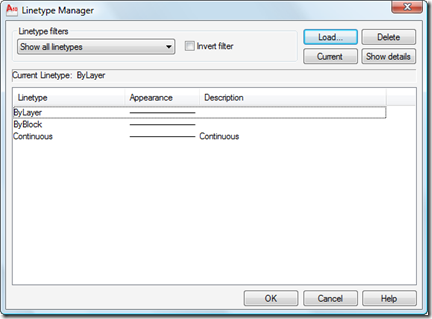
I received this question by email from Chris Witt: I know you can load specific linetypes with vb.net, but is there a way to load *all* line types from a specified lin file with vb.net without having to name each one? This is an easy one, as the Database.LoadLineTypeFile() method supports wildcard characters in the linetype name. Here's some C# code that does this: using Autodesk.AutoCAD.ApplicationServices; using Autodesk.AutoCAD.DatabaseServices; using Autodesk.AutoCAD.EditorInput; using Autodesk.AutoCAD.Runtime; namespace LoadLinetypes { public class Commands { [CommandMethod("LL")] public void LoadLinetypes() { Document doc = Application.DocumentManager.MdiActiveDocument; Database db =…
-
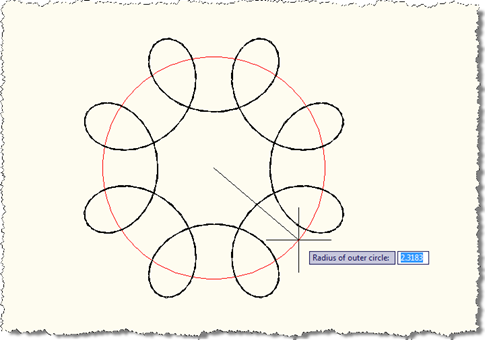
Last week we looked at a preliminary version of this application that made use of an EntityJig to display a Spirograph as we provided the values needed to define it. While that was a good start, I decided it would be better to show additional graphics during the jig process, to give a clearer idea of the meaning of the information being requested from the user. I wanted, for instance, to show temporary circles indicating the radii of the outer and inner circles, mainly to make it clearer how the various parameters affect the display of the resultant Spirograph pattern.…
-
This week I'm going to posting a few topics related to F#, as it feels as though I've been neglecting it, of late. And as this technology is going to hit the mainstream very soon – when Visual Studio 2010 ships – it seems all the more important to keep one's F# skills honed. We're going to start the week with an F# equivalent to the code shown in this previous post, where we go through and reflect on the commands exposed by an assembly in order to create corresponding demand-loading Registry keys automatically. We've shipped VB.NET and C# versions…
-
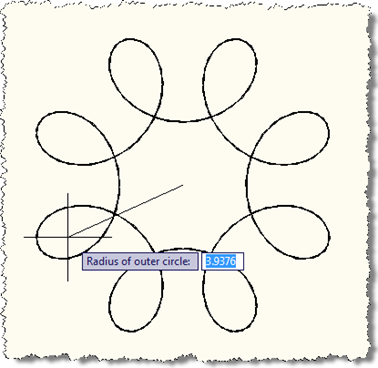
After my initial fooling around with turning AutoCAD into a Spirograph using F#, I decided to come back to this and bolt a jig on the front to make the act of making these objects more visual and discoverable. The process was quite interesting – I'd created jigs from Python and Ruby, but not from F#, so this was a first for me. It's also a multi-stage jig, which is fun: we acquire the outer radius of the pattern followed by the radius of the smaller circle and the distance of the pen from the smaller circle's center. At each…
-
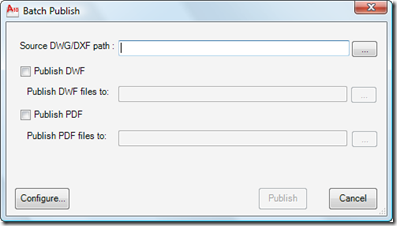
I'm very pleased to announce the availability of this really interesting Plugin of the Month over on Autodesk Labs: Batch Publish for AutoCAD. Here's an excerpt from the ReadMe (which I happen to have written, but anyway): This plugin can be used with AutoCAD to simplify the process of publishing sets of drawings to DWF and/or PDF. It runs as a command within AutoCAD – as opposed to a separate executable – and uses a separate executable to monitor AutoCAD's health and restart it, as needed. The status of the batch publishing operation is stored to disk, allowing it to…
-

We've had a few reports from people implementing external .NET applications to drive AutoCAD – as shown in this previous post – experiencing intermittent failures once AutoCAD 2010 Update 1 has been applied. Here's a typical error message: It contains the text "Problem executing component: Call was rejected by callee. (Exception from HRESULT: 0x80010001 (RPC_E_CALL_REJECTED))" (to help people Googling this error message :-). This "problem" was introduced as we addressed an issue with the way our WPF components in AutoCAD handle inbound messages, largely due to Microsoft's decision not to support nested message loops in WPF. If WPF is in…
-
After one update to the content he originally posted, Stephen Preston has handed the reigns for this DevTV across to Augusto Gonçalves, a São Paulo-based member of our DevTech Americas team. Augusto presented his work to rave reviews at AU 2009, and has now updated the online DevTV content. I've gone ahead and updated the original post to point to this new content, but here are the links, for your convenience: AutoCAD VBA to VB.NET Migration Basics view download (44.7 Mb) Aside from upgrading the presenter (sorry, Stephen – I couldn't resist 😉 we've made some additional enhancements in this…
-
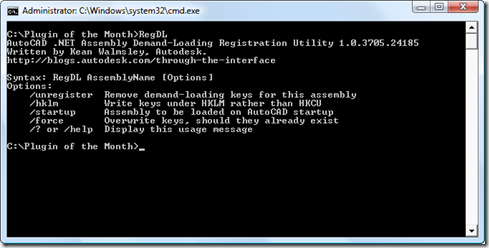
I received a really intriguing question by email from Dave Wolfe on Friday afternoon: Due to your post on the topic, I wanted to improve my installation method for .Net modules. While examining the topic, I ran into a few concerns that shaped my development process. The game changer is that I couldn't find a way to use reflection to check a .net module for the CommandMethodAttributes without being in an AutoCAD session. The CommandMethodAttribute crashes on initialization outside of AutoCAD. Dave went on to describe a couple of ways he'd found to work around this problem by driving AutoCAD,…