AutoCAD .NET
-
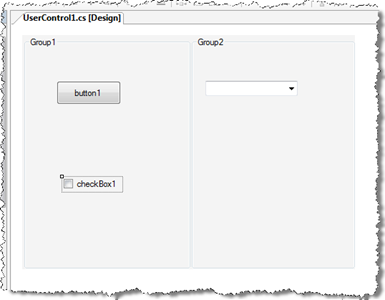
A big thanks to Viru Aithal, from our DevTech India team, for providing the code that inspired this post. Update: it turns out I didn't look deeply enough into the origins of the code behind this post. The code that inspired Viru's code that inspired mine came from our old friend Mike Tuersley, who's delivering a class on customizing the Options dialog at this year's AU (in just over a week). Thanks, Mike! 🙂 One way that applications often want to integrate with AutoCAD is via the dialog displayed by the OPTIONS command. Luckily it's relatively easy to add your…
-
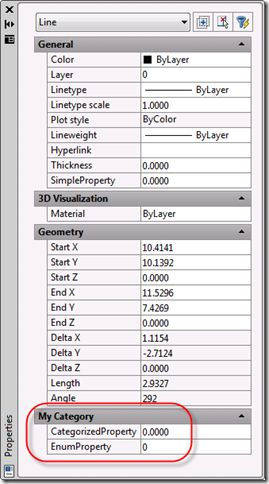
This topic is a little on the advanced side - it requires the use of C++ and some knowledge of COM - but I felt it was worth covering, as you can get some interesting results without a huge amount of effort. Since we introduced the Properties Palette (once known as the Object Property Manager (OPM) and otherwise referred to as the Properties Window) back in AutoCAD 2004 (I think it was) it has become a core tool for viewing and editing properties of AutoCAD objects. In AutoCAD 2009 we have taken the concept further, allowing properties to be added…
-
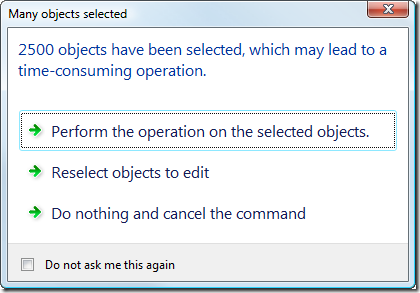
In this previous post we looked at a basic task dialog inside AutoCAD and exercised its various capabilities without showing how they might be used in a real application. This post goes beyond that to show how you might make use of the TaskDialog class to provide your users with relevant information at runtime that helps them decide how best to proceed in certain situations, effectively increasing your application's usability. The specific scenario is this: if the user selects a lot of entities - too many for our command to handle quickly - we want to show a dialog that…
-
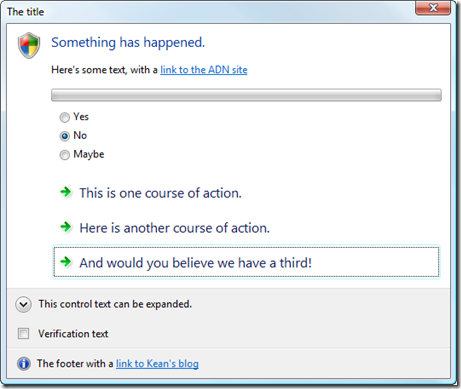
This is a topic I've been meaning to get to for some time... as I finally had to research it for a side project I'm working on, I decided to go ahead and post my findings here. AutoCAD 2009 makes heavy use of task dialogs, which are basically message-boxes on steroids. MSDN contains documentation on Microsoft's implementation of task dialogs, although our implementation is a little different. Why bother with these new task dialogs? They provide a way of asking more user-friendly questions using actual actions as answers rather than yes/no/cancel etc. It's a bit like the way I now…
-
This comment came in from a developer on a previous post: We still do all our stuff w/C++/STL/COM/MFC; lots of custom entities and object behavior - for Civil 3D/Land Desktop/Map -- hence, I'm not Dot Netted. The predominate explanation I've heard to move from C++ to .Net is that UI is maybe easier to write...but we've had all that nicely standardized for years (although I could still strangle someone at MS at least once a week/month.) We tend to minimize external API use, whether ObjectArx/Win32/MFC, and try to have portable code. Granted, it's mostly Win32 dependent and perhaps lacks the…
-
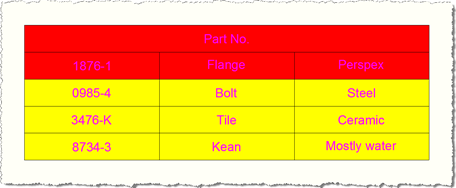
The question of how to define a new table style programmatically has come up a couple of times over the last week or so, so this post shows how to approach this. I've used the code from this previous post as a basis for this post's. The important thing to know is that TableStyle objects are stored in a special dictionary, which can be accessed via a Database's TableStyleDictionaryId property. This ObjectId property allows you to access the dictionary, from which you can query the contents, determine whether your style exists and add a new one if it doesn't. The…
-
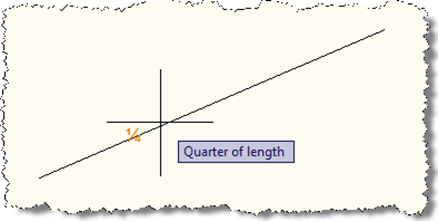
Thanks again to Augusto Gonçalves, from our DevTech Americas team, for providing the original VB.NET code for this sample, as well as helping investigate an issue I faced during implementation. When I saw a recent reply to a developer, showing how to implement a custom object snap in AutoCAD using .NET, I had a really strong sense of nostalgia: it reminded me of a couple of early samples I contributed to the ObjectARX SDK: the "third" sample, which showed how to create a custom osnap that snapped to a third of the way along a curve, and "divisor" which generalised…
-
This post continues on from Part 1 of this series. You'll find much of this content has been used before in these previous posts, although post does include content updated for F# 1.9.6.2 (the September 2008 CTP). The first thing we need to do is – as with any AutoCAD .NET project – add project references to AutoCAD's managed assemblies, acmgd.dll and acdbmgd.dll. With F#'s integration into Visual Studio 2008 you do this in exactly the same way as you would for a C# or VB.NET project, by selecting Project -> Add Reference... from the pull-down menu or right-clicking the…
-
AU Unplugged is the unconference component of Autodesk University. The sessions have been submitted and the voting is now on: based on external feedback the event organizers will schedule the most interesting classes at this year's event. Last year I held a poorly publicized (and therefore poorly attended 🙂 session on comparative AutoCAD development tools/technologies, but I've decided not to repeat that this year, and hang on the coat-tails of one of my team... Stephen Preston, the manager of DevTech Americas and our worldwide platform products technical lead, is planning the following session: AutoCAD .NET: Help Us to Help You…
-
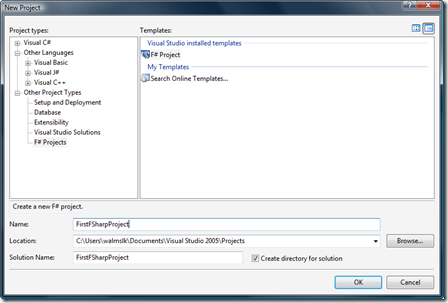
As mentioned in my previous post, I've been beavering away on the handout for a new class I'm delivering at this year's Autodesk University. Here is the first part of this handout. Introduction F# is a new programming language from Microsoft, due to become a first-class .NET citizen (joining its siblings C# and VB.NET) and fully integrated with Visual Studio 2010. In this class we'll introduce many of the concepts behind the F# language, and look at examples where we use it to create applications inside AutoCAD. At the time of writing, F# is available as a Community Technology Preview…
