AutoCAD .NET
-

Well, I couldn't resist... as I mentioned in the last post - where we looked at creating a simple graph inside AutoCAD as an example of modifying objects inside nested transactions - the idea of graphing inside AutoCAD is a good fit for F#. This is for a number of reasons: F# is very mathematical in nature and excels at processing lists of data. I also spiced it up a bit by adding some code to parallelise some of the mathematical operations, but that didn't turn out to be especially compelling with my dual-core laptop. More on that later. Here's…
-

I received this question by email last week: Is it ever required to use more than one transaction per program? The simple answer is that you mostly only need one transaction active per command: you shouldn't leave a transaction active outside of a command, as this is likely to cause problems at some point, and within your own command one transaction is typically enough to do what you want. That said, the transaction mechanism inside AutoCAD has some pretty cool nesting capabilities that make it very flexible and a great way to manage sets of database operation and to roll…
-
This post follows on from this previous one, where we looked at a technique for picking a face on an AutoCAD solid. Tony Tanzillo kindly pointed out this much cleaner solution for this problem, and also highlighted a really simple (and elegant) way to implement LookAt using standard AutoCAD commands. While I really like both pointers provided by Tony, I've decided to persevere with my existing - admittedly sub-optimal - approach, as much as to show ways to exercise some APIs that people may not have used themselves. Please be warned, this isn't the simplest way to address this problem,…
-
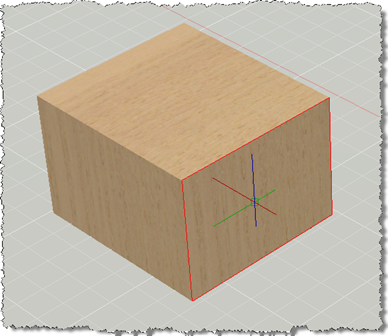
This post has come out of an interesting discussion I had with Jim Cameron at the ADN party at AU 2008. He mentioned an idea, which he kindly later reminded me of by email, which was to develop an AutoCAD equivalent for Inventor's LookAt functionality. I didn't know about LookAt before this discussion, but it seems it allows you to look at a particular face: you pick a face and it rotates the view and zooms in to centre it on the screen. Rather than try to attack the whole problem at once, this post tackles selecting a face (which…
-
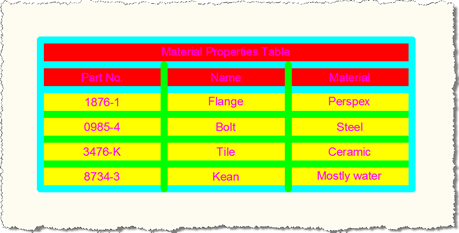
In this previous post we saw some code to create a table style and apply it to a new table inside an AutoCAD drawing. While responding to a comment on the post, I realised that the table didn't display properly using my example: the first column heading was being taken as the table title and the rest of the column headings were lost - the headings in the table were actually taken from the first row of data. I suppose that serves me right for having chosen such eye-catching (and distracting) colours. 🙂 The following C# code addresses this by…
-
For those of you who were unable to attend various Developer Track sessions at this year's Autodesk University (or would just like a refresher for sessions you found useful), my team is beavering away at recording our various AU sessions as DevTV episodes. As a quick taste of how they'll (most likely) look, here's the first: Stephen Preston's popular "AutoCAD .NET Basics" session, which went by the session ID of DE205-4, this year. Here it is for view and for download (139.1 Mb). It's possibly a slightly larger session to stream or download than you may have seen in the…
-
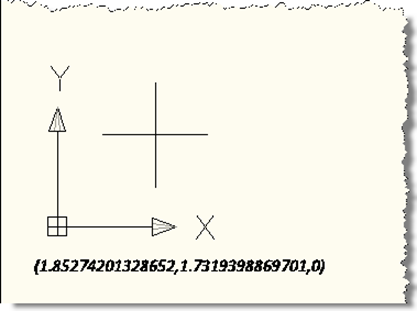
I've often seen the question, over the years, of how to draw text in the plane of the screen, even when the current view is not planar to the current UCS. This ability to "screen fix" text has been there, but has required a number of sometimes tricky transformations to get the right behaviour. Well, during a recent internal discussion I became aware of a really handy facility inside AutoCAD which allows you to dependably draw screen-fixed text without jumping through hoops. In this simple example, we're implementing a DrawJig - a jig that doesn't host an entity but allows…
-
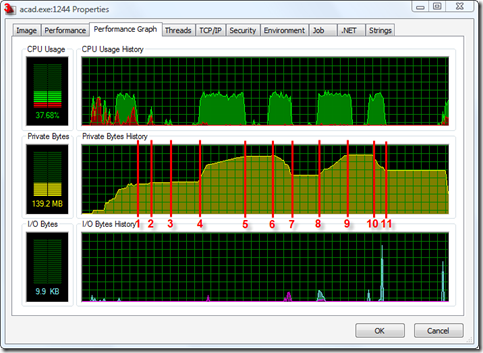
I was pleasantly surprised the other day to find that the "permanent object deletion" API I mentioned back in this post - and had marked as only being available in ObjectARX - was also exposed in the .NET API to AutoCAD 2009. What better way to celebrate the good news than to put together some test code and post it to my blog? 🙂 So, for a Thanksgiving/pre-AU treat, here's some information on making use of the Database.ReclaimMemoryFromErasedObjects() method to - surprisingly enough - reclaim memory from erased objects. Firstly, why is this even needed? Well, when you erase an…
-
There's just one week to go before this year's Autodesk University. If you need more accuracy than this Shaan's here to help. 🙂 I'm going to be pretty busy with last-minute (well, last-week) preparation for the event, but will try to post the odd item of interest. For those of you who won't be in Vegas for AU 2008, please do keep checking this blog: I expect to keep posting during the course of the week which will hopefully prove to be of interest whether you were able to attend or not. One month ago I mentioned an AU Unplugged…
-
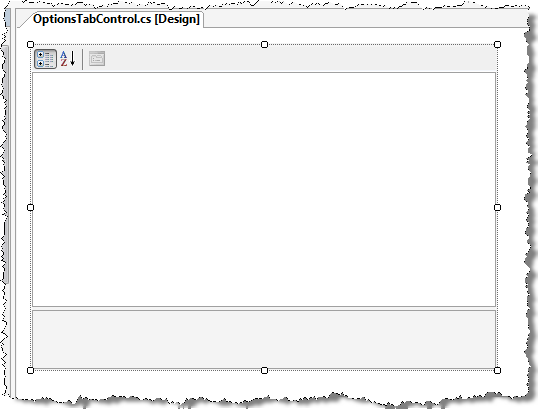
This post extends the approach shown in this previous post to implement a realistic editing and storage mechanism for application settings. It uses the .NET PropertyGrid control to display a custom class, allowing editing of a number of properties. This class is also serializable, which means we can use the .NET Framework to save it out to an XML file on disk. Some readers may have their own approaches to saving custom application settings, whether in the Registry or elsewhere: this post is primarily about displaying properties rather than providing a definitive "how to" for storing custom application settings. I…