AutoCAD
-
Purging can seriously reduce the size of AutoCAD drawings by removing unnecessary symbol table and dictionary entries. The PURGE command in AutoCAD allows you to safely purge these non-graphical objects (layers, linetypes, block definitions, etc.). Since AutoCAD 2005 (if I recall correctly), PURGE also supports the removal of Registered Application names. Applications that make use of Extended Entity Data (XData) must register unique application names in drawings. A few applications have, in the past, created many more names than they required, and as these RegApp names get copied from drawing to drawing (when they get XRefed, for instance), they ended…
-
Firstly I should apologise to those readers using RSS to access this site: I've been playing around with the configuration, to integrate FeedBurner but also to switch from publishing entire articles via RSS to publishing introductions - my posts are just too long, which seems to cause a problem for some RSS readers. So you may have received multiple versions of the same articles for the last few weeks - sorry about that. For those of you who have not yet subscribed via RSS - please see the new options in the side-bar on the left: it should now be…
-
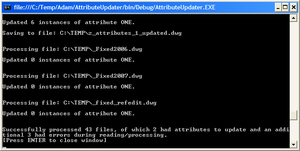
This post finally takes the code last shown in this previous post, migrating it to use RealDWG to update a folder of DWGs without the need for AutoCAD to be installed on the system. A big thanks to Adam Nagy, a member of DevTech working from our Prague office, who turned around my request to convert the code to work with RealDWG in a matter of hours (if not minutes). Firstly I need to make it clear that this code will not run without both RealDWG installed (I'm using RealDWG 2007, as the file format didn't change between 2007 and…
-
This post was almost called "Generating Koch fractals in AutoCAD using .NET - Part 3", following on from Parts 1 & 2 of the series. But by the time I'd completed the code, I realised it to be of more general appeal and decided to provide it with a more representative title. I started off by adding a progress meter and an escape key handler to the code in the last post. Then, while refactoring the code, I decided to encapsulate the functionality in a standalone class that could be dropped into pretty much any AutoCAD .NET project (although I've…
-
As promised in this earlier post, here's the recording of the "Custom Objects Masterclass" session held on July 12. The next in the series, "Creating an Installer", is scheduled for Thursday August 16. You can go here to register (like all in this series, this session is free for all to attend).
-
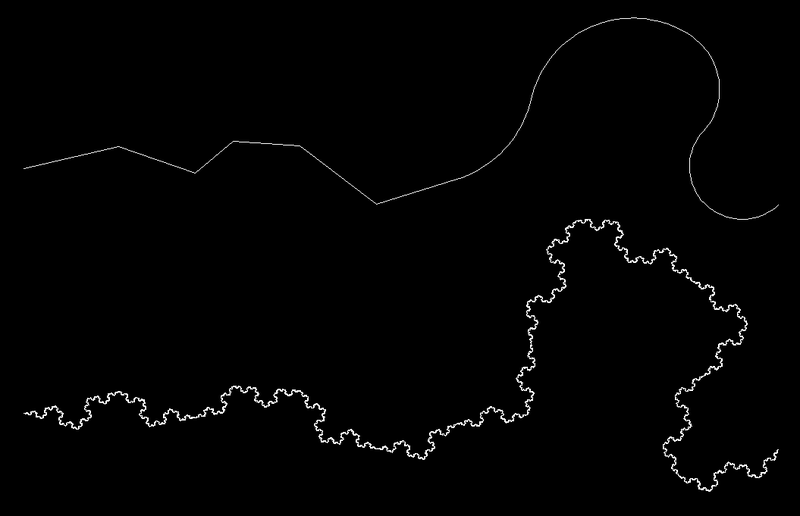
This post continues on from the last one, which introduced some code that creates "Koch curves" inside AutoCAD. Not in itself something you'll want to do to your drawings, but the techniques shown may well prove helpful for your applications. Last time we implemented support for Lines and Arcs - in this post we extend that to Polylines. These are a different animal, as rather than replacing the original entities with 4 times as many for each "level", in this case we add 3 new segments to each original segment. So we don't then mark the entities for erasure, either.…
-

I'm currently waiting to get my RealDWG license through, so I'll interrupt the previous series on side databases to focus on something a little different. I'll get back to it, in due course, I promise. 🙂 A long time ago, back during my first few years at Autodesk (which logically must have been some time in the mid- to late-90s, but I forget now), I developed an ObjectARX application to create fractals from linear geometry. I first got interested in the subject when I stumbled across something called the Koch curve: a very basic fractal - in fact one of…
-
In the last post we looked at some code to search the current drawing for a particular attribute and update its value. In this post - as promised - we're going to look at how to extend this application to work on a folder of drawings, updating those that contain the attribute and saving them to a new filename. Rather than implement a fancy, graphical user interface, I've stuck with my approach of using the command-line for input and output. If you wish to implement your own UI, please do - it's really easy using .NET. I get the occasional…
-
This suggestion came up in reference to this previous post about using side databases. The request is to be able to open a number of DWG files and modify a particular attribute, saving the files back. Rather than jumping in and solving both problems in one post, we'll start today with the problem of updating the attribute and then in the next post we'll look at some code we can use to process a folder of DWGs, opening, updating and saving each one. I'll probably then go one step further and look at the steps needed to extract this code…
-
This topic was briefly introduced almost a year ago, in this post. I then looked into the code a little further in a follow-up post. But at the time this topic wasn't the main thrust of the post, it was really more of an implementation detail. So now it's time to do the topic a little more justice. 🙂 Let's start with some terminology. What we're talking about today are often referred to as "side databases" or "external databases". Basically they're DWG files that are not open in the AutoCAD editor, but ones we want to access programmatically to load…