AutoCAD
-
On October 18th we're delivering a free AutoCAD development-oriented webcast entitled "AutoCAD: .NET for LISP Programmers". Check here for our overall API schedule, or go here to register directly. These sessions are typically held at the end of the working day in Europe (5pm CEST) which is the beginning of the day on the West Coast of the US (8am PDT). As usual, I'll post a link to the recording, once it's available.
-
This post extends this previous post that dealt with driving a single-sheet AutoCAD plot by adding some code to handle selection and transformation of a window to plot. First order of business was to allow the user to select the window to plot. For this I used the classic combination of Editor.GetPoint() for the first corner) and Editor.GetCorner() for the second. All well and good, but the points returned by these functions are in UCS (User Coordinate System) coordinates. Which meant that as it stood, the code would work just fine if (and only if) the view we were using…
-
A comment came in on this previous post regarding how best to know whether a media name is valid during your plot configuration. There are a few approaches, other than the one I chose of hardcoding the device and media names. The first is to implement a user interface of some kind which allows the user to select the device and media names. Another approach for setting the media name is to use PlotSettingsValidator.SetClosestMediaName() to choose the media name that most closely matches the paper size you desire. Today I'll focus on the first option, although I'm only going to…
-
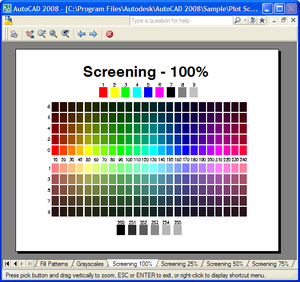
This was a fun one to work on. The code in this post combines and extends upon techniques shown in two earlier posts: one showing how to plot multiple sheets and the other showing how to preview a single-sheet plot. One of the key differences when plotting or previewing is that while plotting can directly support multiple sheets (assuming the device does so), previewing does not. The good news is that AutoCAD provides you the user interface elements to allow cycling through plots: the user is provided with "Next" and "Previous" buttons - it's then up to you to implement…
-
As mentioned in this previous post, tomorrow we're delivering a fun (and free!) AutoCAD development-oriented webcast entitled "AutoCAD: 10 easy ways to crash your AutoCAD addin". In case it's not obvious, the point is to highlight issues to avoid in your code, rather than showing you how to introduce critical bugs. 🙂 Check here for our overall API schedule, or go here to register directly. These sessions are typically held at the end of the working day in Europe (5pm CEST) which is the beginning of the day on the West Coast of the US (8am PDT). I will, of…
-
This week's posts take the code I threw together last week for single-sheet and multi-sheet plotting, and introduces the concept of "plot preview". I'm learning as I go for much of this, so there are structural (although usually not functional) changes being made to the code as it develops. In this instance, for example, I've factored off common functionality needed by both previewing and plotting into a single helper function. This will no doubt evolve further (and change in structure) when I come to apply the principle to multi-sheet plotting later in the week. Here's the C# code: using Autodesk.AutoCAD.Runtime;…
-

Somewhat symmetrically I'm posting this from Chicago airport, once again, but thankfully I'm now on my way home. It was a busy week of meetings, but I did get the chance to put together some code that extended the last post into the realm of multi-sheet plot jobs. The following code took some work, but I finally managed to iron out the obvious wrinkles and put together an approach to plot multiple sheets into a single document. The standard DWF6 driver doesn't appear to support multiple sheet jobs (directly, at least), so I chose to use the DWFx driver that…
-
I just missed my connecting flight in Chicago, so have 3 hours to pass until the next, and decided to post some code I finally got around to writing on the plane from Zurich. I've had a few requests for code showing how to plot using the .NET API in AutoCAD. There's an existing ObjectARX (C++) sample on the SDK, under samples/editor/AsdkPlotAPI, but there isn't a publicly posted .NET version right now. Here's the C# code I put together. Please bear in mind that it was written during less than ideal coding conditions, and I haven't spent a substantial amount…
-

I'm now back from a fantastic break in Italy and am trying hard to catch back up. Next week I'm off again to San Diego (work, this time), which may cause further interruptions in blog postings. This question came through from Genésio from Brazil: I wish jig a leader with an bubble in the and of the leader, at the same time. Can you help me. Perhaps post the solution in your blog (through the interface). It took me a while - frustratingly long, in fact, and probably this is not exactly what Genésio is after - but here's what…
-
This question was asked as comment to a previous post by har!s: Thanks a lot for the code. I have yet to see 2008 and MultiLeader. But I presume that it works on both Model and paper spaces. In that case, what is the best method to make the operation space independent? i.e., it should work on active space irrespective of whether it's model or paper. I think this will be generally applicable to almost all the entity creations. The question is very valid and does indeed apply to a lot of entity creation - and other - activities. Most…