AutoCAD
-
I had too much fun with the last post just to let it drop: I decided to port the main command to F#, to show how it's possible to combine C# and F# inside a single project. The premise I started with was that the point-in-curve.cs library is something that we know works - and don't want to re-write - but would like to use from a new application we're developing in F#. This also gives us the chance to compare the performance between C# and F# when solving the same problem (although as we'll be calling through to some…
-

This may strike you as a fairly bizarre title for a post, but I was inspired to develop the below code by a robotic lawnmower we bought about a year ago. This fantastic tool bounces around our garden, changing direction randomly when it hits the lawn's boundary. I got to thinking how to implement a similar technique to hatch a boundary with a polyline. While this is mostly for fun, I can see a few interesting potential uses: you might use the technique to test randomly generated paths of, for example, a robot or you might simply want to supplement…
-
For information regarding the upcoming release of AutoCAD 2009 and it's siblings (and perhaps its cousins? :-), check out this post on Shaan Hurley's Between the Lines. My team has been working on API samples for this release, some of which I'll introduce over the coming weeks. Watch this space!
-
In the last post we saw code to display and use AutoCAD's built-in colour, linetype and lineweight dialogs. In this post we extend that by using each of them in sequence to display various properties of an entity, allowing the user to modify them. While this is slightly more "real world" than the last post, it doesn't really make sense to implement a command such as the one below (the property palette is much better, for instance :-). The main purpose is to show how to set the initial values in the various dialogs and afterwards to make use of…
-
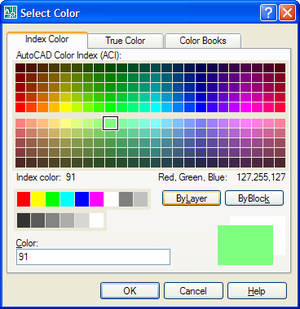
AutoCAD has a number of handy dialogs available in the "Autodesk.AutoCAD.Windows" namespace. The following code shows how to use three, in particular: ColorDialog, LinetypeDialog and LineWeightDialog. These three classes allow you to very easily implement user-interfaces selecting their corresponding properties. Here's the C# code: using Autodesk.AutoCAD.Runtime; using Autodesk.AutoCAD.ApplicationServices; using Autodesk.AutoCAD.DatabaseServices; using Autodesk.AutoCAD.EditorInput; using Autodesk.AutoCAD.Windows; namespace AutoCADDialogs { public class Commands { [CommandMethod("CDL")] public void ShowColorDialog() { Document doc = Application.DocumentManager.MdiActiveDocument; Database db = doc.Database; Editor ed = doc.Editor; ColorDialog cd =…
-
I had an interesting question come in by email and thought I'd share it via this post. To summarise the request, the developer needed to allow command aliasing for their custom commands inside AutoCAD. The good news is that there's a standard mechanism that works for both built-in and custom commands: acad.pgp. acad.pgp is now found in this location on my system: C:\Documents and Settings\walmslk\Application Data\Autodesk\AutoCAD 2008\R17.1\enu\Support\acad.pgp We can edit this text file to add our own command aliases at the end: NL, *NETLOAD MCC, *MYCUSTOMCOMMAND Here we've simply created an alias for the standard NETLOAD command (a simple enough…
-
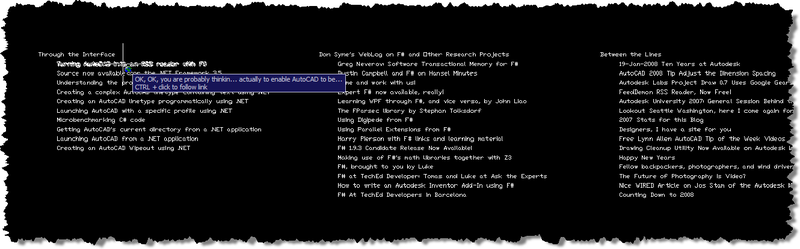
In the last post we saw some code that downloaded data - serially - from a number of websites via RSS and created AutoCAD entities linking to the various posts. As promised, in today's post we take that code and enable it to query the same data in parallel by using Asynchronous Workflows in F#. Asynchronous Workflows are an easy-to-use yet powerful mechanism for enabling concurrent programming in F#. Firstly, a little background as to why this type of technique is important. As many - if not all - of you are aware, the days of raw processor speed doubling…
-
OK, OK, you are probably thinking "why would anyone ever want to use AutoCAD as an RSS reader?". The answer is, of course, "they wouldn't". The point of the next few posts is not actually to enable AutoCAD to be used to read RSS, but to show how it is possible to use F# and .NET to extract information from RSS feeds and create corresponding AutoCAD entities. The reason I came onto this subject will also become more clear when you see my next post: I have been researching Asynchronous Workflows in F# - an uber-cool mechanism for managing concurrent,…
-
In the last post we looked at using .NET to define complex linetypes containing text segments. In the post I admitted to not knowing specifics about the properties used to create the text segment in the linetype, and, in the meantime, an old friend took pity on me and came to the rescue. 🙂 Mike Kehoe, who I've known for many years since we worked together in the Guildford office of Autodesk UK, sent me some information that I've reproduced below. Mike now works for Micro Concepts Ltd., an Autodesk reseller, developer and training centre. He originally wrote the below…
-
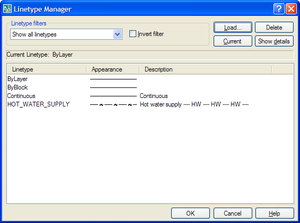
In my last post we saw some code to create a simple linetype using .NET. As a comment on that post, Mark said: Kean, i tried you code and it works great and it also got me thinking... is it possible to programmitically add text in as well? I've tried using ltr.SetTextAt(1, "TEST") but so far i've had no luck, any suggestions??? It turned out to be quite a bit more complicated to make a linetype containing text than merely calling SetTextAt() on one of the segments. In order to understand what properties needed setting, I first loaded the HOT_WATER_SUPPLY…