AutoCAD
-
Happy New Year, everyone! I had a very relaxing break over the holiday period: during the better part of two weeks I managed to stay away from my PC and even my BlackBerry, which I admit I'm generally not very good at ignoring. So now I'm easing back into the swing of things, remembering how to type and open modelspaces, among other things. 🙂 To save my brain from unnecessary stress during the first few weeks of 2008, I've decided to take inspiration from the ADN website. Today's post is based on this DevNote, which shows how to create a…
-
This is a follow-up to this previous post, where we used COM to launch the AutoCAD process. Tony Tanzillo rightly pointed out the code in that post could be simplified slightly, so check out his comment for the specifics. Today we're going to look at launching AutoCAD more manually, allowing us to control the working folder and specify command-line parameters. This is to address the specific question of choosing an alternative startup profile for the application, but AutoCAD's command-line parameters allow you to do a great deal more than that. We're going to use the System.Diagnostics namespace to specify our…
-
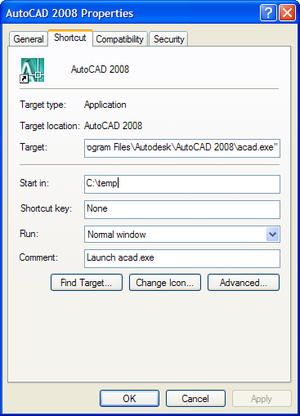
This question came in via a comment from Danny Polkinhorn on this post: After AutoCAD has launched, I often have a need to determine the "Start In" directory specified in the shortcut (Right-click AutoCAD shortcut, Properties, Start in). Is there a way to determine what that directory is? I'm thinking I can use the path of the active drawing (either Drawing1 or the drawing they double-clicked on). Is that a fool-proof way? This is an interesting topic, and raises the questions of what that the "Start In" setting is used for and how it can be modified. The "Start In"…
-
This topic has been raised a few times, and Adam Nagy, from our DevTech EMEA team, sent a technical response recently with code that I decided to use as the basis for this post. Developers typically want to either integrate functionality into AutoCAD (using its plug-in architecture to add commands, user-interface elements, objects, etc.), or to drive it, automating common tasks. Clearly the line can get blurred between these two areas, but today I'm going to focus on the second category. To help with later explanations, I'd like to introduce two types of application interaction: Out-of-process In this situation we…
-
This topic was suggested via a comment from Dale Bartlett on this post. In AutoCAD 2008 an API was exposed for the Wipeout object. For those of you who aren't familiar with Wipeouts: this handy object was originally developed as part of the AutoCAD Express Tools, and has since been integrated into core AutoCAD. The implementation uses a raster image of the same colour as the drawing canvas to "wipe out" the graphics behind it (assuming it's nearer the front in terms of draw order relative to the entities being masked). This is the main reason the Wipeout class is…
-
The last post got me thinking about how to get the names of all the colours that are contained in a particular color-book inside AutoCAD (the last post also contains the explanation for my using both "color" and "colour" in the same sentence, in case that bothers anyone :-). Color-books are stored in .acb files: these files are essentially XML files with the RGB values encoded to prevent people from editing them and polluting the colour definitions on a particular system. So while the RGB information is not directly useful, it is very possible to iterate through these files and…
-
Another quick post, as I'm just about to head back home after a long week in Boston. This post comes from a technical solution provided by Sreekar Devatha, from DevTech India. I won't go into detail regarding the following code, but it should be fairly clear what's going on: from a particular colour-name it looks up a colour from a color-book (yes, I know I've used "colour" and "color" in the same sentence, but "color-book" is an AutoCAD term and it's hard for me to drop my u's when I don't have to, even after having lived in the US…
-
In parts 1 & 2 of this series we looked at metaprogramming with AutoCAD using AutoLISP and VB(A), and then using VB.NET and C#. In this post we're going to look at what's possible from F#, through the lens of my relative inexperience with the language, of course. The quotations mechanism in F# appears to be the way to represent, analyse and execute program structure. This article describes the concepts, although it's quite deep and doesn't address the case that's most immediately interesting to AutoCAD develeopers: the ability to evaluate and execute code represented as a string. In fact, this…
-
In this post we're going to continue the topic started in Part 1 of this series, which looked briefly at metaprogramming with AutoCAD using AutoLISP and VB(A). Now we're going to look at .NET, focusing initially on C# and VB.NET. [I found the inspiration for the code in this post from The Code Project, although I had to update the code to use non-deprecated CLR methods as well as making it work for AutoCAD, of course.] While .NET doesn't provide something as simple as an Eval() function, it actually provides something much more interesting. The CLR exposes the ability to…
-
A recent comment on one of my F# articles got me thinking about this topic (thanks, Thomas! :-), so I thought I'd write a few posts on it. Next week is AU, and the week after that I'm attending a training class in Boston, so posts may be a little sparse over the coming weeks. Metaprogramming – according to the definition on Wikipedia – is the act of writing code that writes or manipulates other programs (or itself). But what is it really all about? The vast majority of programmers are actually metaprogramming without realizing it has such a fancy…