Notification / Events
-
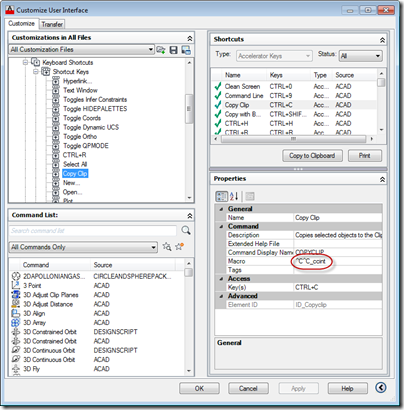
This was a fun question that came in from James Meading. I genuinely didn't think I'd manage to look into it before the break, but it tweaked my interest during my trip back from the UK: I thought this might be a topic you would be interested in. I do not use ctrl-v for pasting entities, only text to command line. I already tried removing the keyboard shortcuts to ctrl-v via the cui, and that just makes ctrl-v not do anything when command line does not have focus. So I think I need to write a transparent function, make a…
-

A developer had an interesting requirement that I thought I'd spend some time looking at: to animate transient graphics inside AutoCAD according to data they've pulled in from an external simulation system. It's clear that AutoCAD is really not an animation platform – we have other products that are better suited to working in this way – but I thought it would be interesting to see what was possible. I decided to take the implementation shown in this previous post and throw in some code to animate a few different things: Change the per-vertex colours of our transient box These…
-
In the last few posts on this topic, we saw some examples of getting information from and controlling AutoCAD via its Bindable Object Layer. In this post, we're going to look at a way to find out when changes are made to AutoCAD's layer table: when layers are added, changed or removed. There are certainly other ways to do this: you can use Database.ObjectAppended(), ObjectModified() and ObjectErased() to find out about changes to LayerTableRecords, for instance, but this is an alternative approach that may be interesting to some people. In this implementation, we attach some event handlers to keep an…
-
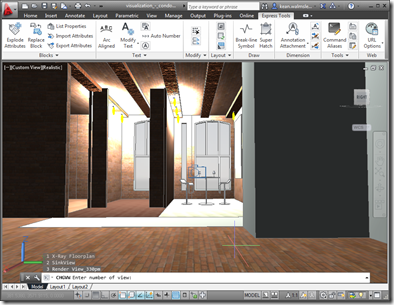
After looking at how the Bindable Object Layer (BOL) in AutoCAD might be used to get information about the current drawing, in today's post we're going to see how it can also be used to manipulate that data (in a fairly limited, albeit useful, way). But first, let's talk a bit about the origins of the BOL. It was first introduced as an architectural feature of AutoCAD when we were looking at delivering AutoCAD for Mac. It's common, these days, for programming frameworks to provide some kind of data-binding facility to simplify the creation of UIs: both WPF and Cocoa…
-
Thanks, once again, to Scott McFarlane for working his magic and finding a simple way to make an approach work that I'd convinced myself wasn't workable. (He took the implementation in my last post and adjusted it to work via a non-static event – something I had tried to do myself, but had somehow failed… I can probably blame it on post-DevDays fatigue… time for a week off, indeed. 🙂 Here's the adjusted PaletteSet2 implementation, with the event no longer defined as static and the trigger happening via an instance rather than being fired statically: using Autodesk.AutoCAD.ApplicationServices; using Autodesk.AutoCAD.Runtime; using…
-
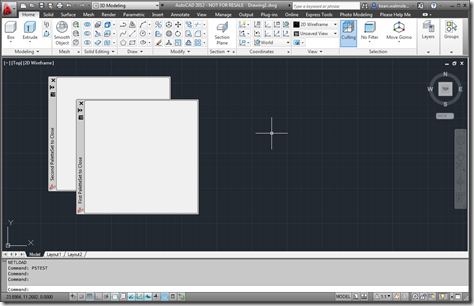
In the last post, we saw some code that provided a relatively crude mechanism for finding out when a particular custom palette set gets closed by the user. In this post, we encapsulate this technique in a new class – which I've called PaletteSet2, for the want of a better name – that can be used to apply it to a number of custom palette sets at once. Here's the C# code for the new PaletteSet2 implementation: using Autodesk.AutoCAD.ApplicationServices; using Autodesk.AutoCAD.Runtime; using Autodesk.AutoCAD.Windows; using System; [assembly: CommandClass(typeof(PaletteSet2))] namespace Autodesk.AutoCAD.Windows { public class PaletteSet2 : PaletteSet {…
-
As a follow-on from the last post, today we're going to see how to actually stop the erase operation from happening for a certain type of object (in this case we're going to focus on Lines). Thanks for Stephen Preston for showing us the way in his comment on that post: inspired by his suggestion I ended up coding this before breakfast (although I do recommend taking care when throwing exceptions on an empty stomach ;-). Here's the C# code implementing the PER (Prevent Erasure) command: using Autodesk.AutoCAD.ApplicationServices; using Autodesk.AutoCAD.DatabaseServices; using Autodesk.AutoCAD.EditorInput; using Autodesk.AutoCAD.Runtime; namespace WeLikeToBlock { public…
-
I started looking into the ObjectOverrule class, this week, to see if I could use it to prevent erasure of certain objects. My thinking was that overruling Erase() would allow me to control whether an object was erased or not, simply by my decision whether or not to super-message to the base implementation. That doesn't appear to be the case, as whether I call the base implementation or not the object gets erased. I'll have to confirm that this is expected behaviour, but in the meantime I thought I'd share a version of my code which adds a simple ObjectOverrule…
-
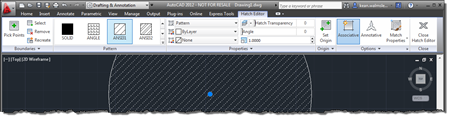
This very interesting feature came to my attention via an internal discussion. Thanks, once again, to George Varghese for providing the base sample used for this post. At various times inside AutoCAD – such as when a block is selected, for instance – a specific ribbon tab is displayed "contextually". As an example, when you select a Hatch object inside the AutoCAD editor, you should see a hatch-related contextual tab displayed: It's possible to implement your own, comparable behaviour inside the AutoCAD editor using a combination of a simple .NET module, a XAML file and some CUI editing (or a…
-
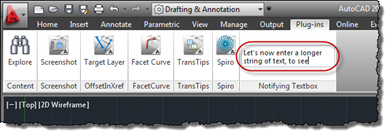
In the last post, we saw a great little sample for adding a textbox to AutoCAD's ribbon which notifies your application of the "commands" entered into it (however you choose to interpret them in your code). In this post, we'll take that further and have that textbox expand vertically as text gets entered, wrapping the contents across multiple lines (only breaking the text at the ends of words, too). Here's the updated C# code, with modified lines in red. You can get the original file here. 1 using Autodesk.AutoCAD.ApplicationServices; 2 using Autodesk.AutoCAD.EditorInput; 3 using Autodesk.AutoCAD.Runtime; 4 using Autodesk.Windows; 5 using System.Windows.Media; 6 using System.Windows.Controls; 7 using System.Windows.Input;…