Notification / Events
-
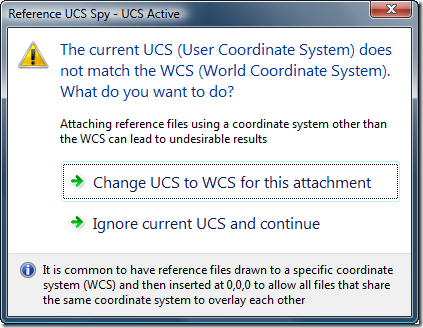
AutoCAD users who work with multiple reference files – whether DWG, DWF, DGN, PDF, PCG files or raster images – usually want them to be oriented in space (and to overlay) properly. One common way to make this happen is to set the various files up in world coordinates and then attach them at the origin of the referencing drawing's WCS. A common issue related to this approach is if the user happens to be in a local UCS: the file will get attached relative to that UCS rather than to the WCS. Glenn Ryan, who generously provided April's very…
-
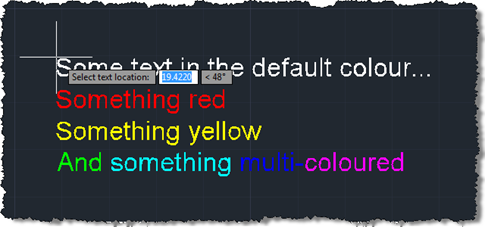
In the last post we created a simple MText object containing sections of text with different colours. The object was located at a hard-coded location, so now we want to use a simple technique to allow placement of our MText (or any object, for that matter) in the current user coordinate system. Rather than implementing a full jig class – whether a DrawJig or an EntityJig (the latter being most appropriate for this scenario) – we're going to use the .NET equivalent of the old (draggen) or acedDragGen() functionality: the overload of Editor.Drag() which takes a selection set, prompt and…
-
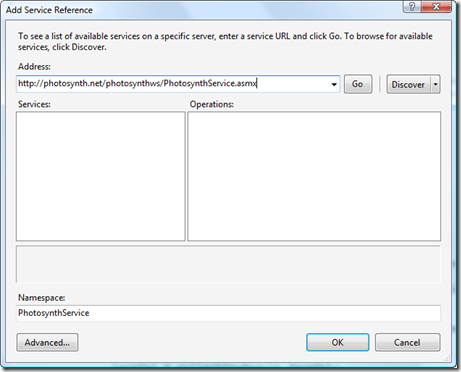
In the previous posts in this series we introduced a command that downloaded and imported point clouds from Photosynth.net, we introduced a WinForms user interface on top of it and then replaced that UI with one implemented using WPF. As threatened last time, we're now going to make some efficiency improvements in the original command implementation. In our previous implementation we were blindly asking for files, one after the other, and using failure to indicate when we'd reached the end. Which was fine, but it limited us in a few ways: we could not reliably parallelize this otherwise highly parallelizable…
-

Well, they've done it again. Having received positive feedback on Episode 1, Stephen and Fenton have now recorded another ADN DevCast, this time with a guest appearance of another member of the DevTech team, Cyrille Fauvel. During this episode they talk about disposing in .NET, diagnosing DLL load problems using gflags, and deepcloning in ObjectARX. If you prefer you can download this episode for offline viewing (36 MB) and take a look at the accompanying samples (95KB). Enjoy! 🙂
-
I received this question by email from Vito Lee: I am trying to write an event handler function in C# and can use your expertise. I am trying to display an alert box whenever a user erases a specific block in a drawing. Which event handler would be best for this situation? This one is interesting, because it's quite a general problem and there are a few ways to solve it. To start with, let's generalise the problem description to cover watching for editing operations on drawing objects. We're indeed going to solve the specific problem stated above – albeit…
-
In response to September's Plugin of the Month - which Shaan has very kindly posted about over on Between the Lines – a few people have requested enhancements to the OffsetInXref tool. Two came up, in particular: The ability to offset the contents of blocks, not just xrefs The ability to enable the XLINE command's offset functionality to work with xrefs (and blocks) The changes to enable these enhancements are very minor, which is always a pleasant surprise. Well, in the first case it isn't much of a surprise: xrefs are actually just a special kind of block, so we…
-
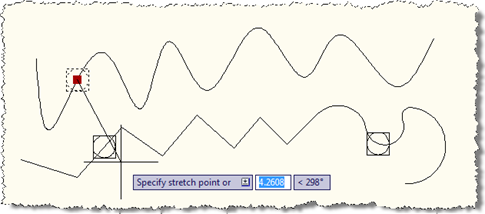
In the last post we looked at some code to create a point on a curve, and make sure it stays on that curve when edited. In this post we're extending that code (albeit slightly) to work with a network of curves: the idea is that any curve which has a point created on it becomes a candidate for any point to snap onto as it moves around. This could clearly be extended to provided a better way of specifying the curves forming the network, of course. Here's the updated C# code, with the modified/new lines in red (the full…
-
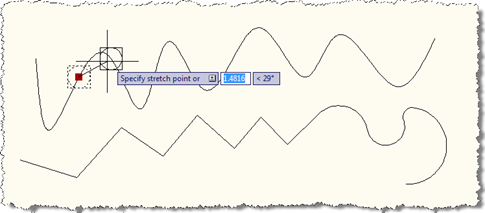
Over the weekend I put together a little prototype to prove a concept for an internal project I'm working on. The idea was to force a point onto a curve (meaning anything inheriting from Curve in AutoCAD, such as Arc, Circle, Ellipse, Leader, Line, Polyline, Polyline2d, Polyline3d, Ray, Spline, Xline…), so that when the point is moved it snaps onto the curve to which it's assigned. The solution I've put together is far from being complete – which is partly why I'm planning on making this a series, so I can flesh it out a little further in further posts…
-
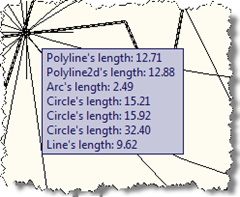
One of the responses to my last post on the "Plugin of the Month" asked about showing information on an AutoCAD drawing object via a tooltip. Other than using the standard rollover tooltip properties mechanism, as shown in this previous post, the best way to achieve this is via a PointMonitor. In the below C# code we check which object ore objects are being hovered over, get information about those objects and add them to the tooltip. using Autodesk.AutoCAD.ApplicationServices; using Autodesk.AutoCAD.DatabaseServices; using Autodesk.AutoCAD.Runtime; using Autodesk.AutoCAD.EditorInput; using Autodesk.AutoCAD.Geometry; public class PointMonitorTooltips { [CommandMethod("SM")] public static void StartMonitor() …
-
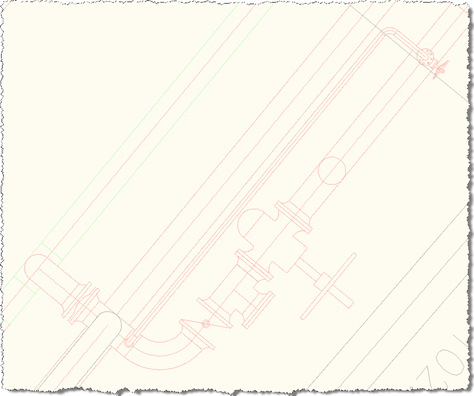
This was a fun little project: to enable AutoCAD's OFFSET command to work on the contents of external references (xrefs), something I'm told is a long-standing end-user wishlist request. AutoCAD's .NET API provides some very interesting events that make this possible without the need for us to implement our own OFFSET command. We can simply respond to the selection event and replace the selected object (the xref itself) with either an item contained in the xref or a clone of it that has been placed in the current space. I ended up using the latter approach: the former worked fine…