SaaS
-
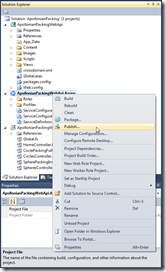
In the last post, we added a Windows Azure deployment project to the ASP.NET Web API project we created previously. In this post, we're going to go ahead and publish our project on Windows Azure. To get this started, we right-click the deployment project in Visual Studio's Solution Explorer and select "Publish"… … which brings up the "Windows Azure Publish Sign In" dialog. At this stage, you probably don't yet have an Azure subscription. Whether you do or not, click the link on the dialog to proceed: If you don't yet have a subscription, it's at this point that you'll…
-
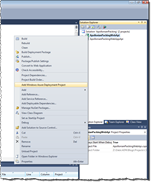
Having built our local ASP.NET Web API project and consumed its data inside AutoCAD, we're now ready to deploy our web-service to the cloud. In this first part, we'll look at some background information on Azure, in particular, and then get ready for the publishing process, which we'll complete in the next post in the series. Choosing a provider As is obvious from the title, for these posts we're going to use Windows Azure. Alternatives such as Amazon Web Services (AWS) provide IaaS (Infrastructure-as-a-Service) capabilities related to hosting ASP.NET – you basically get the ability to deploy Windows Servers in…
-

Consumption seems to be a relevant topic, coming after the long Easter weekend here in Switzerland… I was laid up with gastric flu on Monday: after having consumed large amounts of food with friends on Saturday and Sunday, I ended up eating nothing for the whole day. I managed to put the finishing touches on the previous post in this series, but beyond that I was pretty useless. Anyway, back to the point. We've looked at the trend of moving to the cloud, and the steps for creating and implementing a RESTful web-service using the new ASP.NET Web API. Now…
-
After introducing the (apparently somewhat charged, judging from the comments) topic of moving application functionality to the cloud, and then looking at the steps of creating and implementing an ASP.NET Web API project, we're now going to take a brief step back before looking at how we can effectively make use of the data provided by these web-services inside AutoCAD. If you're looking to assign blame (not that any is needed ;-), it's Scott McFarlane's fault we're taking this brief backwards step: Scott raised the excellent point – which really needs addressing sooner rather than later in this series –…
-
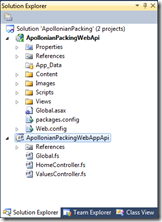
In the last post, we looked at the core technology we're going to use to expose our web-service, along with the basic project set-up. In today's post, we're going to flesh out this project and see the web-service in action. At this point, I should point out that I've switched back across for VS2010 for the purposes of this post (and its immediate successors), as it really will simplify the eventual integration with Windows Azure. Before we dive into the implementation of our web-service, here are a few words on what we're after… We want to implement two web-service APIs:…
-
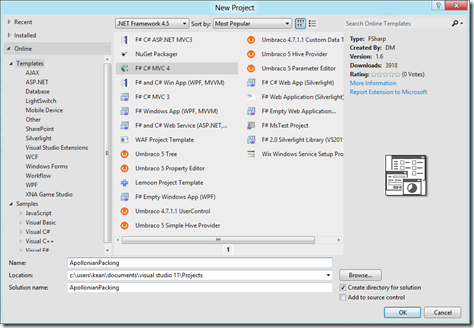
As promised, here begins the technical portion of the series on moving application functionality to the cloud. As suggested, we're going to take code from a couple of previous posts and put it in the cloud (although not immediately – first we're going to move it to a local web-service, consume that in AutoCAD, and then look at our various cloud-hosting options). So why did I choose these two pieces of code, in particular? A couple of reasons: firstly, they both implement "behind-the-scenes" algorithms that are independent of AutoCAD – a typical piece of business logic that companies might choose…
-

This is all very exciting: given the recent launch of a number of "360" products by Autodesk – including Autodesk 360, Autodesk PLM 360 and Autodesk BIM 360 – it looks as though we're about to enter a strategic relationship with Microsoft to make Autodesk products interoperate seamlessly with their industry-leading games platform, the Xbox 360. It's as yet unclear exactly what this means for the two companies and their respective 360 products, although I'm hopeful that some of the work I've been doing to prototype the use of Kinect and Metro with our products is going to be relevant…
-

This is a topic I've been meaning to cover for some time. It concerns a transition we're seeing overall in the software industry, and is certainly one that the ADN team broached in depth during the last two DevDays tours. I don't think anyone is in real doubt, at this stage, that software is increasingly being delivered "as a service", rather than via locally-installed desktop applications. Some readers may understandably be skeptical about the near-term likelihood of powerful design tools working in the cloud… I personally believe it's an inevitable shift (whether we're talking about a timeframe of 2 years…
-
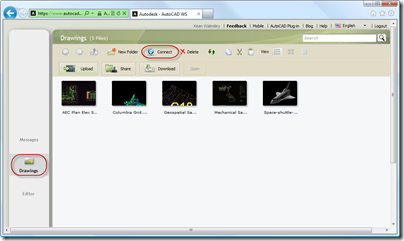
It's been a while since I've talked about AutoCAD WS, even though the application is proving hugely popular on its various platforms: whether inside a web browser or on iOS and Android devices. There have been some really interesting capabilities exposed, lately, which are making it increasingly interesting to the development community. One, in particular, that I'd like to talk about today is the ability for AutoCAD WS to connect to sites supporting the WebDAV protocol. I've used WebDAV a number of times, over the years, mainly with ProjectPoint and SharePoint. It's certainly possible to set up your own WebDAV…
-

As promised, I spent some time talking to Tal Weiss, Senior Software Development Manager for AutoCAD WS, to understand a little more about this technology and how it's evolving. Many thanks to Tal for taking the time to share this interesting information with this blog's readership. [I've formatted the below discussion as a Q&A, but with extensive editing and paraphrasing.] What is AutoCAD WS? The goal for AutoCAD WS is to extend the AutoCAD experience to the web as well as to emerging platforms and devices – mobile, tablets, etc. We already had Project Butterfly working in the browser and…