ASP.NET
-

As we reach the end of this long series of posts on moving code to the cloud – and a look at ways to use the functionality from a wide variety of applications, many of them on mobile devices – I felt it was worth putting together a quick summary post to reinforce the overall message (which may have been a bit lost in the sheer volume of information). Firstly, here are the posts in this series, including those looking at the original creation of the "desktop" application functionality: Creating the core desktop functionality Circle packing in AutoCAD: creating an…
-
In the previous post in this series, we saw the code for an initial, basic implementation of a 3D viewer for our Apollonian web-service developed for Windows 8 using WinRT. In this post, we extend that code to provide support for a few basic gestures, particularly swipe-spin, pinch-zoom and tap-pause. To properly show the gestures in action, I recorded the app working inside the Windows 8 emulator (which in turn was running inside Windows 8 running inside a Parallels VM, so fairly far from "the metal", as it were). Here's a quick video of the updated app in action: Unable…
-
After tackling the implementation of a basic 3D viewer for our Apollonian web-service using a variety of technology stacks – AutoCAD, Unity3D, Android, iOS & HTML5/WebGL – I felt as though I really needed to give it a try with WinRT, the new runtime powering Windows 8. All of the previous stacks had some "object" layer I could use above the base graphics engine – Rajawali provided it for Android/OpenGL ES, iSGL3D for iOS and Three.js for HTML5/WebGL – but for WinRT all bets were off. The general guidance for developing Metro-style 3D applications (typically that means games) is to…
-
To finish off our look at developing an HTML5-based 3D viewer for our Apollonian web-service, today's post integrates the trackball capability of the Three.js library. Many thanks to Jeff Geer for once again pointing me in the right direction on this. 🙂 The trackball capability allows you not to worry about manual implementation of 3D navigation inside your viewer: you simply set up some basic parameters to indicate the size of your model and the speed with which you want navigation to occur – as well as the keys for rotate, zoom and pan – and then you just let…
-
In the last post, we created another, basic 3D viewer for the data from our Apollonian web-service – this time using HTML5 via Three.js. In this post, we'll extend the code to listen for keyboard events and manipulate the model according to user-input, as well as enabling feature detection of WebGL (allowing the same implementation to call into the canvas rendering code when WebGL isn't present). We're introducing keyboard-based commands to enable zoom, rotate (meaning spin, although not continuously) and the change of levels: + Zoom in - Zoom out , or % Rotate left . or / Rotate right…
-
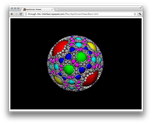
After looking at how to bring data from our Apollonian web-service into Unity3D, Android and iOS over the last few weeks, it seemed natural to extend this series to cover HTML. A big thanks to Jeff Geer for suggesting Three.js, which is the HTML5-based framework I ended up adopting for this project. I like Three.js for a number of reasons: just as jQuery (another library I've used in this project, to good effect) attempts to abstract away the messiness inherent in supporting multiple browsers, Three.js does the same for the world of browser-resident 3D. The other main reason I like…
-
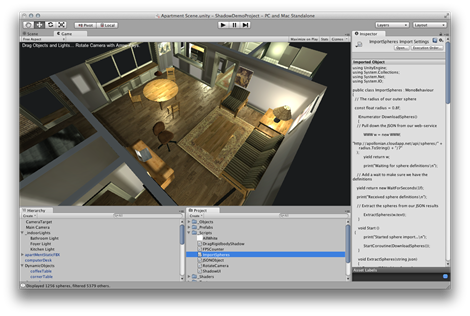
As mentioned in the last post, today we're going to have some fun pulling data from our recently-implemented, cloud-based web-service into the Unity3D game engine. My intention, here, is to reinforce the fact that exposing web-service APIs really does give you broader reach with your technology. In this case, we'll be calling our web-service – implemented using F#, which we could not have included in our Unity3D project – inside a game engine that could be hosted on any one of a wide variety of operating systems. A few words on Unity3D: according to its web-site, Unity3D is "a feature…
-
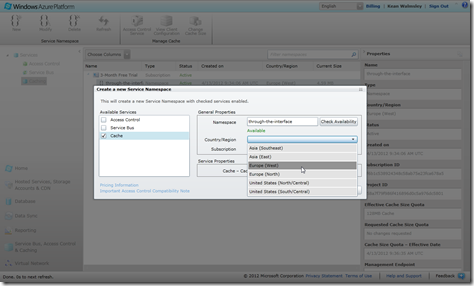
As mentioned in the last post, while working on deploying our web-site and its related services to Windows Azure, I started to chew on the economics of Azure hosting. This is especially relevant as I start to see my free 3-month subscription's resources being burned through by all of you checking them the links in the last post. 😉 Here's what I found… "extra small" instances are a mere sixth of the cost of "small" instances (not taking into account the 6-month pre-purchase discount on small instances, admittedly), which got me thinking: if I can reduce the resources needed for…
-
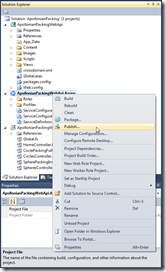
In the last post, we added a Windows Azure deployment project to the ASP.NET Web API project we created previously. In this post, we're going to go ahead and publish our project on Windows Azure. To get this started, we right-click the deployment project in Visual Studio's Solution Explorer and select "Publish"… … which brings up the "Windows Azure Publish Sign In" dialog. At this stage, you probably don't yet have an Azure subscription. Whether you do or not, click the link on the dialog to proceed: If you don't yet have a subscription, it's at this point that you'll…
-
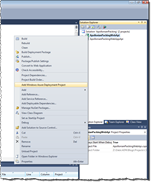
Having built our local ASP.NET Web API project and consumed its data inside AutoCAD, we're now ready to deploy our web-service to the cloud. In this first part, we'll look at some background information on Azure, in particular, and then get ready for the publishing process, which we'll complete in the next post in the series. Choosing a provider As is obvious from the title, for these posts we're going to use Windows Azure. Alternatives such as Amazon Web Services (AWS) provide IaaS (Infrastructure-as-a-Service) capabilities related to hosting ASP.NET – you basically get the ability to deploy Windows Servers in…