User interface
-
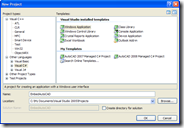
This post takes a look at another topic outlined in this overview of the new API features in AutoCAD 2009. AutoCAD 2009 introduces the ability to embed the application in a standalone dialog or form via an ActiveX control. This capability has been around for a number of releases of AutoCAD OEM, but this feature has now been made available in the main AutoCAD product. The way the control works is to launch an instance of AutoCAD in the background (it should go without saying that AutoCAD needs to be installed on the system, but I've said it, anyway 🙂…
-
A big thanks to Scott McFarlane, from Geotropix, Inc., for sharing the code in this post. Here's an email I received from Scott: I was reading this blog entry on "Through the Interface" and some folks were asking about how to implement .NET combo box versions of the color and linetype ActiveX controls that are available. I just wanted to share a simple .NET implementation of a color combo box. The color combo is quite easy, really. The linetype one would be more difficult. Attached is the source code. This is just a generic color combo, that loads up with…
-
In the last post we saw code to display and use AutoCAD's built-in colour, linetype and lineweight dialogs. In this post we extend that by using each of them in sequence to display various properties of an entity, allowing the user to modify them. While this is slightly more "real world" than the last post, it doesn't really make sense to implement a command such as the one below (the property palette is much better, for instance :-). The main purpose is to show how to set the initial values in the various dialogs and afterwards to make use of…
-
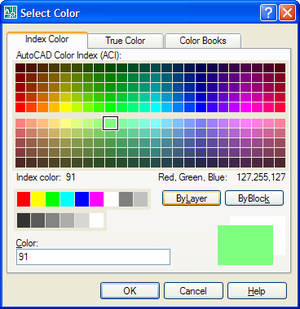
AutoCAD has a number of handy dialogs available in the "Autodesk.AutoCAD.Windows" namespace. The following code shows how to use three, in particular: ColorDialog, LinetypeDialog and LineWeightDialog. These three classes allow you to very easily implement user-interfaces selecting their corresponding properties. Here's the C# code: using Autodesk.AutoCAD.Runtime; using Autodesk.AutoCAD.ApplicationServices; using Autodesk.AutoCAD.DatabaseServices; using Autodesk.AutoCAD.EditorInput; using Autodesk.AutoCAD.Windows; namespace AutoCADDialogs { public class Commands { [CommandMethod("CDL")] public void ShowColorDialog() { Document doc = Application.DocumentManager.MdiActiveDocument; Database db = doc.Database; Editor ed = doc.Editor; ColorDialog cd =…
-
A comment came in on this previous post regarding how best to know whether a media name is valid during your plot configuration. There are a few approaches, other than the one I chose of hardcoding the device and media names. The first is to implement a user interface of some kind which allows the user to select the device and media names. Another approach for setting the media name is to use PlotSettingsValidator.SetClosestMediaName() to choose the media name that most closely matches the paper size you desire. Today I'll focus on the first option, although I'm only going to…
-
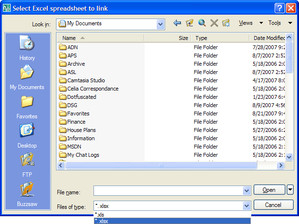
Today I started putting together some code showing how to link an Excel sheet to an AutoCAD table (watch this space - there should be something posted later this week). As I was working through it I decided enough was enough, and rather than - yet again - using the command-line to get the name of the file, I'd use the opportunity to demonstrate how to make use of AutoCAD's standard file selection dialog in your applications. At which point I decided to cut the original post short, as I didn't want this useful (but quite short) topic to get…
-
This post was almost called "Generating Koch fractals in AutoCAD using .NET - Part 3", following on from Parts 1 & 2 of the series. But by the time I'd completed the code, I realised it to be of more general appeal and decided to provide it with a more representative title. I started off by adding a progress meter and an escape key handler to the code in the last post. Then, while refactoring the code, I decided to encapsulate the functionality in a standalone class that could be dropped into pretty much any AutoCAD .NET project (although I've…
-
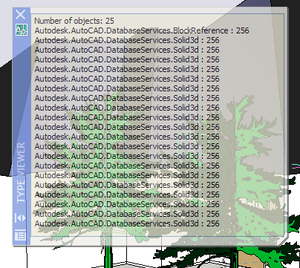
After a brief interlude we're back on the series of posts showing how to implement basic user-interfaces inside AutoCAD using .NET. Here's the series so far: Using a modal .NET dialog to display AutoCAD object properties Using a modeless .NET dialog to display AutoCAD object properties Using a modeless .NET dialog to display properties of multiple AutoCAD objects In this post we're going to swap out the modeless form we've been using in the last few posts in the series and replace it with an instance of AutoCAD's in-built palette class (Autodesk.AutoCAD.Windows.PaletteSet). Firstly, why bother? Well, the PaletteSet class is…
-
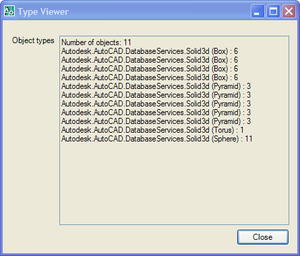
After a few comments on this previous post I decided that, rather than rushing on to show palettes, I'd first extend the existing code to work with multiple entities and provide specific support for solids. Here are the main changes to the way the code works: Changes to the Commands class The form object is now a static member, and so is shared across documents To support this I added a DocumentCreated event to make sure it gets added when new documents are created or opened Initialization/termination happens via IExtensionApplication, not on class construction/destruction In OnMonitorPoint we get the first…
-
In this previous post we looked at creating a simple modal dialog and using it to display object properties. This post looks at the structural changes you need to make to your application for the same dialog to be used modelessly. In a later post we'll look at the benefits you get from leveraging the Palette system for modeless interaction inside AutoCAD. Firstly, let's think about the interaction paradigm needed by a modeless dialog. A few things come to mind: There is no longer a need to hide and show the dialog around selection Rather than asking the user to…