User interface
-
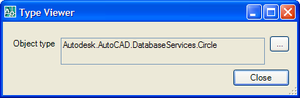
Firstly, a big thanks for all your comments on the first anniversary post. It's good to know that people are finding this blog useful, and I hope the flow of ideas (internal and external) doesn't dry up anytime soon. So keep the comments coming! 🙂 This post is going to start a sequence of posts that look at how to integrate forms into AutoCAD. This post looks at modal forms, and later on we'll look more at modeless forms and - in particular - palettes. Just to be clear, these posts will focus on the basic integration - the more…
-
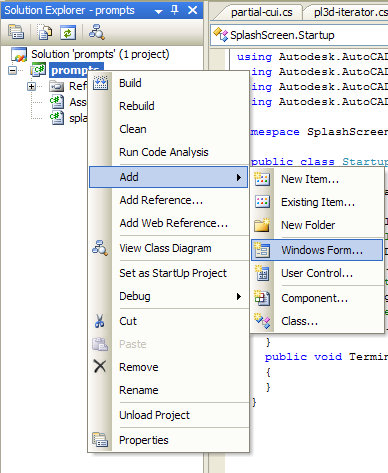
Thanks once again to Viru Aithal for the inspiration behind this post, although I did write most of the code, this time. 🙂 Adding a splash screen can give a touch of class to your application, assuming it's done non-intrusively. This post focuses on how best to do so within AutoCAD, and use the time it's displayed to perform initialization for your application. The first thing you need to do is add a Windows Form to your project: You should select the standard "Windows Form" type, giving an appropriate name (in this case I've used "SplashScreen", imaginatively enough). Once this…
-

It's often desirable to show a progress meter during lengthy operations. Although there's currently no public API to make use of AutoCAD's progress meter from .NET, there are nevertheless a couple of approaches to doing so. In this post I'll show how to do this using P/Invoke (using some code borrowed from Fenton Webb, from DevTech Americas) and in my next post I'll show how to use the "internal" AutoCAD managed assembly. Here's the C# code that uses P/Invoke, which should work for AutoCAD 2007 and 2008: using Autodesk.AutoCAD.Runtime; using System.Runtime.InteropServices; using System.Windows.Forms; namespace ProgressMeterTest { public class Cmds…
-
In the last post we looked at a jig that can be used to add block references to an AutoCAD drawing. This post extends that code to support annotative block definitions (available from AutoCAD 2008) and blocks with attributes. Thanks once again to Holger Steiner for the jig class and to Roland Feletic for posting the code to support annotative blocks. A comment on the previous post asked about having attributes visible during the jig process: unfortunately that's not currently possible, as the existing managed AttributeCollection implementation wraps the version of the AcDbBlockReference::appendAttribute() ObjectARX function that requires the block reference…
-
A big thanks to Holger Seidel from CADsys for proposing this topic and providing the bulk of the code. My main contribution - aside from some minor edits - was to implement the logic in the "BJIG" command to allow selection of the block and then loop to multiply insert it. The jig definition is almost entirely Holger's. The below C# code essentially implements a streamlined "multiple insert" command, without the options to scale or rotate the block (this would be very simple to add, of course). The code was written for AutoCAD 2007-2008. The only change you should need…
-
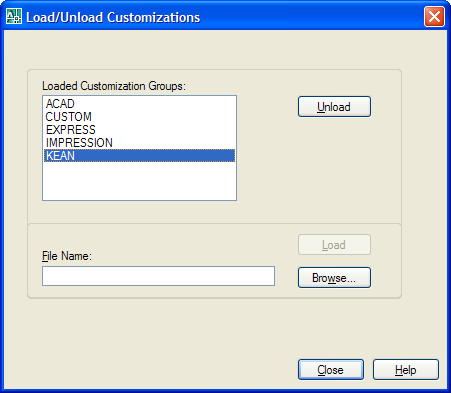
I started to address this topic during this previous post, but it seemed like it was worth coming back to. This time I'm looking at a different technique: to create our own partial CUI file programmatically using the Autodesk.AutoCAD.Customization functionality, save it to disk and then make sure it's loaded at the beginning of every subsequent AutoCAD session. I'm not going to focus on adding menus etc. into AutoCAD's list - that's left for a future post - this is mainly about the logic needed to make sure a CUI is created and loaded. Here's some C# code I put…
-
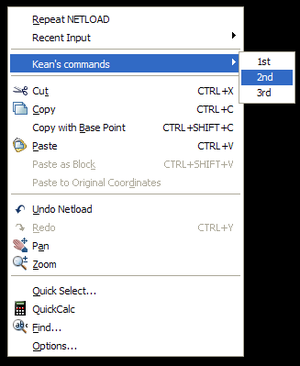
To follow on from the last post, we're now going to take a look at adding custom menu items to the default context menu in AutoCAD. The default menu appears when the user right-clicks on the drawing but has no objects selected. This is a good place to put application commands, for instance. The approach is very similar to the previous one, although I've added some additional commands to control adding and removing the various menus in addition to relying on the module's initialization callback. Some other notes: We're not just adding a single menu item, but are using a…
-
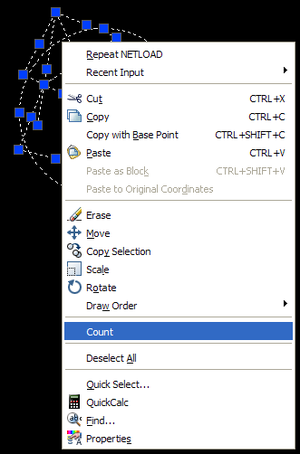
It's been quite a week - between interviews for a DevTech position we're working to fill in Beijing and AU proposals (my team managed to pull together and submit nearly 60 API class proposals at the beginning of the week) life has been extremely hectic. Thankfully we're now in the middle of the "May Day Golden Week" here in China. The Chinese government schedules three Golden Weeks every year - one for Spring Festival, one for Labour Day (also known as May Day) and one for the National Day. They're basically week-long holidays formed by a few standard holidays and…
-
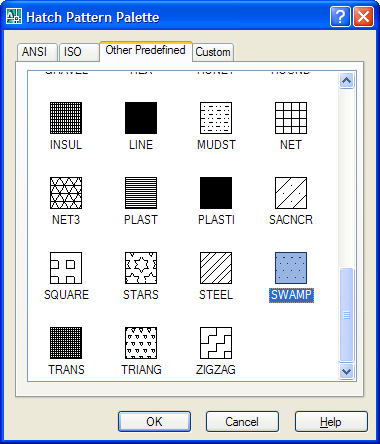
This question was posted by csharpbird: How to get the Hatch dialog using .NET? It seems that there is no such class in the .NET API? It's true there is no public class - or even a published function - to show the hatch dialog inside AutoCAD. It is, however, possible to P/Invoke an unpublished (and therefore unsupported and liable to change without warning) function exported from acad.exe. Here's some C# code that shows how. The code works for AutoCAD 2007, but will be different for AutoCAD 2006: the function takes and outputs strings, so the change to Unicode in…
-
The bulk of this code was donated by Virupaksha Aithal, a member of our DevTech team in India. It's fairly common for developers to want to check for user input from time to time during long operations, especially to see whether the user wants to cancel the current activity. In VB you'd use DoEvents() to enable messages to be processed by the application's message loop and in ObjectARX you'd use acedUsrBrk(). So how to do this in .NET? The answer is to use a message filter. This allows us to check on user-input events... we still call DoEvents, as with…