User interface
-
As mentioned in this previous post, my team delivers regular webcasts on programming with Autodesk technologies. Assuming you're reading this while the metaphorical ink's still damp, it's still not too late to register for a class being held on Thursday October 16th at 8am Pacific, 5pm CET: AutoCAD: .NET for LISP Programmers. Otherwise you should be able to find a recording of the webcast on this page within a few weeks of the session being delivered. In fact, here's the recording of the last time this session was delivered (although it may well have been updated slightly, as the session…
-
Since posting three different options for Zooming to a Window or Entity inside AutoCAD, I've had a few discussions with a developer on how best to implement this cleanly. The requirement is to change the AutoCAD view via a smooth view transition (currently not exposed via any kind of view-modification API, only via the ZOOM command), but also to hide the fact we're sending commands to the command-line to do so. While we were discussing, I remembered an old friend, the NOMUTT system variable, which allows almost all command-line noise to be filtered out - even the "Command:" prompt disappears.…
-
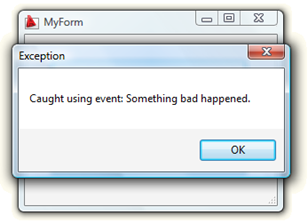
Another juicy tidbit from an internal Q&A session. The question... How can I throw an exception from within a modal form on mine inside AutoCAD, and catch it in the calling command? I have tried try/catch, but nothing seems to work. Here's my command definition: using Autodesk.AutoCAD.ApplicationServices; using Autodesk.AutoCAD.Runtime; using System.Windows.Forms; using MyApplication; using acApp = Autodesk.AutoCAD.ApplicationServices.Application; namespace CatchMeIfYouCan { public class Commands { [CommandMethod("CATCH")] static public void CatchDialogException() { try { MyForm form = new MyForm(); DialogResult res = …
-
My manager is currently sailing back from Honolulu to San Francisco, after his boat came 2nd in its division in the 2008 Pacific Cup (congratulations, Jim! :-), so I'm spending more time on management-related activities than I would normally. Which means I'm getting less time to spend on the fun stuff, such as researching blog posts: I'm plundering what I can from my email archives, but my output may feel a little thin over the next week or two. Here's some information from an internal discussion that I thought might be of general interest. The question: Why is it important…
-
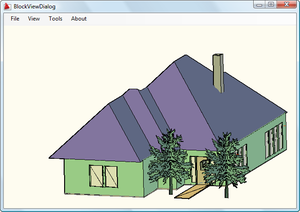
Fenton Webb, from DevTech Americas, has been beavering away on a .NET port of the ObjectARX BlockView sample (found on the ObjectARX SDK under samples/graphics/BlockView). Thanks, Fents! 🙂 Here is the C# source project for Visual Studio 2005. To build it you will almost certainly need to remap the acdbmgd.dll and acmgd.dll assembly references in the project. One important note: if you load this project and try to view the BlockViewDialog in the Visual Studio Designer, the Visual Studio application will almost certainly crash. This is because the Designer is attempting to load into the dialog the GsPreviewCtrl component which…
-
Back when I joined Autodesk in 1995, I worked in European Developer Support with one of the most talented programmers I've met, Markus Kraus. One of Markus' contributions to the R13 ARX SDK (or maybe it was R14?) was a sample called pretranslate, which remained on the SDK up until ObjectARX 2008, under samples/editor/mfcsamps/pretranslate (it was removed from the 2009 SDK when we archived a number of aging samples). Anyway, with AutoCAD 2009 the API that makes this sample possible has been added to the .NET API, so in homage to Markus' original sample (which I have fond memories of…
-
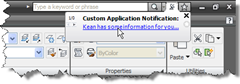
In this previous post I showed some code to display balloon notifications via InfoCenter in AutoCAD 2009 (and, it seems, in AutoCAD 2008, albeit with a different look & feel). In a comment on that post, I promised to take a look at another way to show user notification balloons in AutoCAD, by displaying balloons (or maybe it's "blowing bubbles"? 🙂 on the application status bar. It's really up to you to decide which style of balloon is more appropriate for your application notifications... I personally find the InfoCenter balloons less intrusive (and more modern-looking), but the choice is yours.…
-
On the theme of the Ribbon, whose API in AutoCAD we introduced in this previous post... The other day I came across this interesting post, which talks about the design history culminating in the Office 2007 ribbon. The post focuses on product design rather than programming, but it's very interesting to see the story behind this significant user-interface innovation, especially as Autodesk has adopted the ribbon paradigm in AutoCAD 2009.
-
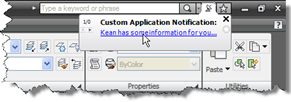
This post is the latest in the series of closer looks at the new APIs in AutoCAD 2009. It dips into the InfoCenter API, a .NET API allowing you to customize and drive the InfoCenter feature inside AutoCAD. To make use of this API you need to add Project References to two managed assemblies from the AutoCAD 2009 root folder: AcInfoCenterConn.dll and AdInfoCenter.dll. Here's some C# code that will display a balloon notification to your users: using Autodesk.AutoCAD.ApplicationServices; using Autodesk.AutoCAD.Runtime; using Autodesk.AutoCAD.AcInfoCenterConn; namespace InfoCenterApp { public class Commands { [CommandMethod("icb")] public void infoCenterBalloon() …
-
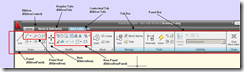
Thank you to Sreekar Devatha, from DevTech India, for writing this article for the recently published ADN Platform Technologies Customization Newsletter. This article talks about the new Ribbon API referenced in this overview of the new APIs in AutoCAD 2009. A complete sample demonstrating the use of this API is provided as part of the ObjectARX 2009 SDK, under samples/dotNet/Ribbon. Introduction Most of the AutoCAD® UI was redesigned in this release. Ribbon, Menu browser and Tooltips are some of the prominent UI features to list. As you might already know the UI enhancements are based on the new Windows® Presentation…