User interface
-
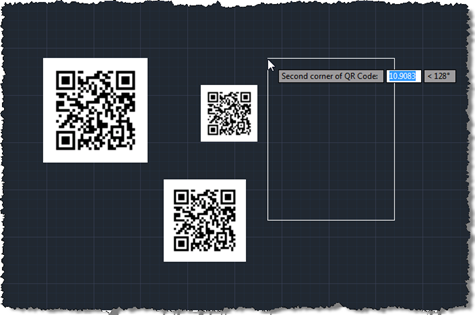
As promised, the code in this post extends that from the last post to add some user selection to the process of defining and placing a QR Code in an AutoCAD drawing. This version of the code also makes sure the raster is positioned in an "upright" orientation, irrespective of the order in which the corners are selected. Many images need to be positioned in such a way (although QR Codes are presumably more tolerant due to the positioning squares in three of the corners), so I expect this technique will be of interest to various people who need to…
-
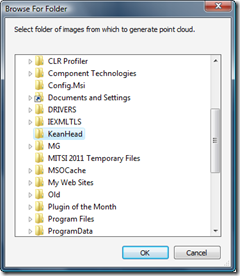
After I'd had such fun working out how to bring point clouds from Microsoft's Photosynth into AutoCAD, I was delighted when the Autodesk Labs team came to me with the suggestion of a comparable – although ultimately more useful – integration with the then-soon-to-be-released Project Photofly. The concept was simple: provide AutoCAD users with a command allowing them to select a folder of images to upload to – and be processed by – Photofly. The resulting photo scene – once available – would then be used to generate a point cloud back inside the AutoCAD session. So basically a one-click…
-
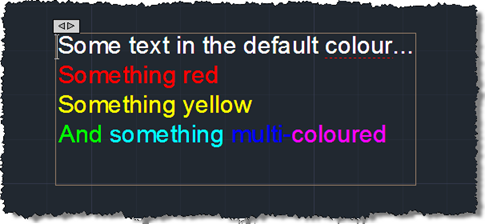
First we saw some simple code to create a pretty multi-line text object, then we saw some code to place it using a "drag jig", now we're going to launch AutoCAD's In-Place Editor (IPE) for MText once the object has been placed. To do this we're going to make use of the InplaceTextEditor object added to the Autodesk.AutoCAD.ApplicationServices namespace in AutoCAD 2011. There's very little work needed to do this – I had concerns about whether it could work safely with a newly-created, transaction-resident object, but it seems to work very well, as far as I can tell. Here's the…
-
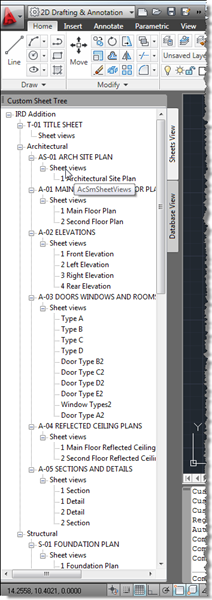
I didn't realise when I created the last post (with code borrowed from Fenton) that this would become a multi-part series – otherwise I'd clearly have called the earlier post "Part 1". 🙂 A comment from Harold Comerro requested information on getting more from the DST than was previously shown. Today's post extends the previous code to create two different slices of the data: a "Sheets View" and a "Database View", both hosted in the same palette set. Here's the updated C# code: using Autodesk.AutoCAD.ApplicationServices; using Autodesk.AutoCAD.EditorInput; using Autodesk.AutoCAD.Runtime; using Autodesk.AutoCAD.Windows; using acApp = Autodesk.AutoCAD.ApplicationServices; using ACSMCOMPONENTS18Lib; using System.Windows.Forms;…
-
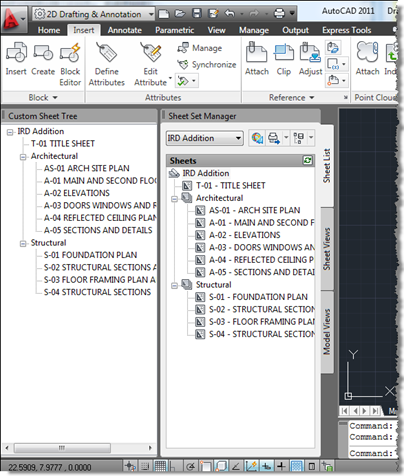
A big thank you to Fenton Webb, from DevTech Americas, for providing the code which was the basis for this post. Thanks, Fents! 🙂 Fenton sent a version of this code recently to an ADN member who was interested in duplicating the information shown in AutoCAD's Sheet Set Manager inside a custom, palette-hosted tree-view dialog. Fenton's version made use of WPF: I've dumbed it down a little to use WinForms, but may do a follow-up post using WPF (although the WPF TreeView doesn't appear to support data-binding, so I may well decide not to bother). I have made some other…
-
In the previous posts in this series we introduced a command that downloaded and imported point clouds from Photosynth.net, we introduced a WinForms user interface on top of it and then replaced that UI with one implemented using WPF. As threatened last time, we're now going to make some efficiency improvements in the original command implementation. In our previous implementation we were blindly asking for files, one after the other, and using failure to indicate when we'd reached the end. Which was fine, but it limited us in a few ways: we could not reliably parallelize this otherwise highly parallelizable…
-
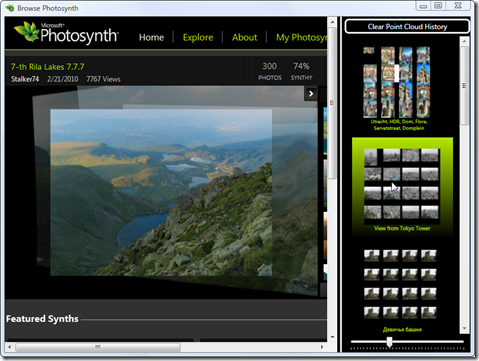
As alluded to in the last post in this series (ignoring a related post that dealt with user interface integration) I wasn't really happy with some of the tricks I needed in the WinForms version to try and make a coherent user interface for tracking accessed point clouds in a hosted Photosynth browsing session. This post replaces the WinForms UI with one implemented using WPF, and in fact might also have been titled "Using data-binding in WPF to track a list of objects with associated thumbnails" or something to that effect. 🙂 What I've done in the new version of…
-
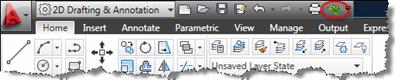
I received this question from Vikas Hajela a few days ago: I am developing a plugin in C#, which will add a link in Quick Access Toolbar in AutoCAD. […] My problem is that I don't know how to add a link into existing Quick Access Toolbar and Menu Bar in AutoCAD using ObjectARX SDK and C#. Also I want that on click of that link it should open a new window. We're going to look at some code that – on initialization of the application – adds an item to AutoCAD's "Big A" Application Menu and to the Quick…
-
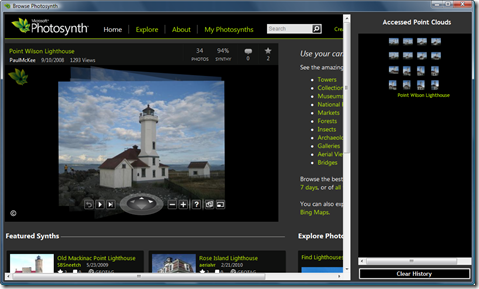
In the last post we looked at a command to allow importing of Photosynth point clouds into AutoCAD. In this post we'll put a GUI on the front end, to avoid people having to sniff network traffic to determine the location of the appropriate files on the Photosynth servers. The application is actually relative simple: it hosts a browser control that gets pointed at the Photosynth web-site, allowing the user to browse through Photosynths. As point clouds are detected (as the browser has some handy events notifying of the HTTP traffic generated by the embedded Photosynth application, and we know…
-
I feel like I'm posting a lot about our Plugin of the Month initiative, at the moment, but then I suppose it's to some degree a function of what I'm spending time on. It's definitely eating into the time I would normally focus on blogging… after a number of AU-related posts coming out over the next few weeks (as I finish my AU prep next week and then blog from the event the week after) I'd hope to return to somewhat more typical posts in December (although as I'm going on to Japan, Korea and China from Las Vegas, this…