AutoCAD
-
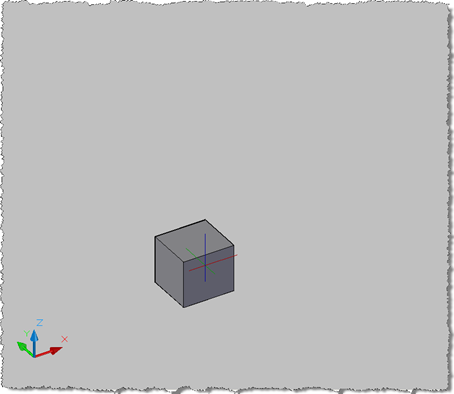
After getting my feet wet in the last post with my first IronPython application running inside AutoCAD, I decided it was time to attack a slightly more challenging problem: jigging a database-resident Solid3d object. The idea had come after I'd received a question by email from David Wolfe, who wanted to have a fully rendered 3D view of a cylinder he was jigging. I'd done something similar for a prototype application I worked on late last year (which was demoed at AU). The jig itself only collected the selection data I needed – the display of the Solid3d objects was…
-

I've been meaning to play around with the Python language for some time, now, and with the recent release of IronPython 2 it seems a good time to start. Why Python? A number of people in my team – including Jeremy Tammik and the people within our Media & Entertainment workgroup who support Python's use with Maya and MotionBuilder – are fierce proponents of the language. I'm told that it's an extremely easy, general-purpose, dynamic programming language. All of which sounds interesting, of course, although I have to admit I'm less convinced of the importance of the dynamic piece: I've…
-
Thanks, once again, to Philippe Leefsma, a DevTech engineer based in Prague, for contributing the code for this post. While researching an issue he was working on Philippe stumbled across a comment on this previous post where I more-or-less said jigging attributes wasn't possible. Ahem. Anyway, Philippe decided to – quite rightly – prove me wrong, and the result is today's post. 🙂 It turns out that the trick to jigging a block with attributes is to add the block reference to the database prior to running the jig. I'd been coming at this from another direction – working out…
-
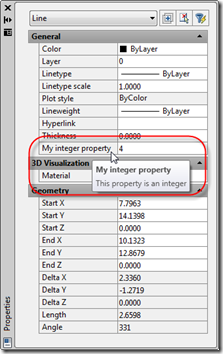
In the last post we looked at the code behind an ObjectARX module exposing AutoCAD's Properties Palette for use from managed .NET languages. Thanks again to Cyrille Fauvel for providing this implementation. In this post we're going to move right onto using this implementation from C#. First things first: if you didn't understand much of what was said in the previous post in this series, Don't Panic! (Yes, that's a quick reference to The Hitchhiker's Guide to the Galaxy.) The actual implementation details aren't particularly important - you only really need to understand them if you want to expose additional…
-
A huge thanks to Cyrille Fauvel, who manages DevTech's Media & Entertainment team but still finds the time to dip into the odd deeply-technical, AutoCAD-related issue. Cyrille provided the original article on this topic late last year, but it's taken me time to get around to editing and publishing it. A quick tip... if you're not interested in the technical details of how Cyrille has exposed the various Properties Palette interfaces to .NET, you can safely skip this post and join us again when we go ahead and make use of the implementation to add dynamic properties to core AutoCAD…
-
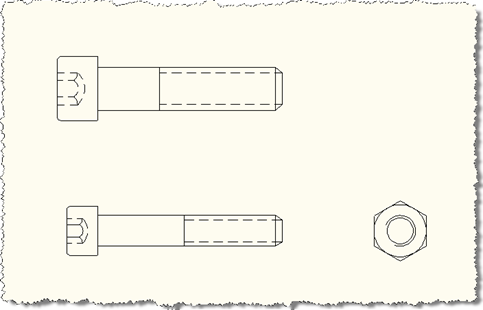
In the last post we looked at some code that essentially dumped out the dynamic properties of dynamic blocks to the command-line. In this post we take it a step further and capture the properties from one dynamic block reference and attempt to apply them to another. We're going to apply slightly different logic, depending on the situation... If the block references refer to the same dynamic block definition (i.e. their DynamicBlockTableRecord property contains the same ObjectId) then we'll assume they have the same dynamic properties in the same order. So we'll go through and attempt to copy the property…
-
This is one of those funny scenarios... I was just thinking about what to do for my next post - whether to dive into some new features of AutoCAD 2010 (which I will do soon, I promise! 🙂 or whether to choose something from my ever-increasing to-do list, when I received two emails. One was from our old friend Fernando Malard, suggesting a topic for a blog post, and the other was from Philippe Leefsma, a member of our DevTech team in Europe, in response to an ADN members question. It provided some code that could eventually form the basis…
-
Thanks again to Fenton Webb for providing the code behind the first post in the series and to Jeremy Tammik for providing the suggestion of this alternative implementation. This post follows on from this previous post, which introduced a technique to smoothly transition between 3D views in AutoCAD. It applies a more standard algorithm - known as spherical linear interpolation (or Slerp to its friends 🙂 - to interpolate between views, rather than interpolating individual values using Fenton's custom-built CosInterp() function. We still use CosInterp() to interpolate the width and height of the field of view, but otherwise the below…
-
This inspiration for this post came during the research for this previous post, where we looked at implementing LookAt inside AutoCAD. It also has roots in the need to perform smooth transitions when zooming inside AutoCAD, which the ZOOM command manages for transitions between 2D views. Fenton Webb, from our DevTech Americas team, kindly volunteered to put together an ObjectARX sample that formed the basis for the code in this post. A huge thanks to Fents for his hard work on this! This code presents a technique that allows smooth transitioning between 3D views in AutoCAD: you set up the…
-
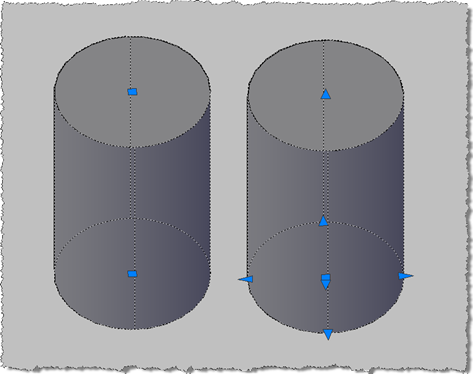
This question came up recently on the AutoCAD .NET Discussion Group: how to create a Solid3d object which provides the user with the full set of grips to manipulate it (which I've abbreviated to "editable" in the title of this post :-). This comes down to a enhancements that were made in AutoCAD 2007 to allow better manipulation of solids via the user-interface via extended grips and a push-pull mechanism. These capabilities need to be enabled solids as you create them - and unfortunately cannot be retro-fitted to existing solid objects - by telling the solid that you would like…