AutoCAD
-
This comment came in from a developer on a previous post: We still do all our stuff w/C++/STL/COM/MFC; lots of custom entities and object behavior - for Civil 3D/Land Desktop/Map -- hence, I'm not Dot Netted. The predominate explanation I've heard to move from C++ to .Net is that UI is maybe easier to write...but we've had all that nicely standardized for years (although I could still strangle someone at MS at least once a week/month.) We tend to minimize external API use, whether ObjectArx/Win32/MFC, and try to have portable code. Granted, it's mostly Win32 dependent and perhaps lacks the…
-
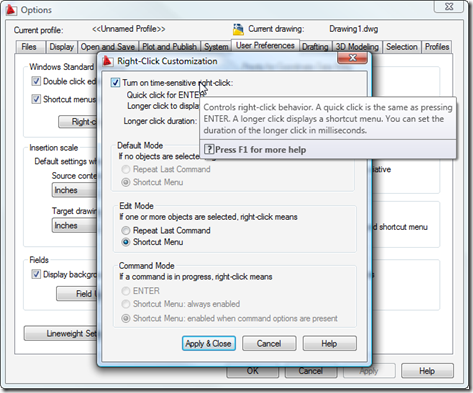
Some of you may have stumbled across these previous posts, which show how to add custom context menu items for specific object types and to the default AutoCAD context menu. There is a third way to create and display context menus inside AutoCAD, and this approach may prove useful to those of you who wish to display context menus during particular custom commands. One word of caution: I've been told that this technique does not currently work for transparent commands, so if your command needs to be called transparently then this may not be the approach for you (you should…
-
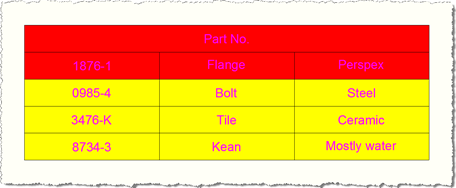
The question of how to define a new table style programmatically has come up a couple of times over the last week or so, so this post shows how to approach this. I've used the code from this previous post as a basis for this post's. The important thing to know is that TableStyle objects are stored in a special dictionary, which can be accessed via a Database's TableStyleDictionaryId property. This ObjectId property allows you to access the dictionary, from which you can query the contents, determine whether your style exists and add a new one if it doesn't. The…
-
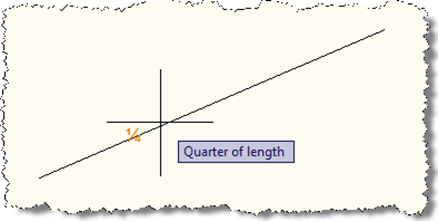
Thanks again to Augusto Gonçalves, from our DevTech Americas team, for providing the original VB.NET code for this sample, as well as helping investigate an issue I faced during implementation. When I saw a recent reply to a developer, showing how to implement a custom object snap in AutoCAD using .NET, I had a really strong sense of nostalgia: it reminded me of a couple of early samples I contributed to the ObjectARX SDK: the "third" sample, which showed how to create a custom osnap that snapped to a third of the way along a curve, and "divisor" which generalised…
-
This post continues on from Part 1 of this series. You'll find much of this content has been used before in these previous posts, although post does include content updated for F# 1.9.6.2 (the September 2008 CTP). The first thing we need to do is – as with any AutoCAD .NET project – add project references to AutoCAD's managed assemblies, acmgd.dll and acdbmgd.dll. With F#'s integration into Visual Studio 2008 you do this in exactly the same way as you would for a C# or VB.NET project, by selecting Project -> Add Reference... from the pull-down menu or right-clicking the…
-
AU Unplugged is the unconference component of Autodesk University. The sessions have been submitted and the voting is now on: based on external feedback the event organizers will schedule the most interesting classes at this year's event. Last year I held a poorly publicized (and therefore poorly attended 🙂 session on comparative AutoCAD development tools/technologies, but I've decided not to repeat that this year, and hang on the coat-tails of one of my team... Stephen Preston, the manager of DevTech Americas and our worldwide platform products technical lead, is planning the following session: AutoCAD .NET: Help Us to Help You…
-
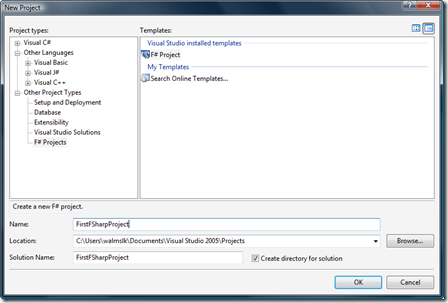
As mentioned in my previous post, I've been beavering away on the handout for a new class I'm delivering at this year's Autodesk University. Here is the first part of this handout. Introduction F# is a new programming language from Microsoft, due to become a first-class .NET citizen (joining its siblings C# and VB.NET) and fully integrated with Visual Studio 2010. In this class we'll introduce many of the concepts behind the F# language, and look at examples where we use it to create applications inside AutoCAD. At the time of writing, F# is available as a Community Technology Preview…
-
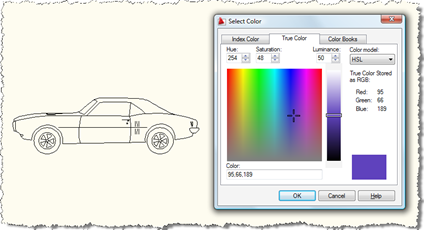
Here's a question that came in to us, recently: How can I show the AutoCAD color dialog from .NET? I need to allow the user to select a block, show the AutoCAD color dialog and apply the selected color to the contents of the selected block. A new member of DevTech Americas - Augusto Gonçalves, who's based in our São Paulo office - answered with the following code (which I've modified slightly, mostly to follow this blog's coding conventions). Thanks, Augusto! By the way, these previous posts may also be useful to those interested in this topic. Here's the C#…
-
As mentioned in this previous post, my team delivers regular webcasts on programming with Autodesk technologies. Assuming you're reading this while the metaphorical ink's still damp, it's still not too late to register for a class being held on Thursday October 16th at 8am Pacific, 5pm CET: AutoCAD: .NET for LISP Programmers. Otherwise you should be able to find a recording of the webcast on this page within a few weeks of the session being delivered. In fact, here's the recording of the last time this session was delivered (although it may well have been updated slightly, as the session…
-
This is the fourth and final part of the series documenting my recent interview with John Walker. Where the first three parts looked at the early history of the company, the architectural evolution of AutoCAD and its APIs and Autodesk's strategy and eco-system, this part takes a look at past and future business opportunities for the company. I have not linked to terms previously linked to in the first part of the series, which should also be referred to for typographical conventions, if they're not clear. Part 1 - Autodesk's early history Part 2 - AutoCAD's architecture & APIs Part…
