AutoCAD
-
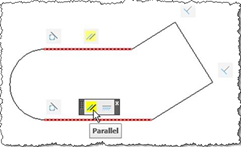
This is the second post in the series looking at the new APIs in AutoCAD 2010, and following on from this post. I've copied the information in this post from the recently-published Platform Technologies Customization Newsletter, a quarterly newsletter available to ADN members. A big thank you to Stephen Preston, Fenton Webb and Gopinath Taget for putting the material together. Parametric Drawing API If you know Inventor® software products, then this feature will seem strangely familiar :-). Using the same solver engine as Inventor, and closely following the Inventor parametric design user interface, the AutoCAD 2010 Parametric Drawing feature is…
-
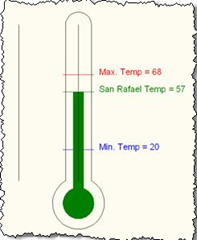
This is the first post in a series looking at the new APIs in AutoCAD 2010, and follows on from this post looking at the migration steps required. I've copied the information in this post from the recently-published Platform Technologies Customization Newsletter, a quarterly newsletter available to ADN members. A big thank you to Stephen Preston, Fenton Webb and Gopinath Taget for putting the material together. AutoCAD 2010 New API Overview AutoCAD 2010 has some really cool APIs. Please download the ObjectARX 2010 Beta SDK and review the Migration Guide for a complete list of changes and additions. [This is…
-
This post looks at the basic steps required to prepare your application to work with AutoCAD 2010. I've copied the information from the recently-published Platform Technologies Customization Newsletter, a quarterly newsletter available to ADN members. A big thank you to Stephen Preston, Fenton Webb and Gopinath Taget for putting the material together. AutoCAD 2010 software release marks the end of a binary compatibility cycle. Remember the migration from AutoCAD 2004/5/6 to AutoCAD 2007? Don't worry – this time is a lot easier. And now you have another three years of compatibility to look forward to. The major migration issues are:…
-

My sister sent this one through to me, and I think it's just great: a font with holes in, allowing you to save up to 20% on ink and therefore reduce your impact on the environment. Here's what the font looks like inside AutoCAD, to give you an idea: I don't think the eco-innovators have very much to teach the CAD world, however: we've been using dashed linetypes for years! 🙂 I'd be very interested to hear how the readers of this blog have made changes to their (or their customers') work processes in the interests of either economy or…
-

As promised in the last post, we're now going to look at how to change the code to make the colour averaging routine work in parallel. The overall performance is marginally better on my dual-core machine, but I fully expect it to get quicker and quicker as the number of cores multiply. To start with, though, here's the modified "synchronous" version of the code - as I went through making the code work in parallel, I noticed a bunch of general enhancements that were applicable to both versions. Here's the updated F# code: // Use lightweight F# syntax #light…
-
A friend and esteemed colleague asked - very validly - why I decided to use circles on a grid to display the results of a mathematical function in this last post, rather than using a linear object of some kind. Well I did, in fact, have a plan in mind... 🙂 This post extends the concept, introduced in that post, of displaying data in a grid of solid-hatched circles. This post focuses on importing a bitmap image from a file, pixelizing the contents and using the "averaged" pixel colours to modify our grid. The idea actually came to me during…
-
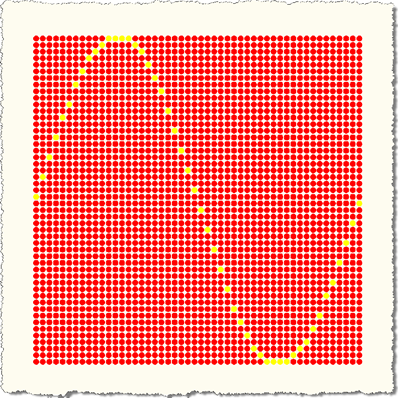
Well, I couldn't resist... as I mentioned in the last post - where we looked at creating a simple graph inside AutoCAD as an example of modifying objects inside nested transactions - the idea of graphing inside AutoCAD is a good fit for F#. This is for a number of reasons: F# is very mathematical in nature and excels at processing lists of data. I also spiced it up a bit by adding some code to parallelise some of the mathematical operations, but that didn't turn out to be especially compelling with my dual-core laptop. More on that later. Here's…
-
I received this question by email last week: Is it ever required to use more than one transaction per program? The simple answer is that you mostly only need one transaction active per command: you shouldn't leave a transaction active outside of a command, as this is likely to cause problems at some point, and within your own command one transaction is typically enough to do what you want. That said, the transaction mechanism inside AutoCAD has some pretty cool nesting capabilities that make it very flexible and a great way to manage sets of database operation and to roll…
-
This post follows on from this previous one, where we looked at a technique for picking a face on an AutoCAD solid. Tony Tanzillo kindly pointed out this much cleaner solution for this problem, and also highlighted a really simple (and elegant) way to implement LookAt using standard AutoCAD commands. While I really like both pointers provided by Tony, I've decided to persevere with my existing - admittedly sub-optimal - approach, as much as to show ways to exercise some APIs that people may not have used themselves. Please be warned, this isn't the simplest way to address this problem,…
-
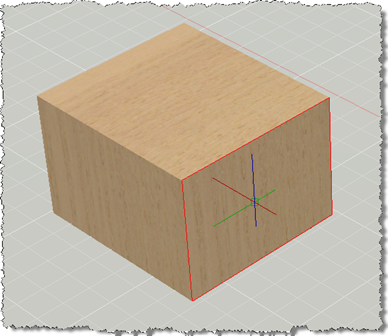
This post has come out of an interesting discussion I had with Jim Cameron at the ADN party at AU 2008. He mentioned an idea, which he kindly later reminded me of by email, which was to develop an AutoCAD equivalent for Inventor's LookAt functionality. I didn't know about LookAt before this discussion, but it seems it allows you to look at a particular face: you pick a face and it rotates the view and zooms in to centre it on the screen. Rather than try to attack the whole problem at once, this post tackles selecting a face (which…