JavaScript
-
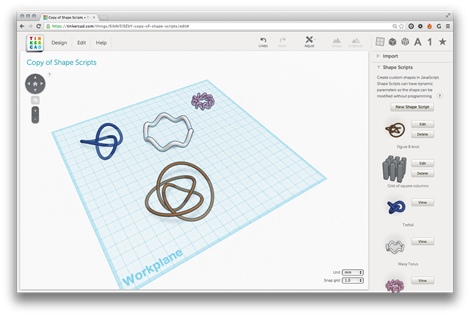
Following on from my initial playing around with Tinkercad and its Shape Script implementation, I started to look more closely into what's possible with the Gen6 kernel. I came across this recent blog post, which highlights the ability to make Shape Script implementation details public. The Shape Scripts shown in the post looked nice and complex, so I tracked down the model by selecting "Discover" inside Tinkercad and searching for "Brandon Cole", the originator of these very interesting Shape Scripts. He published this design about 3 weeks ago, which I went ahead and copied (yes, shamelessly, but at least I'm…
-
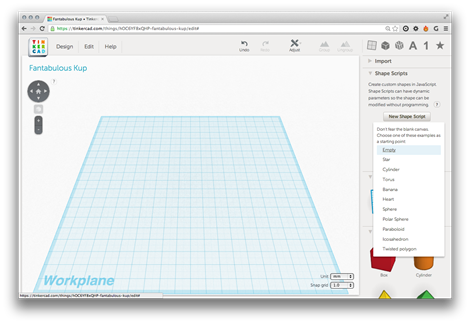
A little over a month ago, Autodesk acquired Tinkercad. Tinkercad is a 3D CAD tool that uses WebGL to display graphics directly in your browser. While this tool is primarily targeted at consumers – it's proving very popular among the 3D printing community – I thought I'd check it out to understand its customization capabilities. If you want to get to know the capabilities of the Tinkercad system, I suggest taking a look at these step-by-step lessons. I personally just dove right in – the system is very straightforward to learn – but I'm sure there are basics that I've…
-

I'm a few days late to the party (largely because I got a little distracted), but felt it was still worth posting on this topic: we've just launched AutoCAD 360, the successor to AutoCAD WS. It's more than a straight re-branding, though: while the mobile apps for iOS and Android are updates to the existing WS-branded technology, there's a brand new web app that's currently in Beta. We've also taken the opportunity to roll out a true freemium offering, whereby the basic, free capabilities are complemented by "Pro" and "Pro Plus" mobile plans. Here's a comparison of the offerings, in…
-
Here's something else that may be of interest to people. As I was working towards the solution shown in the last post – before Albert told me about the ucsToWorld() function (thanks, Albert 🙂 – I ended up extending the .NET code we saw in the previous post to include a TransformToWcs() method (marshaled by a transToWcs() function on the JavaScript side of things). What's interesting about this function – and has caused me to show it here, despite its existence being rendered redundant by ucsToWorld() – is that it returns a value to the caller by serializing point data…
-
I've learned a few things since the last post, where we complemented AutoCAD's new JavaScript API with some additional .NET functionality to work around an issue that existed in the code we'd developed in the previous two posts. Firstly, I found out there's a better way for your jig to display transient graphics than via "manual" calls to addTransient(), updateTransient() and eraseTransient(). Acad.Jig exposes an update() function you can call, passing in the xml fragment representing your geometry. The jig will manage the display of the transient and clear it at the end. (Thanks to Sherry Tan for pointing me…
-
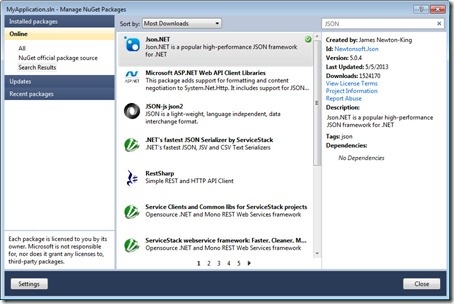
After having some fun writing our first jig inside AutoCAD, last week, and calling it either from an HTML page or an AutoCAD command defined in a .js file, in today's post we're going to see how we can use AutoCAD's .NET API to extend its new JavaScript layer. We're going to take a concrete problem we had in last week's implementation: it turns out that when you draw a transient circle beneath the cursor using JavaScript – as we do during our jig – it absorbs mouse clicks. This is something we've logged as an issue, but it seems…
-
Just to complement yesterday's post showing how to define a simple jig using JavaScript, here's the same code from a separate .js file: var doc = Acad.Application.activedocument; var center = new Acad.Point3d(0, 0, 0); var radius = 0; var trId; function pointToString(pt) { var ret = pt.x.toString() + "," + pt.y.toString() + "," + pt.z.toString(); return ret; } function createCircle(cen, rad, first) { // Build an XML string containing data to create // an AcGiTransient that represents the circle var cursor = ''; var drawable =…
-
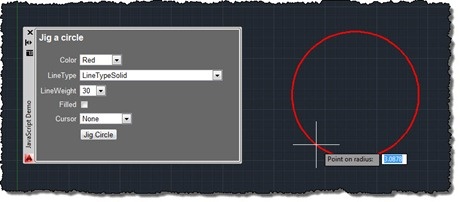
After talking about the architecture of our JavaScript API in this recent post – and mentioning the approach we expect developers to take when creating geometry in one of the comments – I thought it would be worth spending the time to write my first JavaScript jig in AutoCAD. For those of you who haven't come across jigs in either ObjectARX or AutoCAD .NET, jigs are the primary way applications request users to dynamically specify geometric parameters while providing them with graphical feedback. As users select points or specify distances, the object or objects they're creating are updated in real-time…
-

Being here in San Rafael, it seemed like a good opportunity to put pen to paper on the internals of the JavaScript API introduced in AutoCAD 2014. It's a topic I've been meaning to get to for some time, and sitting in the cube next to Albert Szilvasy helps me get information straight from the horse's mouth, as it were (no offence, Albert ;-). For those of you who don't know Albert, he's someone who has had an incredible impact on the AutoCAD product, over the years, particularly from a platform perspective. Albert was the person to architect and introduce…
-
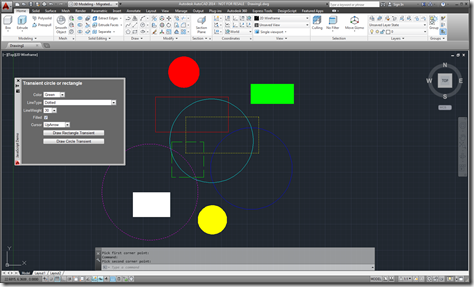
After introducing the new JavaScript API as one of the new features in AutoCAD 2014, in the last post we looked at a simple command defined using JavaScript. In this post, we're going to implement a simple, palette-based UI inside AutoCAD using HTML5 and JavaScript. Let's start by looking at the HTML code (with the JavaScript embedded, for simplicity): <html> <head> <title>Draw a transient circle or rectangle</title> <script type="text/javascript" src="http://www.autocadws.com/jsapi/v1/Autodesk.AutoCAD.js"> </script> <script type="text/javascript"> // Some global variables …