JavaScript
-

Now that registration is open for Autodesk University 2014, people are busy signing up for classes. For those of you who are curious about the classes I'm delivering/hosting/attending at this year's event, here they are. I'll break things down day-by-day, in case you're interested in finding an opportunity to meet up but can't attend one of my sessions. Monday (Dec 1st) I'll be attending the ADN DevDay, all day. Always lots of great information to absorb there, of course (jetlag permitting ;-). Tuesday (Dec 2nd) I'll be hanging out at the ADN DevHack for most of the afternoon, although I…
-
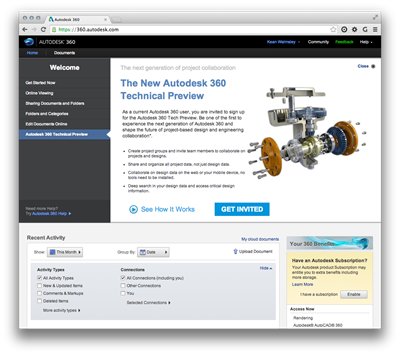
In the last post we saw the process for getting content uploaded to Autodesk storage and translated into the format required by the Autodesk 360 viewer. In this post we're going to show the steps to take that data and embed it in a "simple" HTML page. (Any complex capability in this page it's due to the UI code that Dan Wellman kindly allowed me to borrow for the sample: otherwise what it does is very simple indeed.) There are, of course, more complex samples that the ADN team has developed to demonstrate the richness of the new View &…
-

Sometimes you just need to ease back into work after a few weeks off. So today I decided to have a go at integrating DogeSharp – a programming language on top of of .NET inspired by Dogescript – into AutoCAD. There was absolutely no reason to do so, other than to cause myself some amusement. Which is actually a pretty good reason, now that I think about it. For those of you who – like me – are almost completely unaware of Internet memes such as Doge, this was apparently a big one in 2013 and all started with this…
-
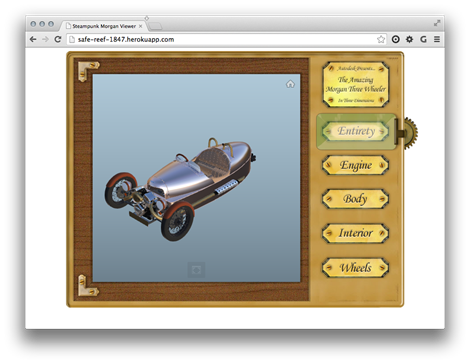
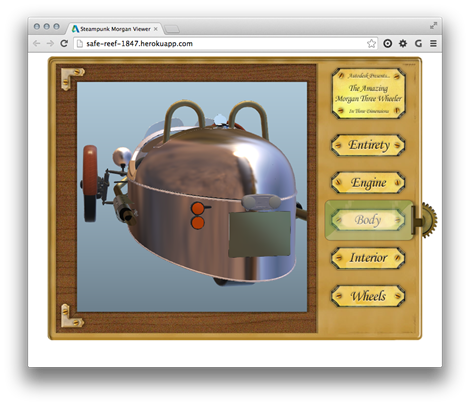
As mentioned last week, I've been having fun with Fusion 360 to prepare a model to be displayed in the new Autodesk 360 viewer. The sample is now ready to view, although I'm not yet quite ready to post the code directly here, mainly because the API isn't yet publicly usable. Here's the app for you to take for a spin, as it were. The Autodesk 360 Viewing & Data API is currently being piloted by a few key partners, and hopefully we'll soon be broadening the scope to allow others to get involved (we first have to iron out…
-

We've been getting some interesting responses back from the AutoCAD Security Survey that has been posted over on the AutoCAD Futures beta forum. (If you haven't already responded, we'd appreciate you taking the time to do so: it'll probably take you less time than reading the rest of this blog post. Then please come back and finish reading this, too. 😉 The survey is intended to gauge whether the safeguards we first introduced in AutoCAD 2013 SP1 (and then further enhanced with the SECURELOAD mechanism in AutoCAD 2014) are properly understood and considered valuable. From some of the feedback we've…
-
After introducing the series and looking at sample applications for 2D graphics using Paper.js and 2.5D graphics using Isomer, it's now really time to go 3D. We're going to use much of the same code we saw in the last post – with some simplification as we no longer need to sort the solids by distance – but this time we're going to feed data into an HTML client app that's fundamentally similar in nature to the one seen in this series of posts using Three.js. I'm happy to have some experience using Three.js, because it happens to be a…
-
After introducing the series and looking at a sample 2D JavaScript application, it's time to go 3D. Well, 2.5D, anyway. We're going to implement a simple sample using the Isomer library that extracts bounding box information about 3D solids – which could be extended to get more detailed topological information, albeit with quite some work – and displays them in an isometric view in the HTML canvas. This time we're only going to have a single button in our UI allowing model updates to be refreshed in our isometric view. I decided to leave this as a manual operation, but…
-
Having introduced this series, it's time to look at some code. This first sample shows how to create and host a web-page that uses an external graphics library – in our case Paper.js – within an AutoCAD application. The main "trick" to this is going to be getting the data from the HTML page into AutoCAD, which we'll do by extending AutoCAD's shaping layer. Bear in mind that this code will work with AutoCAD 2015, but I can't guarantee it will do so with 2014 (the JavaScript API was very much a "preview" in that release). Something I should say,…
-

During the last week or so I've put together a number of new sample integrations of JavaScript-based technologies with AutoCAD, mainly to form the basis of my proposed AU2014 class but also (obviously) to share here. This first post introduces the series, giving an overview of some benefits – as I see them – of adopting this development environment. As I'm sure I've mentioned before, over the years I've had a love/hate relationship with HTML and JavaScript: I'm comfortable working with them but have lived through plenty of frustrating moments. These days, though, I'm finding it to be very different…
-
After a minor technical glitch, I've now been able to submit two class proposals for Autodesk University 2014. Both are currently planned as 90-minute lectures. The first is about AutoCAD's JavaScript API: Connect AutoCAD to the web with HTML5 and JavaScript AutoCAD 2015's JavaScript API enables a whole new generation of web-enabled applications. This session focuses on how you can use this API to connect web-based applications with AutoCAD. We'll look at how HTML5 can be used to implement user interface components inside AutoCAD – modal & modeless dialogs, palettes and new document windows – including calling into core AutoCAD…