Plugin of the Month
-
I mentioned in the last post that I was looking to optimise my approach for automatic cropping of an image. It turns out that using Bitmap.LockBits() and the corresponding UnlockBits() does indeed help, although I haven't run any actual benchmarks to measure the difference in the two approaches. The disadvantage of this approach is that you're a bit more down "in the weeds" when it comes to accessing the raw data – you have to support different raw image formats, for instance (and it may well be that I've missed some important ones – it's only really by chance that…
-
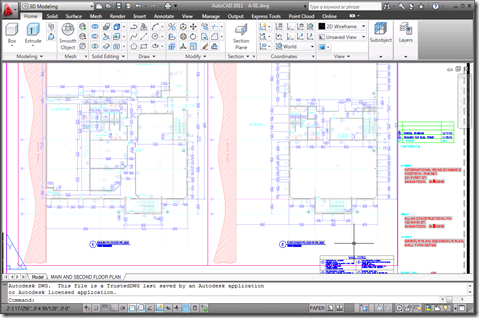
I received a few comments by email and otherwise regarding the preview capability added to the Clipboard Manager Plugin of the Month in the last post. Basically it's useful, but only to a point: the bitmap created on the clipboard is the same size as AutoCAD's screen, with the copied objects in their location relative to the screen. This means that if you're working on a drawing like this: And you want to copy the leader to the left of the cursor to the clipboard, the preview you'll end up with will be something like this: Which – when scaled…
-
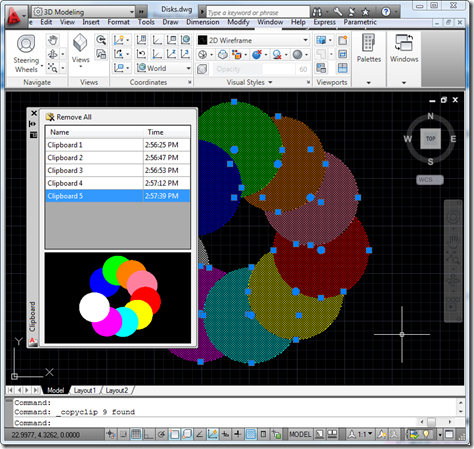
As mentioned yesterday, I went ahead and integrated previewing into the Clipboard Manager Plugin of the Month. I won't include the code directly in the post – it's fundamentally similar in nature to that posted yesterday and is, in any case, included in the project. There were a few additional tricks needed, such as modifying the SplitterDistance property of a SplitContainer to make sure the aspect ratio of the image gets maintained, but nothing particularly earth-shattering. Here's the updated project – I'll be looking into the "save between session" feature (which I suspect is going to morph into a "save…
-

I've been meaning to attack this one since we first published the Clipboard Manager as a Plugin of the Month: working out how to display a preview image of the clipboard contents inside the Clipboard Manager palette. And then I happened to receive a request by email, yesterday, suggesting a couple of enhancements to the tool. A nice reminder. 🙂 1. Have the clipboard include image previews, similar to that of the wblock command (instead of needing to immediately rename the item when fast copying multiple items). 2. Have the clipboard store items in memory for use in between autocad…
-
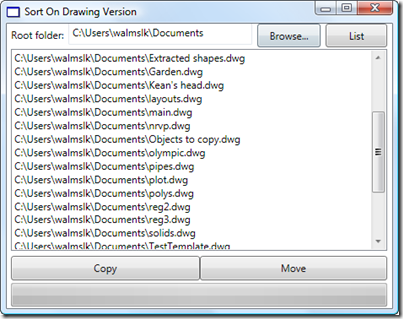
A friend in our Product Support team in Neuchâtel asked me to help develop a little application to sort drawing files on disk. He has some old Clipper scripts that he used during a previous life as a CAD Manager to sort drawing files into different folders based on their version (held in the first six bytes of the DWG file, as mentioned in this previous post and this post of Shaan's). We decided I'd implement it in VB.NET, to make it easier for him to understand and extend. The application is simple enough, but could make a mess of…
-

Many of you will have seen previous incarnations of this tool, during its development. It's a little more complex than most of our other monthly plugins – mostly as it depends on a couple of external components – but the functionality should hopefully be simple enough to understand and use. I won't go into great details here, but if you're using AutoCAD 2011, give it a try by downloading the ZIP from the Autodesk Labs Plugin of the Month site and executing the contained installer package. From there you should be able to run the BROWSEPS command inside AutoCAD to…
-
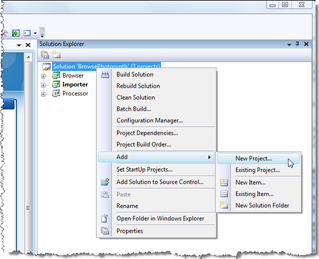
It's been a long time since I've dabbled with software deployment technology, which is absolutely fine by me (in my experience installation issues are some of the gnarliest to deal with, so – presumably like the majority of developers, with apologies to Install specialists – I prefer not having to care about them, myself). But last week I had to put together a few installers - as an internal test - for some of our Plugins of the Month, and ended up deciding the process was worth documenting, especially where it relates to the RegDL component I created and published…
-

After a break of a week, I thought it was time to take the QR Code application a little further, after our previous versions creating basic QR codes at a fixed location, using user-specified corners and using a jig. The code in this post adds quite a bit of functionality to the application: The ability to encode various types of data Calendar events Contact information Email addresses Geo-locations Phone numbers Plain text URLs The ability to edit QR Codes The data used to create the QR Code is attached to the raster image as XData and gets used for default…
-

Yesterday Scott Sheppard announced the availability of this plugin over on It's Alive in the Lab. We originally received a request for this Plugin of the Month some time ago. Fenton Webb, from our DevTech Americas team, developed the initial version using an ObjectARX custom entity – as the requester required support for versions of AutoCAD prior to 2010 – but for this public release, Stephen Preston went ahead and re-implemented the mechanism in a .NET application using the Overrules API introduced in AutoCAD 2010. This plugin basically allows you to see graphically when an AutoCAD drawing is digitally signed,…
-

The class catalogs for AU 2010 – for both the physical and virtual classes – have now been posted to the AU website: I have a few AU classes scheduled – thanks to any of you who took the time to vote for them. My first class is virtual… Getting to Know the AutoCAD® Plugins of the Month (CP212-1V) Tuesday November 30th, 6:00-7:00 am PST Tuesday November 30th, 11:00 am-12:00 pm PST The Autodesk Developer Network (ADN) team has been publishing "Plug-ins of the Month" on Autodesk Labs for over a year. Each of these plug-ins extends an Autodesk® product…