AutoCAD .NET
-
Here's a question I received recently from Dustin Vest, who works as a PDMS administrator at Fluor: I am having a problem with Intergraph's SmartSketch dwg files it exports... I found some code on your site that got me into the blocks, but I can't seem to change the draworder of entities within the block. SmartPlant 3D exports all the symbols as blocks but with wipeouts on top of the rest of the block. Dustin provided some code that was very nearly working – it really didn't need much work to get it in shape – and has kindly allowed…
-
Here's something else that may be of interest to people. As I was working towards the solution shown in the last post – before Albert told me about the ucsToWorld() function (thanks, Albert 🙂 – I ended up extending the .NET code we saw in the previous post to include a TransformToWcs() method (marshaled by a transToWcs() function on the JavaScript side of things). What's interesting about this function – and has caused me to show it here, despite its existence being rendered redundant by ucsToWorld() – is that it returns a value to the caller by serializing point data…
-
I've learned a few things since the last post, where we complemented AutoCAD's new JavaScript API with some additional .NET functionality to work around an issue that existed in the code we'd developed in the previous two posts. Firstly, I found out there's a better way for your jig to display transient graphics than via "manual" calls to addTransient(), updateTransient() and eraseTransient(). Acad.Jig exposes an update() function you can call, passing in the xml fragment representing your geometry. The jig will manage the display of the transient and clear it at the end. (Thanks to Sherry Tan for pointing me…
-
After having some fun writing our first jig inside AutoCAD, last week, and calling it either from an HTML page or an AutoCAD command defined in a .js file, in today's post we're going to see how we can use AutoCAD's .NET API to extend its new JavaScript layer. We're going to take a concrete problem we had in last week's implementation: it turns out that when you draw a transient circle beneath the cursor using JavaScript – as we do during our jig – it absorbs mouse clicks. This is something we've logged as an issue, but it seems…
-
Just to complement yesterday's post showing how to define a simple jig using JavaScript, here's the same code from a separate .js file: var doc = Acad.Application.activedocument; var center = new Acad.Point3d(0, 0, 0); var radius = 0; var trId; function pointToString(pt) { var ret = pt.x.toString() + "," + pt.y.toString() + "," + pt.z.toString(); return ret; } function createCircle(cen, rad, first) { // Build an XML string containing data to create // an AcGiTransient that represents the circle var cursor = ''; var drawable =…
-
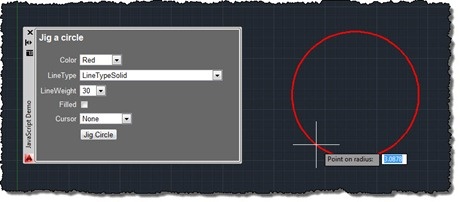
After talking about the architecture of our JavaScript API in this recent post – and mentioning the approach we expect developers to take when creating geometry in one of the comments – I thought it would be worth spending the time to write my first JavaScript jig in AutoCAD. For those of you who haven't come across jigs in either ObjectARX or AutoCAD .NET, jigs are the primary way applications request users to dynamically specify geometric parameters while providing them with graphical feedback. As users select points or specify distances, the object or objects they're creating are updated in real-time…
-

I arrived back safely in Switzerland on Saturday night. It was a pretty good trip to the Bay Area, this time: most surprisingly this is the first time ever I've managed to sleep through until 6am (or thereabouts) on every single day of a trip to California. But then I – like many people – do find going west to be easier than going east, jetlag-wise. I certainly found that I couldn't get back to sleep when I woke up at home on Sunday morning at 3am, which made for a very long day (especially as we participated in the…
-
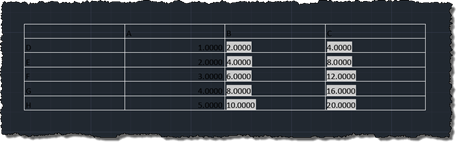
I'm back in San Rafael after a tiring – but very rewarding – two days down in Santa Cruz. I've decided to rattle out a quick post – inspired by this recent comment – before heading out for dinner, so I hope my brain isn't playing tricks on me when it says the code's good enough to post. Please do let me know if you see anything wrong with it. Here's the question: Kean, I am wondering how to do this on table objects. When importing a table from excel as pasting special ACAD objects, you can reset the table…
-

Or otherwise named "Creating an AutoCAD jig to dynamically display a guilloché pattern using F#". But then why pass up the chance for a Jerry Maguire reference? 🙂 Anyway, to continue on from last week's post, Doug – who had presented the original challenge – went on to suggest that I give it the same treatment as Spiro. Basically to implement a jig to display the guilloche pattern dynamically as you input the various options. I understand the difficulty in understanding the nature of the geometry being created in the previous version… the fact that I'd named the original variables…
-
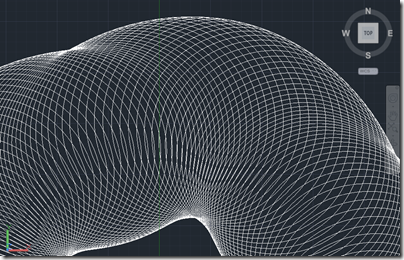
Here's a fun one to finish up the week. And no, it isn't a belated April Fool's gag. 😉 I should probably say right away that you won't be printing money after reading this blog post, but you might know more about some of the security measures used by those who do. A couple of weeks ago, I received an email from Doug Bell at PaperMoneyWorld.net: I have tried your Spiro for AutoCAD and I enjoy it very much. I would like to challenge you to another function I would like to see that is related to the spirograph. I'd…