AutoCAD
-
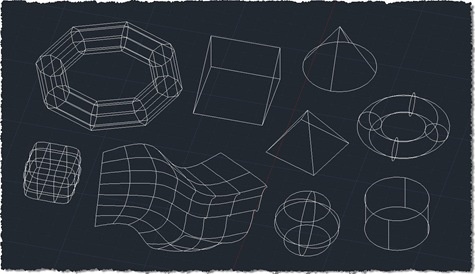
After revealing the purpose for collecting points from 2D geometry in the last post, this post extends the 2D collection code to work with additional 3D objects. I don't know whether it's exhaustive or not – I've added more specific support for Solid3d and Surface objects – but I have no doubt people will let me know if I've missed anything, over time. The good news is that the previous approach of exploding complex entities and processing their components means that many types of standard solid – such as boxes, cones and pyramids – will get adequately captured using this…
-
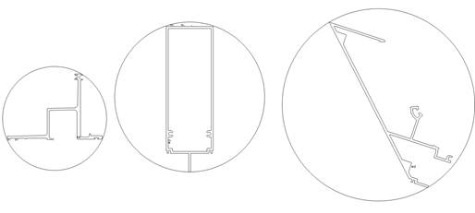
Now it's time to shed some light on the reason for the code in the last post. I wrote it to help address a question that came in from Elson Brown via our Plugin of the Month feedback alias: I have a request for an app that will draw the smallest circle around a polyline object. Pick the polyline and the app draws the smallest possible circle around the shape. It turns out this is a well-known problem (and thanks to Stephen Preston for pointing me in this direction), commonly known as the minimal enclosing circle or smallest circle problem.…
-

The reason for this post may be obvious to some – probably those who are doing this kind of analysis already – and less obvious to others – who will have to wait for the next post to see why it's helpful. 🙂 I won't ruin the surprise, but suffice it to say that for various types of spatial analysis it's helpful to acquire first points from geometry. This post attempts to do that for 2D geometry, and hopefully deals with a few of the trickier cases related to rotated text and such-like. For this particular task I chose a…
-
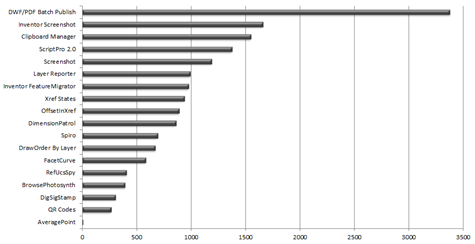
Another month, another plugin. 🙂 As announced over on Scott's blog a few days ago, the latest Plugin of the Month is now live. It's based on the code in this previous post, the only change being how the average point gets returned to AutoCAD's command-line: we now send it as a string that gets interpreted as a LISP point, rather than straight, comma-delimited decimals, because a) it reduces my concerns about working on different locales and b) AutoCAD deals with the points in this format much more nicely if the command is called non-transparently. Thanks to those who made…
-
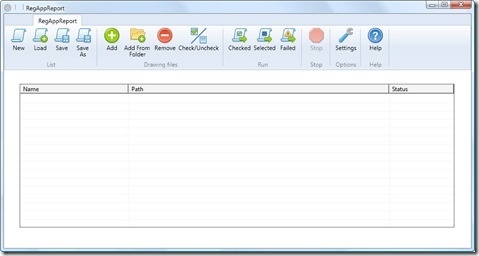
It's time to wrap up the series on batch-reporting Registered Application IDs. For reference, here's how we got to where we are today: Implement a command to collect RegAppId information for the active document Extend this command to work on a drawing not loaded in the editor Save our RegAppId information to some persistent location (XML) Transform the resulting XML file to HTML using XSLT Create a modified version of ScriptPro 2.0 (one of our Plugins of the Month) to call our command without opening the drawing The broader point of today's post – other than simply to deliver on…
-
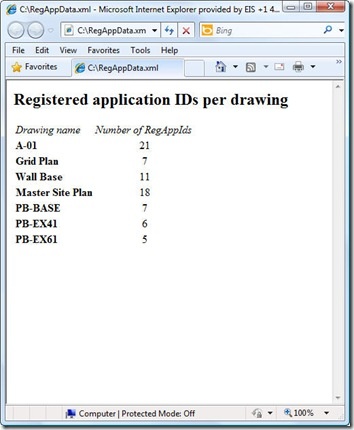
As raised as a possibility at the end of the last post, I did choose to throw together a quick XSLT stylesheet to generate an HTML report of the XML data created by our XRA command. To enable this I did make a few changes to our command implementation, which we'll take a look at first. Here's the updated C# code, with new/modified lines in red (and here's the updated source file): 1 using Autodesk.AutoCAD.ApplicationServices; 2 using Autodesk.AutoCAD.DatabaseServices; 3 using Autodesk.AutoCAD.EditorInput; 4 using Autodesk.AutoCAD.Runtime; 5 using System.Collections.Generic; 6 using System.Text; 7 using System.Xml; 8 using System.Xml.Serialization; 9 using System.IO; …
-
This post takes the code from the last post and extends it to serialize the collected RegAppId data to an XML file, as per Step 3 below: Implement a command to collect RegAppId information for the active document Extend this command to work on a drawing not loaded in the editor Save our RegAppId information to some persistent location (XML) Create a modified version of ScriptPro 2.0 (one of our Plugins of the Month) to call our command without opening the drawing I've chosen once again to leverage the very handy XmlSerializer class to handle serialization to and from XML:…
-
This post extends the code shown in the last – very similarly named – post, to work on a specified drawing, that – very importantly – does not get loaded into the AutoCAD editor. Step 2 in the list for this series: Implement a command to collect RegAppId information for the active document Extend this command to work on a drawing not loaded in the editor Save our RegAppId information to some persistent location (XML) Create a modified version of ScriptPro 2.0 (one of our Plugins of the Month) to call our command without opening the drawing The code starts…
-
Many of you will be aware of what has been referred to as the "RegAppId virus": drawings that have been unfortunately polluted with excessive Registered Application IDs – which are used by applications to attach XData to entities – have these RegAppIds brought into a main drawing when Xrefed, duplicating and duplicating IDs that were often redundant in the first place. In fact – back in the day – I remember a very popular 3rd party application (which has long since been fixed and shall remain nameless) that erroneously used to create hundreds (if not thousands) of these IDs in…
-
This request came in over the weekend: There is a useful object snap in AutoCAD for the mid point of 2 selected points. I would like a midpoint (average) of 3 (or more) points. Could this work in 3D as well as 2D? It's useful when drawing building surveys, often you triangulate a point from several and there are often 'minimal' differences in the dimension and you just take the average. Given the fact we're actually talking about an arbitrary number of points that will almost certainly not belong to a single entity, object snaps are probably neither the easiest…