AutoCAD
-

Here's an idea I've been playing around with for some time: say you want to capture geometry as code for pasting back into your application, how do you do it? For instance, sometimes you might want to model geometry using AutoCAD and then capture it as code for later generation at runtime. I have a specific example in mind, of course: I have some boundary loops that can be used to generate the outer shell of a space shuttle using the surfacing capabilities introduced in AutoCAD 2010. I'd really like to use code to store these loops and – in…
-
I spent more time than I wanted tunneling down a rabbit-hole, today. Thankfully I really didn't have a great deal of time to focus on the problem at hand, otherwise I might have spent even more time down there. But perhaps the time wasn't all wasted – at least I've made a blog post out of it, even if it's mainly to vent my frustration. 🙂 I started – on a positive note – by fixing the focus issues when certain uses of the Clipboard Manager result in AutoCAD not having focus (presumably the palette has it, instead): P/Invoking the…
-
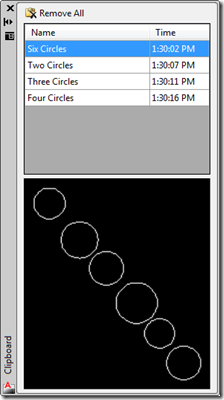
I've made a couple of updates to the Clipboard Manager in this latest version. Firstly I wanted to remove a peculiar situation that occurred in the previous versions when you copy something to the clipboard that isn't AutoCAD geometry: for some reason this act invalidates the ability to access data – such as the preview images – from the items in the Clipboard Manager. The pasting into the drawing still works, as setting an AutoCAD object back onto the clipboard re-enables access to AutoCAD data. You can try this with the previous version by creating a number of entries on…
-
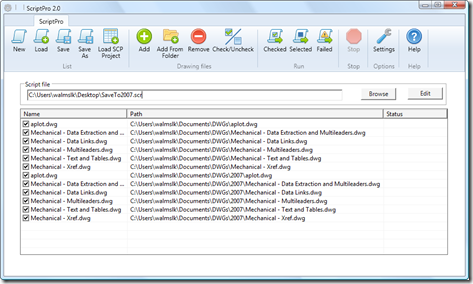
As mentioned previously, Viru Aithal, from DevTech India, has been working hard on a replacement for the venerable ScriptPro tool. I'm delighted to say that it's now ready, and is live on Autodesk Labs as November's Plugin of the Month. Viru took the codebase he developed for the DWF/PDF Batch Publish tool and created ScriptPro 2.0, written from the ground up in C# and developed without any dependency on a specific AutoCAD version. Viru's approach uses the equivalent of late binding to call into AutoCAD through COM and so doesn't require a specific AutoCAD Type Library. Which means the tool…
-
I mentioned in the last post that I was looking to optimise my approach for automatic cropping of an image. It turns out that using Bitmap.LockBits() and the corresponding UnlockBits() does indeed help, although I haven't run any actual benchmarks to measure the difference in the two approaches. The disadvantage of this approach is that you're a bit more down "in the weeds" when it comes to accessing the raw data – you have to support different raw image formats, for instance (and it may well be that I've missed some important ones – it's only really by chance that…
-
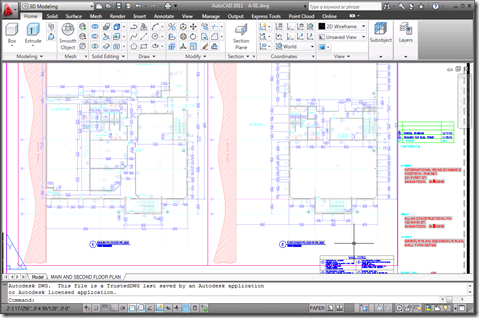
I received a few comments by email and otherwise regarding the preview capability added to the Clipboard Manager Plugin of the Month in the last post. Basically it's useful, but only to a point: the bitmap created on the clipboard is the same size as AutoCAD's screen, with the copied objects in their location relative to the screen. This means that if you're working on a drawing like this: And you want to copy the leader to the left of the cursor to the clipboard, the preview you'll end up with will be something like this: Which – when scaled…
-
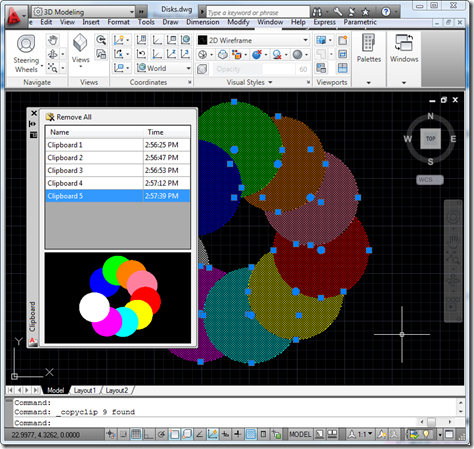
As mentioned yesterday, I went ahead and integrated previewing into the Clipboard Manager Plugin of the Month. I won't include the code directly in the post – it's fundamentally similar in nature to that posted yesterday and is, in any case, included in the project. There were a few additional tricks needed, such as modifying the SplitterDistance property of a SplitContainer to make sure the aspect ratio of the image gets maintained, but nothing particularly earth-shattering. Here's the updated project – I'll be looking into the "save between session" feature (which I suspect is going to morph into a "save…
-

I've been meaning to attack this one since we first published the Clipboard Manager as a Plugin of the Month: working out how to display a preview image of the clipboard contents inside the Clipboard Manager palette. And then I happened to receive a request by email, yesterday, suggesting a couple of enhancements to the tool. A nice reminder. 🙂 1. Have the clipboard include image previews, similar to that of the wblock command (instead of needing to immediately rename the item when fast copying multiple items). 2. Have the clipboard store items in memory for use in between autocad…
-
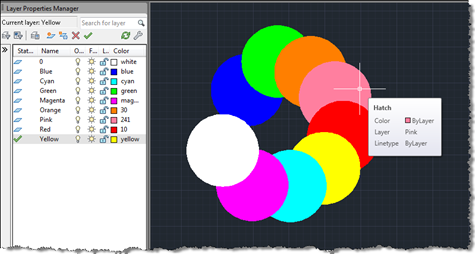
Terry Dotson has – once again – generously offered an application to be an ADN Plugin of the Month. This little tool, called DrawOrderByLayer, allows you to modify the draw-order of objects in an AutoCAD drawing according to the layer they're on. I don't expect this to go live for another month or so (I still have plans for November's plugin), but I did want to post it in order to give people the chance to provide feedback. Here's basically how it works… You have layers containing geometry – in this case I've created circular solid hatches on layers named…
-
I had a very nice surprise in my inbox, this morning. Thorsten Meinecke, from GTB in Berlin, decided to convert the VB.NET code contained in the last post into an F# script and to share it with this blog's readership. Thanks, Thorsten! 🙂 One thing about it being an F# script (typically stored in a .fsx file) is that it can be loaded and executed directly from the "F# Interactive" (FSI) component in Visual Studio without the need to build it into a project creating an executable. What's also very nice is that the XAML defining the WPF dialog is…