AutoCAD
-
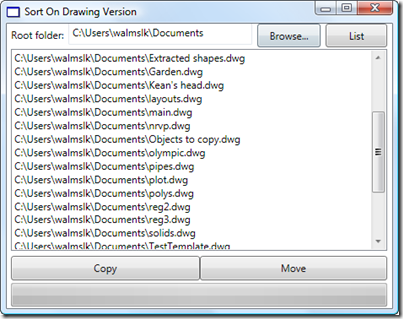
A friend in our Product Support team in Neuchâtel asked me to help develop a little application to sort drawing files on disk. He has some old Clipper scripts that he used during a previous life as a CAD Manager to sort drawing files into different folders based on their version (held in the first six bytes of the DWG file, as mentioned in this previous post and this post of Shaan's). We decided I'd implement it in VB.NET, to make it easier for him to understand and extend. The application is simple enough, but could make a mess of…
-
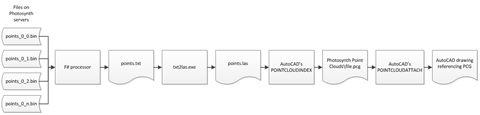
I just thought I'd report back on a few changes made to the BrowsePhotosynth Plugin of the Month during the course of this week. The updated version has just been announced on Scott Sheppard's blog and I thought I'd share some of the specific implementation details. The first one (in the 1.0.1 update) was a really interesting problem and I owe a big thanks both to Alberto Venturini for reporting it and to Marat Mirgaleev, from our DevTech team in Moscow, for helping test on a comparable OS. The problem was that on all the systems upon which Alberto had…
-
Just back from a great little break: yesterday we drove across and spent the day at the Swiss Museum of Transport in Luzern (more on that in a bit), before having dinner at the Rathaus Brauerie opposite the Kapellbrucke. Then we spent the night at the Hotel Bellevue, a very friendly hotel near the edge of Lake Luzern, and today headed across to Ballenberg – with its amazing historical view of Swiss life – before arriving home this evening. All in all a great deal of fun crammed into two short days. One of the highlights for me was a…
-
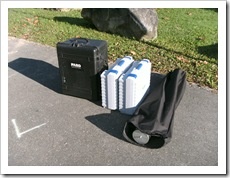
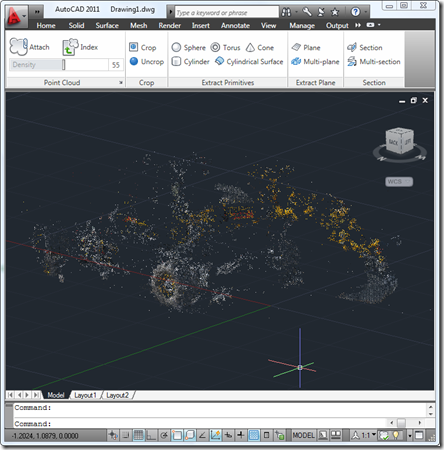
In this previous post I attempted to capture the geometry of a monument close to my home with approximately 500 photographs imported into Photosynth (and October's Plugin of Month to bring it into AutoCAD, of course :-). As promised in that post, I managed to find time this weekend to go back down with a FARO Photon 120 laser scanner (which I'd mentioned in this previous post) to capture the same monument using a different technology: a 3D laser scanner. The first thing to note was there was a lot more to carry: …
-

Many of you will have seen previous incarnations of this tool, during its development. It's a little more complex than most of our other monthly plugins – mostly as it depends on a couple of external components – but the functionality should hopefully be simple enough to understand and use. I won't go into great details here, but if you're using AutoCAD 2011, give it a try by downloading the ZIP from the Autodesk Labs Plugin of the Month site and executing the contained installer package. From there you should be able to run the BROWSEPS command inside AutoCAD to…
-

Well, I've finally taken the plunge and ordered a MacBook Pro. I have very little experience with Apple products – other than owning an aging iPod Photo and having bought an iPod Touch for my wife – so this is quite a departure for me. I'm far from being ready to call myself "a Mac" rather than "a PC", but if I'm to talk intelligently about working with AutoCAD for Mac then it was bound to happen, sooner or later. I ordered the 15" model with a screen and processor upgrade. I'm very curious to see how it performs. A…
-
Thanks to Philippe Leefsma, from our DevTech team in Europe, for providing the code for this post. Philippe kindly based his code on that provided in this previous post, which made it especially easy for me to format for posting. Thanks, Philippe! 🙂 In the post linked to above we saw some code defining a SAP (SweepAlongPath) command. This post extends that to implement a complementary RAA (RevolveAroundAxis) command. Philippe's original code asked the user for a line to define the axis of revolution. I generalised the code slightly to accept a curve: as we're only using the vector between…
-
As mentioned in the last post, I decided to update the RegDL tool – which can be used to create demand-loading entries for an AutoCAD .NET module from, for instance, an installer – to support optional logging to a file. If you now run RegDL.exe with the /log command-line switch, then the application will now create a text file, reglog.txt, in the executable's folder with the high-level results of the registration (with hopefully some useful detail in case of failure). Here are the main, updated files, Program.cs: using System.Reflection; using System.IO; using System; using DemandLoading; namespace RegDL { …
-
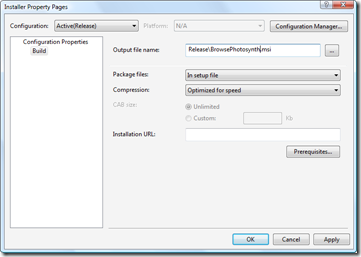
In the first part in this series, we looked at getting our basic installer to install files and in the second part we focused on checking and modifying the Registry. In this part we're going to finish up our installer by tweaking the user interface. Let's get started with some fundamentals: the name of the MSI file itself. This can be modified via the Installer project's property page (which I pulled up by right-clicking the project in the Solution Explorer and selecting "Properties"): A pretty simple one, but one that's worth making, nonetheless. Let's go ahead and spruce up our…
-
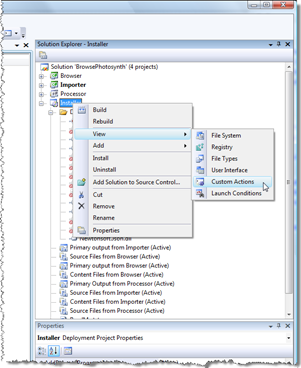
In the last post we created a basic installer to deploy our product files and source into a user-specified location. In this post we'll look at the Registry-related activities that need to happen from our installer. One of the files we added to the install project was the RegDL executable. We're going to add some custom actions which use this executable to create/remove our demand-loading Registry entries on install/uninstall. The advantage of this approach is that we don't need to duplicate information in an installation script that's already stored in our .NET assemblies: RegDL queries an assembly programmatically for its…