Runtime
-
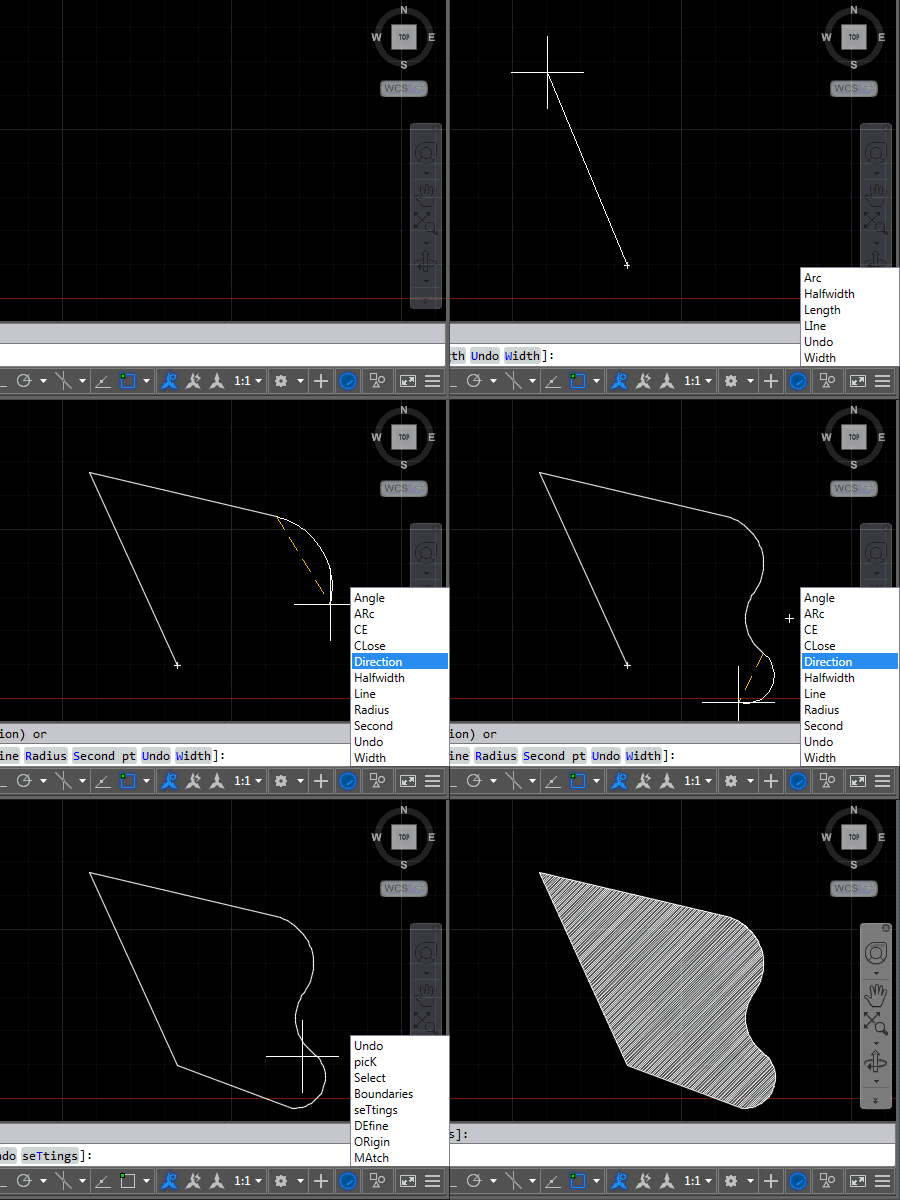
After introducing this project in the last post, now it's time to share some code. The project, as it currently stands, contains three source files: the first one relates to AutoCAD – it implements the various commands we'll use to attach event handlers to tell us when to display (or hide) keywords and the other two files relate to the UI we'll use to display them. We're going to use an invisible window which has a child popup containing a listbox of our keywords. Here's the application in action – for now in English AutoCAD, as that's what I have…
-
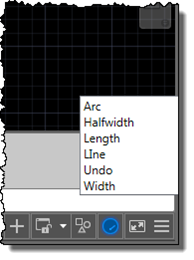
I'm up in the mountains, supposedly on vacation, but as one of our children woke up with a fever, I'm skipping the morning session on the slopes to stay home with him. Which gives me the chance to start writing up a little project I've been working on for our Localization team. Here's the idea… apparently it's relatively common in certain countries for AutoCAD users to learn the product in English but then end up working with a localized version of the software. While it's always possible to use global commands and keywords by prefixing an underscore, it's not always…
-

After yesterday's fun with creating an HTML5-based progress meter for AutoCAD, today we're going to have some more fun styling it with CSS. To recap, here's the progress meter that comes "out of the box", with the default styling from Chromium on Windows. The first thing we need to do for our various changes is to use CSS to disable the default styling, at which point we can then use CSS to override it. progress { width: 100%; -webkit-appearance: none; } Here's how our progress meter looks when unstyled: Now that it's stripped bare, we can…
-

This week I've spent quite a bit of time looking into future API features. For one of them I needed to create a progress meter, and thought to myself "why not create one in HTML5?" And as it's nothing specific to a future product release, I decided to go ahead and post it now. For context, here's the way AutoCAD's standard progress meter currently looks, displayed using the code from this previous post: So why would you go head and create your own progress meter? A few different reasons come to mind… yes, AutoCAD has its own, but perhaps you…
-
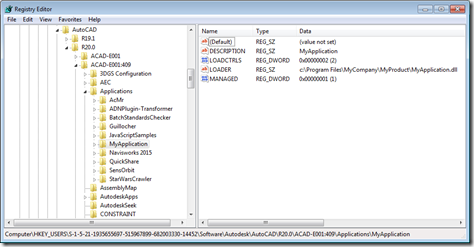
Operating System-level environment variables are a handy way to reduce redundancy or to simplify providing support for per-user settings. (I'm sure they're good for other things, too, but these are the ones that spring to my mind, at least. 🙂 One thing I only discovered recently – and thanks to Tekno and Dieter for discussing this – is that you can use environment variables in a number of places in the file path settings accessed via AutoCAD's OPTIONS command. The topic came up in the specific context of the TRUSTEDPATHS settings, but it seems to have more general support than…
-

An interesting query came into my inbox, last week. A member of one of our internal product teams was looking to programmatically modify the contents of an external reference file. She was using the code in this helpful DevBlog post, but was running into issues. She was using WblockCloneObjects() to copy a block definition across from a separate drawing into a particular xref, but found some strange behaviour. In this post I'm going to show the steps we ended up following to make this work. We're going to implement a slightly different scenario, where we modify an external reference to…
-
The title of this one is a little specific – the post actually deals with the scenario of passing data from .NET to an HTML-defined palette, as well as some other tips & tricks – but it's something I wanted to show. Here's the basic idea: whenever a closed curve gets added to the drawing, we want to display its area as the only item in an HTML palette. We also want the palette to update when objects get erased, etc., which makes life somewhat trickier. To set the scene, here's a quick screencast of the finished application in action…
-
Over the last few months I've had a number of people ask me for an update to this 6-year old post on implementing a CAD standards plugin for AutoCAD (which in turn was based on code from an older DevNote created from a much older VB6 sample). Augusto Gonçalves from the ADN team very kindly made a start on this while I was out on vacation, providing a basic port that I've now just put a few finishing touches on. Very few changes were actually needed from the code in the original post, thankfully. Also, I did do my best…
-
In the last post we saw some code to exercise to two available system variable enumeration mechanisms in AutoCAD, SystemObjects.Variables and the new SystemVariableEnumerator class. Today we're going to take a closer look at these two mechanisms, briefly comparing their performance and results. I took some code from this previous post to measure elapsed time, deleting the "runs" database to simplify the code once I'd realised the performance was basically comparable. Here's the C# code, with the updated ESV and ESV2 commands which now create correspondingly named .txt files in c:\temp, rather than printing the results to the command-line (and…
-
On my flight across to Toronto, I took another look at the "What's New in AutoCAD 2015" section of the .NET API documentation and decided to dig into the new SystemVariableEnumerator implementation. I was particularly curious about this feature as there is already a way to get access to system variables via the Autodesk.AutoCAD.Runtime.SystemObjects.Variables collection. As an initial look at these two classes, I decided to put together a couple of simple variable iterator commands that use the same function to print out some information concerning the system variables exposed by each collection. Here's the C# code implementing two commands,…