AutoCAD
-
After the first three parts of this series covered the basic jig that makes use of the standard keywords mechanism to adjust text's style and rotation as it's being placed, it eventually made sense to implement the remaining requirement initially provided for the jig: this post looks at different approaches for having the jig respond to single keystrokes rather than full keyword inputs. Dave Osborne very helpfully got me started on this by providing an initial implementation that makes use of an IMessageFilter – something he'd apparently gleaned from this previous post. Thanks, Dave! 🙂 All the approaches I'll outline…
-

As reported by Tom Stoeckel over on Without a Net, AutoCAD 2013 Service Pack 1 is now available for download. I've been waiting for this release with some impatience… in my new role I've been increasingly involved in discussions around the security of AutoCAD and our customers' data, and this Service Pack makes significant progress in this area. As Tom notes, malware attacks in AutoCAD typically† take advantage of the fact that when a drawing is loaded, AutoCAD tries automatically to load various types of acad.* files (acad.dvb, acad.lsp, acad.fas, acad.vlx, …) from the drawing's folder. Which means that when…
-
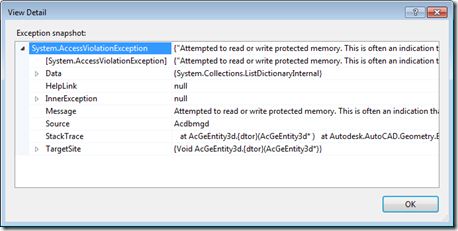
To accompany the last post – which raised some questions around when and where to call Dispose() on objects created or accessed via AutoCAD's .NET API – today we're going to look at a few concrete examples. Thanks to Danny P for not only requesting some examples but also presenting some concrete areas he wasn't fully clear on. Let's start by looking at those (and feel free to compare the responses I've put below with the ones I made in direct response to Danny's original comment): Within a transaction where something is added to the database, some new objects (Xrecords,…
-
This is a follow-on to this previous post, prompted by a thread over on The Swamp discussing a recent blog post by Fenton Webb on the AutoCAD DevBlog. Fenton's assertion is that you really need to call Dispose() on all AutoCAD objects that you create yourself, unless they are managed by AutoCAD's transaction system (i.e. you've passed responsibility across to AutoCAD by calling Transaction.AddNewlyCreatedDBObject()). Which means that while you don't need to call Dispose() on objects such as the AutoCAD Editor or the active Document (and you really shouldn't), you really should call Dispose() on various objects you've been used…
-

Earlier in this series, we implemented a jig to rotate, size and place text more easily in an AutoCAD drawing, which we then extended to allow adjustment of font-level properties. In this post, we're going to add some additional functionality to allow the text to be justified differently around the cursor location. It has to be said that the code introduced in this post isn't very extensive, but nonetheless tricky to get right (and therefore deserving of its own post). It's also worth noting that the changes would be much more complicated if we hadn't designed the code to add…
-

In the last post, we saw a simple jig implementation to position, size and rotate standard AutoCAD text. In this post, we're extending that implementation to handle font properties such as bold and italic text. At first blush, this sounds pretty straightforward – how hard can it be, right? The complexity gets introduced when we consider that these are not properties that are exposed directly from the text itself, but from the associated text style (or – to be more accurate – from the font descriptor object associated with the text style). Which begs the question: when the user chooses…
-

Back in March, I received an email from Thomas Fitou suggesting an interesting blog topic: I was thinking about a cool feature in jigs: You invoke a command to enter an Mtext or text The editor is asking for some text You enter the text Then a jig is dragged asking for position But in the editor appear some options:[R]egular [B]old [I]talic [R]otate 90 If the user hits "B" the text becomes bold If the user hits "R" the text is rotated 90 degrees If the user hits "R" again, another 90 degrees and so on... It struck me as…
-
As mentioned in this previous post, I was very keen to see how AutoCAD could be used to help streamline the process of generating what I've now found out can be classified as anamorphic street art. Leon Keer had mentioned that the technique dates back to Leonardo Da Vinci and – sure enough – Wikipedia agrees. As part of my research, I found the original video that inspired my interest in Leon's work, which should help put this post in context: To make the process reasonably realistic – and to some degree replicate the approach Leon has taken in his…
-

Stephen Preston recently posted on the AutoCAD DevBlog that the Autodesk Exchange store is now open – for anyone* – to submit apps for hosting by Autodesk. [* Hopefully this point is obvious: anyone can submit apps, but Autodesk clearly reserves the right to reject inappropriate submissions.] Exchange Stores are available for the following products: AutoCAD AutoCAD Architecture AutoCAD Civil 3D AutoCAD ecscad AutoCAD Electrical AutoCAD Mechanical AutoCAD MEP Autodesk Alias Autodesk Inventor Autodesk Inventor Publisher Autodesk Revit Autodesk Simulation Autodesk Vault As I've probably said before, these stores are a huge opportunity for developers to gain direct access to…
-

As I ended up not being able to post during the last week or so, I've switched to the past tense now that I'm back in Switzerland. I'll start back on more technical topics in the coming days, but as I'm still re-adjusting I may as well wrap up my holiday's travelog, first. 🙂 After the unexpected highlight of visiting the Shard, I was worried the remainder of our time in the UK might prove a disappointment. Thankfully, my worries were completely unfounded: we had a great trip to London's Natural History Museum (with a quick stop by Harrods for…