AutoCAD
-
I looked back and couldn't find a post covering this particular topic and so decided to put something together. It may well have been covered elsewhere (I admit to not having looked) but I felt like throwing some code together, either way. 🙂 To perform a Boolean operation between Solid3d objects inside AutoCAD, you can use Solid3d.BooleanOperation() on the primary Solid3d, passing in the secondary one. We want to implement commands for Unite (or Union), Intersect (Intersection) and Subtract (Subtraction). Only the last of these needs us to select a primary object explicitly – as the other two operations are…
-

This week has so far had an AU theme to it, just as last week we talked exclusively about Leap Motion and AutoCAD. Perhaps I'm sub-consciously shifting this blog to a weekly-themed format? Hmm. Like many of you, I'm sure, I received an email over the weekend to let me know that the recorded sessions from Autodesk University 2012 are now available online (for anyone with a valid AU online account). I wasn't sure which of my sessions had made it up there from this last year's event (thank goodness I rarely have to write cheques anymore), and so was…
-
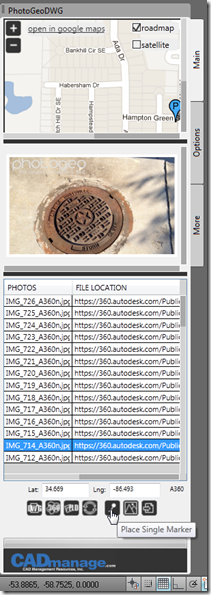
I've talked a few times about the APPHACK held at AU 2012, as well as posting a photo of the contestants. One of the drivers behind this APPHACK – as well as the one that was held internally to Autodesk which resulted in the creation of apps such as the excellent "QR Codes" by my friend John Beltran – was to encourage development of apps for hosting in the Autodesk Exchange store. The first of the winning entries has now made it up to Exchange: PhotoGeoDWG from CAD Management Resources Inc. – the second place winner – is now available…
-

It's been a fun week of blogging about the Leap Motion controller, but now it's finally time to Leap to a conclusion (groan). We started the week by introducing the device and we then used it to navigate models, interact with AutoCAD commands and draw 3D geometry. Today's post is an attempt to summarise the impressions I've formed from working with the Leap Motion controller, and take a shot at predicting (no doubt inaccurately) where it's going to make most impact. Let me start by saying that the Leap Motion controller does what it says on the tin. It's extremely…
-
After cranking out a post per day so far this week on my exploratory integration of AutoCAD with the Leap Motion controller, it's time to wrap up the technical portion of my "Leap Week" (a bit like a Leap Year, geddit? 😉 with a nice, juicy topic: creating 3D geometry inside AutoCAD using the Leap Motion controller. The Leap Motion controller has a couple of key selling points for interacting in 3D space. It's both highly reactive – they've done a great job of minimising any processing lag to allow you to build highly responsive systems – and very accurate.…
-
After introducing Leap Motion and seeing some code to make view changes inside AutoCAD, now it's time to start thinking about geometry creation. We'll see two different approaches to compare and contrast. The first – covered in today's post – is a very generic integration at the Windows Message-level: as the user's hand hovers over the device, a component inside AutoCAD translates this into cursor movements. Quick and dirty, but hey – it's in the second approach (probably in the next post) that we'll see an ultimately more compelling, higher-level integration. With the first approach the user will see the…
-
Now that we've introduced the Leap Motion controller, it's time to do something interesting with it. [If you want to cut to the chase, scroll down to the bottom of the post for a video of the results.] The team at Leap Motion has provided a very decent set of language options via the controller's SDK, including Java, JavaScript, Python, C++ and C#. In order to prototype a quick (and perhaps just a little dirty) integration with AutoCAD, I've gone ahead and used C#. I'm currently using v0.7.1 of the SDK, having started with v0.6.6 and migrated my code to…
-

I've been alluding somewhat vaguely (and sometimes more specifically) to an interesting integration project I've been working on recently. The project is to integrate the Leap Motion controller into AutoCAD, to explore the possibilities of this device. For those of you who haven't yet heard about the Leap Motion controller, this could well be the hottest tech gadget of 2013. At last week's CES, the BBC interviewed Avinash Dabir from Leap Motion to understand the potential for the device and a little about how the technology works. And here's a very quick demo video: So what could this mean for…
-
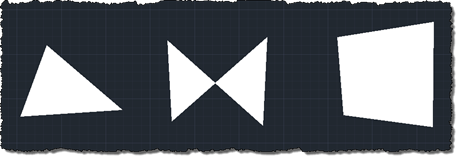
I had this question come in via a blog comment. I would usually suggest asking this type of question on the relevant online forum, but something about it intrigued me: Now i would like to ask you that to post an item showing how to get the vertexs of 2d solid to create a boundary, could you add one which shows exporting the entity to other format like .shp.? My first thought was "wow – someone still uses 2D solid objects inside AutoCAD! I wonder what the Solid object's .NET API is like?". (Hopefully this comment doesn't start a flood…
-
This post is based on some information provided by Peter Muigg, a developer in Germany Austria who has long been a friend of Autodesk. In fact, if memory serves me well – and do step in if I'm mis-remembering, Peter – back in 1995 when I first joined the company, Peter delivered German-language ObjectARX training on behalf of Autodesk. Peter reached out with this tip just before the holiday break: he needed to display a dialog on AutoCAD startup, but found that it was too soon to do so on IExtentionApplication.Initialize() (it's assumed this module is either demand- or auto-loaded,…