AutoCAD
-

Thanks to some recent coverage on a Channel 9 blog (which I consider a great honour – I've been a huge fan of Channel 9 since its inception :-), I decided to get around to posting an update to the AutoCAD + Kinect samples I demonstrated at AU 2011. While attending the recent hackathon, I spent a fair amount of time porting my AutoCAD-Kinect integration samples from the Beta 2 of the Microsoft Kinect SDK (for the Kinect for Xbox 360 sensor) to the released SDK for the Kinect for Windows. It was pretty impressive just how many of the…
-
As promised in my last post, I spent some time hacking together a basic application to get a feel for what it's like to develop inside the WinRT sandbox for Windows 8. If you're interested in the source code, here it is. Be warned: the code is really just to prove a concept – there's a lot therein I'd consider sub-optimal for a production application. If you're more interested in seeing the application in action, but haven't yet installed the Windows 8 Consumer Preview, then here's a quick screencast I recorded: A few comments on the experience of developing with…
-
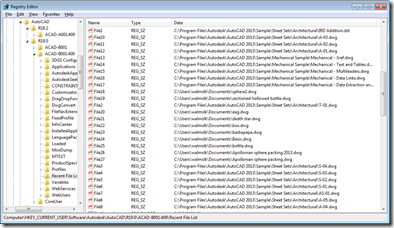
Inspired by the Windows 8 conference I attended on Monday, I've decided to build my first Metro-style application which scrolls through AutoCAD's Most-Recently-Used (MRU) drawing list. I now have a barebones installation of the Windows 8 Consumer Preview + VS11 Beta inside a Parallels VM on my Mac, but rather than installing AutoCAD into that, I decided to write a simple exporter on my existing Windows 7 machine (which now has AutoCAD 2013 installed) to generate the data for my Metro-style application. Let's start by looking at what file-oriented MRU data AutoCAD stores, and where. At the end of each…
-
This post was inspired by an email I saw from Philippe Leefsma, from DevTech EMEA, which made use of the Autodesk.AutoCAD.Windows.Data namespace – something I didn't even know existed. The specific example Philippe showed was how to access the list of hatch patterns available in the current drawing without iterating through the relevant dictionary in the named objects dictionary. Here's Philippe's C# code: using Autodesk.AutoCAD.ApplicationServices; using Autodesk.AutoCAD.EditorInput; using Autodesk.AutoCAD.Runtime; using Autodesk.AutoCAD.Windows.Data; public class DataStuff { [CommandMethod("HPS")] static public void GetHatchPatterns() { Editor ed = Application.DocumentManager.MdiActiveDocument.Editor; foreach ( string str in HatchPatterns.Instance.AllPatterns) …
-
Following on from our look at the Core Console, Dynamic .NET and .NET migration for AutoCAD 2013, today we're going to look briefly at the remaining API features in the AutoCAD 2013 release. Model Documentation The model documentation feature was introduced in AutoCAD 2012 – simplifying creation of 2D sections and details of 3D drawing content – and this initial API provides (primarily read-only) access to this information. It comprises the following classes SectionSymbol SectionViewstyle ViewBorder ViewRepBlockReference DetailViewStyle DetailSymbol The writeable aspects of the API are mostly related to the "style" objects – these can be created and edited programmatically,…
-

After my struggles to get here, I've had a fun (working) weekend in the Bay Area. We held our first internal Hackathon event, where members of the AutoCAD Engineering organisation sat in a room and developed applications that work with AutoCAD. Food and drink was provided throughout the 4-day event – reducing the need for people to leave the room – and someone even brought a sleeping bag along and camped out in the lobby for Saturday night. The final submissions deadline is looming, in a few short hours, and then tomorrow there'll be a series of demonstrations, showing (and…
-
I'm on my way to San Francisco for some internal meetings (including a Hackathon, over the weekend, which should be fun), but have unfortunately been held up at Heathrow by fog (it delayed my inbound flight, along with many others', but somehow didn't stop my outbound flight from leaving, which always seems to be the case… I then had to queue for 2.5 hours to get a new flight, the only highlight of which was standing behind members of the junior Kuwaiti ice hockey team [at least that's what they said they were – they may have been pulling my…
-
Another really interesting, developer-oriented feature in AutoCAD 2013 is something we've been calling "Dynamic .NET". I don't know whether that's official branding, or not – I suspect not – but it's the moniker we've been using to describe this capability internally and to ADN members. The capability is based on an addition to .NET in version 4.0: to complement (or perhaps just as part of) the integration of the Dynamic Language Runtime into the core .NET Framework, various interfaces – including IDynamicMetaObjectProvider – were provided to developers to let their objects participate in "dynamic" operations. Providers of APIs therefore now…
-
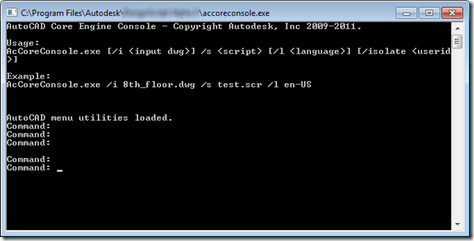
In the first of this week's posts on the new, developer-oriented features in AutoCAD 2013, we're going to take a look at the AutoCAD Core Console. I predict that this one feature alone is going to be worth its weight in gold to many customers and developers. Picture this: a stripped down version of AutoCAD – but only from a UI perspective – that can be executed from a standard Command Prompt. We're talking about a version with almost all the capabilities of full AutoCAD – with the ability to load certain applications and execute scripts – but launches in…
-
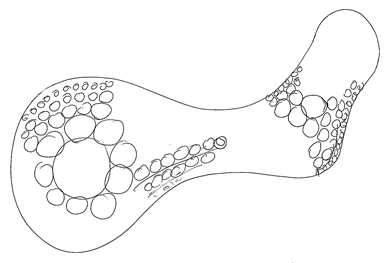
As we're nearing the end of this series, it seems a good time to do a quick recap of where we've been with the posts leading up to this point. Here goes… An interesting challenge: generating variable density fill patterns for 3D printing Generating hyperbolic geometry on a Poincaré disk in AutoCAD using .NET Generating hyperbolic tessellations inside AutoCAD using .NET Scripting the generation of hyperbolic tessellations inside AutoCAD Circle packing in AutoCAD: creating an Apollonian gasket using .NET Circle packing in AutoCAD: creating an Apollonian gasket using F# – Part 1 Circle packing in AutoCAD: creating an Apollonian gasket…