Commands
-
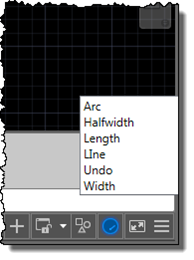
I'm up in the mountains, supposedly on vacation, but as one of our children woke up with a fever, I'm skipping the morning session on the slopes to stay home with him. Which gives me the chance to start writing up a little project I've been working on for our Localization team. Here's the idea… apparently it's relatively common in certain countries for AutoCAD users to learn the product in English but then end up working with a localized version of the software. While it's always possible to use global commands and keywords by prefixing an underscore, it's not always…
-

photo credit: Marcin Wichary via photopin cc As mentioned in the last post, fibers are now inactive in AutoCAD 2015 (the code paths are still there, largely for testing purposes, but should not need to be enabled for typical usage of the product). Fibers were a technology that Microsoft introduced way back when to help single document (and typically single-threaded) applications adapt more easily to the brave new world of MDI. At least that's my recollection and understanding. They were basically a mechanism by which applications such as AutoCAD could manage their per-document state, making the relevant data current depending…
-
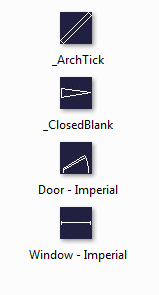
There was an interesting coincidence, earlier in the week. A blog comment came in on an old post on the exact day there was an internal email discussion on the same topic. The post was about using the BLOCKICON command on a document that gets loaded into the editor just for that purpose, generating a thumbnail image on disk for each of the contained block definitions. The problem with this approach – as was suggested by a couple of people in blog comments – is that the generated thumbnail is really small at just 32 x 32 pixels. The exact…
-
Just to complement yesterday's post showing how to define a simple jig using JavaScript, here's the same code from a separate .js file: var doc = Acad.Application.activedocument; var center = new Acad.Point3d(0, 0, 0); var radius = 0; var trId; function pointToString(pt) { var ret = pt.x.toString() + "," + pt.y.toString() + "," + pt.z.toString(); return ret; } function createCircle(cen, rad, first) { // Build an XML string containing data to create // an AcGiTransient that represents the circle var cursor = ''; var drawable =…
-
Late last week I received an interesting email from Bruno Saboia, who's been experiencing some performance issues with code he'd written to return all the objects of a particular type – in his case, Lines – from the model-space of the active drawing. We exchanged a few emails on the topic, and Bruno kindly allowed me to post his code and my suggestions for changes. In today's post, we're going to look at both the code and my suggestions, while in the next post (in this mini-series, at least) we'll look at a simple execution framework that can allows you…
-
This question came in day or two ago: "I attach an XData to some AutoCAD entities. When the AutoCAD entity is offset by OFFSET command, the XData is cloned in the offset entity. What's the way to control(stop) the cloning of my XData in OFFSET command?" This is an interesting one. Many applications rely on External Entity Data (XData) providing unique references from AutoCAD objects to other locations, so when objects with XData attached get copied, it either needs to be removed or updated to refer to something different (an identifier to a new record in an external database table,…
-
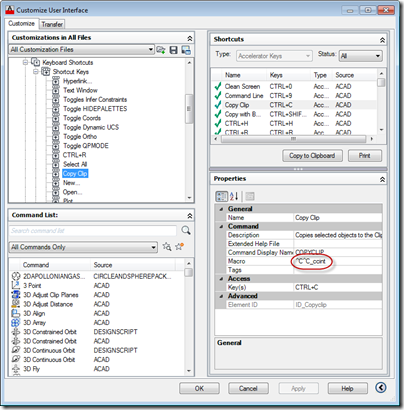
This was a fun question that came in from James Meading. I genuinely didn't think I'd manage to look into it before the break, but it tweaked my interest during my trip back from the UK: I thought this might be a topic you would be interested in. I do not use ctrl-v for pasting entities, only text to command line. I already tried removing the keyboard shortcuts to ctrl-v via the cui, and that just makes ctrl-v not do anything when command line does not have focus. So I think I need to write a transparent function, make a…
-
Another Friday, another installment of Wayne Brill's AutoCAD .NET training DevTV series (to complement those sessions from previous weeks). Today's session is focused user-interface elements such as the .NET attributes for exposing commands and optimizing loading, adding your own tab to the options dialog and implementing drag & drop. This series of DevTV sessions is a companion for the new AutoCAD .NET training material available from the AutoCAD .NET Developer Center. Enjoy! 🙂
-
Just a quick note to say Glenn Ryan's latest contribution, RefUcsSpy, is now live as August's Plugin of the Month. I posted a preview of the application a few weeks ago, and you can now get the compiled plugin with complete source project from the Plugin of the Month page on Autodesk Labs. Thanks, Glenn! 🙂 You'll note the posted plugin only claims support for AutoCAD 2009 onwards. This is because it relies on the Task Dialog implementation introduced in that version of AutoCAD. If you would like to get it working for prior versions of AutoCAD, you'll find an…
-
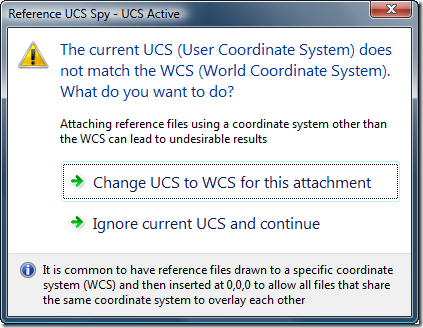
AutoCAD users who work with multiple reference files – whether DWG, DWF, DGN, PDF, PCG files or raster images – usually want them to be oriented in space (and to overlay) properly. One common way to make this happen is to set the various files up in world coordinates and then attach them at the origin of the referencing drawing's WCS. A common issue related to this approach is if the user happens to be in a local UCS: the file will get attached relative to that UCS rather than to the WCS. Glenn Ryan, who generously provided April's very…