2015
-
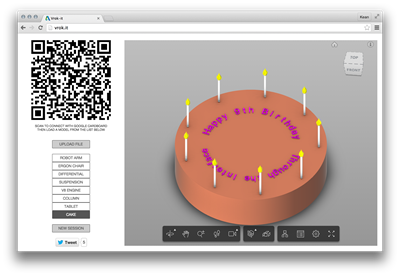
It's insane how the years tick past. Today marks the 9th anniversary of Through the Interface. For a bit of fun, I've added an Easter Egg (well, actually it's more like a Birthday Cake) to Vrok.it: Choose the "Cake" button on the left to view a Birthday Cake modelled completely using AutoCAD. If you connect to the session using the QR code, you can see the birthday cake in stereoscopic 3D on your smartphone using Google Cardboard. Or without it, if you're good at squinting. In case you're interested, the mechanics of creating the 3D text in AutoCAD were quite fun:…
-
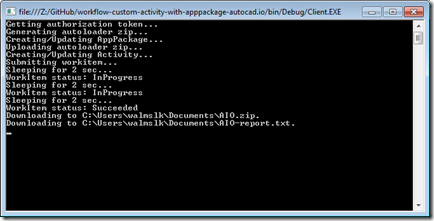
Now that we've introduced how the CRX will be loaded by AutoCAD I/O – via an Autoloader bundle – we're going to take a look at the code needed to create and test our Activity using it. As a starting point – and as mentioned last time – you should get hold of the code in this sample on GitHub and copy & paste the (C# & XML) code we've seen in the last two posts into their respective files. The code we're going to see in today's post belongs in Client\Program.cs. We're very much tailoring the existing implementation, making…
-
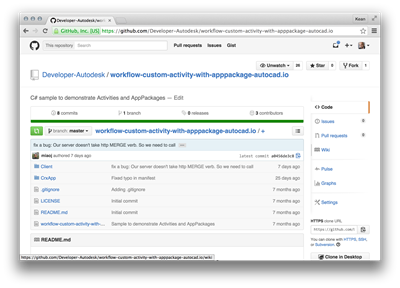
After introducing the series and looking at the additional code needed for a .NET CRX app to work with AutoCAD I/O, in this post we're going to go the extra small step to prepare the Autoloader manifest, getting it ready to create the Activity and its AppPackage. To simplify the process of developing this app, I recommend a couple of things: download the sample on GitHub I pointed you at, last time – whether by cloning the project or downloading it as a ZIP – and make modifications directly to that. To build the sample I'm creating, for instance, you…
-

As promised yesterday, this post deals with modifying your CRX module to make it work with AutoCAD I/O. A quick reminder on what writing a CRX app means for .NET developers: we're still creating a .DLL (unlike ObjectARX developers, whose CRX modules have the .crx extension), but it can only reference AcDbMgd.dll and AcCoreMgd.dll (not AcMgd.dll). Importantly the module must be loadable – and testable – in the Core Console. The basic C# code we're going to extend is from this previous post. The real change that's required for commands to work in AutoCAD I/O is how they get user-input…
-

Over the coming weeks I'm going to be exploring – and blogging about – the ability to run custom .NET code inside AutoCAD I/O. After all, I've submitted an AU class on the topic, so I really do need to get my head around it. 🙂 I see this series being made up of the following high-level tasks, although each of these may end up requiring multiple posts to cover (and conversely there may be some that can be covered in a single post): Writing a CRX module that's I/O-ready Building an Autoloader bundle for the CRX module Defining an…
-
It's live! Our entry for the recent VR Hackathon in San Francisco has received a significant amount of spit and polish (OK, perhaps not the best mental image) over the last couple of weeks and is now ready for prime time (i.e. Beta testing ;-). Check it out at http://vrok.it! It should work well with Chrome, Firefox or Safari, although for best results I'd stick with Chrome on mobile devices. The term "vrok" is one I came up with on the trip back from San Francisco… it's a combination of an invented acronym – Virtual Reality Online Collaboration – and…
-
I wanted to post on a more in-depth topic, today, but I've been heads-down working on our project from the recent VR Hackathon, getting ready to push it live. We've made really good progress over the last few days, especially considering it's only a part-time project for Lars, Oleg and myself. We've implemented per-session support and a number of other important features (Lars has also spent some serious time re-factoring the code – it's certainly more elegant than what I'd usually crank out ;-). The code is all here, in case. Here's a quick audio-less demo, to give you a…
-
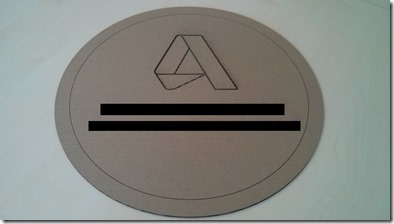
I spent some time back down at our local Fab Lab, today, finishing the laser cutting work for the jigsaw project I mentioned previously. Since I last mentioned it, we managed to procure some Plexiglas – in our case it was Perspex, in fact – and cut various sections of the puzzle, with each piece including an engraved word and a hole to make it into a key-chain souvenir. Today's job needed the additional size of the Fab Lab's laser cutter – theirs can cut sheets with 40cm on a side, whereas ours can only manage 30cm – as we…
-
As promised (threatened?) back in February, this blog has finally received a much-needed design refresh. I had hoped to get our internal creative team to help with this, but that unfortunately didn't pan out: all issues that you come across are therefore the responsibility of yours truly. Here are the key changes in this refresh: Based on Typepad's "Snap" responsive design template Switched to new fonts: Lato for titles and headings, Open Sans for body text Displays excerpts rather than full posts on the home page and post indices/archives The intention is that the blog be much more readable on…
-
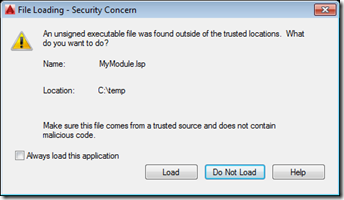
Yesterday we introduced the need to sign program modules for AutoCAD 2016. Today we're going to see how AutoCAD behaves when loading signed and unsigned modules, as well as what the innards of a signed LISP module look like. Here's a simple piece of AutoLISP code that I've placed in a file called c:/temp/MyModule.lsp: (defun c:test() (princ "\nThis is a test command.") (princ) ) Here's what AutoCAD displays when we try to load this module: We can use AcSignApply.exe to sign this module with our digital certificate, as we discussed yesterday: Here are the contents of the file…