AutoCAD .NET
-
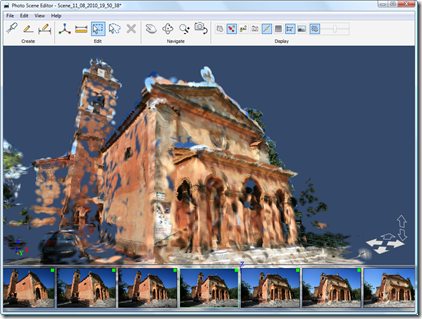
In this previous post I showed some code which uploads photos to Photofly and pulls down and imports the resultant point cloud into AutoCAD 2011. The application relies on a special executable from the Photofly team which was built from code extracted from Photo Scene Editor that uploads photos to Photofly and asks for them to be stitched together into a scene on the server. While we're working to tidy this little executable up for publishing, I realised that a good portion of the application could be used as it stands: rather than uploading the photos directly from AutoCAD to…
-
A big thanks to Thorsten Meinecke for pointing out the obvious issue with my prior post (the nested entity selection loop which has frustrated me unnecessarily when developing the code for that post and another). Here are the details of the fix: using Editor.GetNestedEntity() along with a PromptNestedEntityOptions object, instead of a direct message string, allows us to specify AllowNone to be true. Which, in turn, causes PromptStatus.None to be returned when the enter or space keys are used to terminate the selection loop. An obvious omission, in hindsight, but anyway – I'm much obliged to you, Thorsten! 🙂 I've…
-

In a recent comment, Adam requested the code from this previous post be modified to work in the same way as another, more recent, post: Is it possible to get a version of this code where the user is prompted to create a selection set of nested objects first, and then being prompted for the new colour of the objects? i.e is it possible to get the code for changing colour working the same way as it does for changing layer, as detailed here? This would allow the user to pick and choose the objects affected, rather than making a…
-
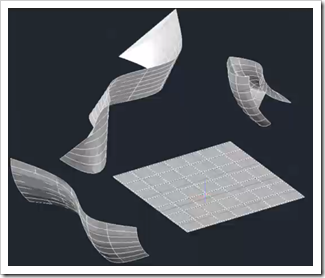
In preparation for his upcoming AUv session, Philippe Leefsma – from our DevTech team in Europe – has recorded a DevTV all about the Associative Surfaces API introduced in AutoCAD 2011. Philippe covers three main topics in this interesting session: The Associative Framework Associative Surfaces Nurbs Surfaces DevTV: AutoCAD 2011 Surfaces API view download (82.3MB) Enjoy! 🙂
-
Just a quick note to say Glenn Ryan's latest contribution, RefUcsSpy, is now live as August's Plugin of the Month. I posted a preview of the application a few weeks ago, and you can now get the compiled plugin with complete source project from the Plugin of the Month page on Autodesk Labs. Thanks, Glenn! 🙂 You'll note the posted plugin only claims support for AutoCAD 2009 onwards. This is because it relies on the Task Dialog implementation introduced in that version of AutoCAD. If you would like to get it working for prior versions of AutoCAD, you'll find an…
-

During my recent stay in the Bay Area, Stephen suggested I join the San Rafael-based DevTech team to record another ADN DevCast. Our hope was to cut down the length somewhat by focusing on a single topic, but those plans pretty much went out the window as soon as I started talking. :-S 🙂 Thanks to Stephen, Gopi and Fenton for their warm welcome in San Rafael, and for keeping the session interesting with all their questions! [We experienced a few technical glitches due to my system getting very close to its end-of-life (it only has a 90 GB hard-drive,…
-
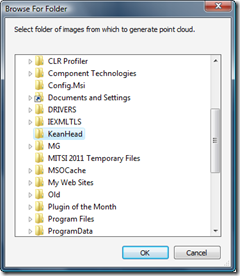
After I'd had such fun working out how to bring point clouds from Microsoft's Photosynth into AutoCAD, I was delighted when the Autodesk Labs team came to me with the suggestion of a comparable – although ultimately more useful – integration with the then-soon-to-be-released Project Photofly. The concept was simple: provide AutoCAD users with a command allowing them to select a folder of images to upload to – and be processed by – Photofly. The resulting photo scene – once available – would then be used to generate a point cloud back inside the AutoCAD session. So basically a one-click…
-
Here's some simple C# code that asks the user to select an external reference and then detaches it from the current drawing: using Autodesk.AutoCAD.Runtime; using Autodesk.AutoCAD.ApplicationServices; using Autodesk.AutoCAD.DatabaseServices; using Autodesk.AutoCAD.EditorInput; namespace XrefApplication { public class Commands { [CommandMethod("DX")] static public void DetachXref() { Document doc = Application.DocumentManager.MdiActiveDocument; Database db = doc.Database; Editor ed = doc.Editor; // Select an external reference Transaction tr = db.TransactionManager.StartTransaction(); using (tr) { BlockTableRecord btr = null; ObjectId xrefId = ObjectId.Null; // We'll loop, as…
-

A big thanks to Philippe Leefsma, from the DevTech team in Europe, for providing this handy piece of code in a response to an ADN member. In the last post we saw some code that made use of DBObject.HandOverTo() to maintain identity between an old line and a new one with which we wanted to replace it. This code makes use of this method's counterpart, DBObject.SwapIdWith(), which works on two database-resident objects (rather than the replacement being in-memory, as is the case with HandOverTo()). Here's C# code implementing two commands, to swap the identity (and therefore the order) of two…
-

Brent Burgess commented on this previous post showing how to extend lines in AutoCAD: Is there a different process for shortening lines, or is it similar syntax? A very valid question… unfortunately the Curve.Extend() method only works with points or parameters that are outside the current definition of the curve, so we need to find another way (if you try, you'll get an eInvalidInput, at least that's what I found :-). I chose the approach of using Curve.GetSplitCurves() on each line, passing in an array of parameters at which to split the curve. I calculate the start parameter as 25%…