User interface
-

Another Friday, another installment of Wayne Brill's AutoCAD .NET training DevTV series (to complement those from previous weeks). Today's session is focused on responding to database events and creating a palette-based user interface. This series of DevTV sessions is a companion for the new AutoCAD .NET training material available from the AutoCAD .NET Developer Center. Enjoy! 🙂
-

It's Friday, which means it's time for the next installment of Wayne Brill's AutoCAD .NET training DevTV series (as mentioned in last Friday's post). Today's session is focused on user interaction and user input. This series of DevTV sessions is a companion for the new AutoCAD .NET training material available from the AutoCAD .NET Developer Center. Enjoy! 🙂
-
As promised, I ended up burning more that a few hours this evening (after being up very early for meetings this morning), to add orthographic drawing support to the code shown in the last post. It took quite some work, switching between UCS and WCS until my head was more than a little twisted. This thread on The Swamp provided well-needed inspiration, too (thanks, MickD :-). Here's the C# code – I would have highlighted the modified lines in red, but the code is too wide to add 3-digit lines without it looking ugly, and – besides – I need…
-
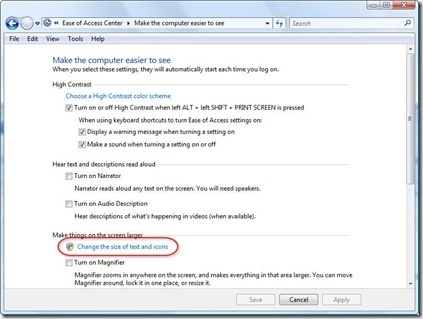
This topic isn't at all specific to AutoCAD – in fact it was encountered by Adam Nagy with the recent Plugin of the Month he developed for Revit – but it seemed something people might hit. Thanks to Adam for proposing this topic and providing the information to share with everyone. 🙂 In recent versions of Windows – at least with Vista and Windows 7, but perhaps versions before that – it's possible for the user to adjust DPI Scaling options on their system as part of the usability/accessibility options. This can cause issues with how your dialogs are displayed,…
-
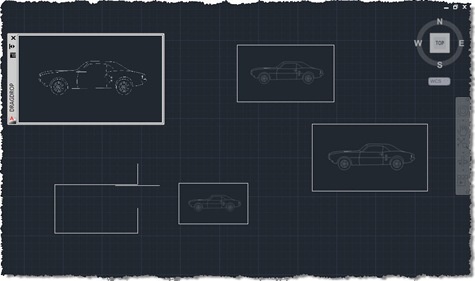
I'm in Las Vegas, running between meetings, presentations and performance reviews, so just a quick post, today (it's just before midnight here, but already Monday morning in Europe). I promised in the last post and the one before that I'd extend the code we've been looking at to enable drag & drop of raster images into AutoCAD with resizing of the dropped image via a jig, using the code in this previous post as a foundation. The below C# code does just that, with the new/modified lines in red (and the complete, unnumbered source file here): 1 using Autodesk.AutoCAD.ApplicationServices; …
-
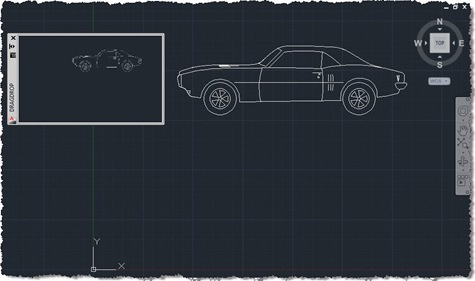
I'm up early (after sleeping late) with jetlag, so I thought I may as well put together this post. My brain isn't fully functional, I suspect, so forgive any errors (but please let me know about them, so I can fix them :-). I was inspired to implement the code in this post by an internal email thread, wherein Albert Szilvasy recommended implementing a comparable technique to a colleague. Please don't blame Albert for the implementation details, though, they are all mine. The idea is simple: you have some kind of modeless PaletteSet, and you want to initiate and manage…
-
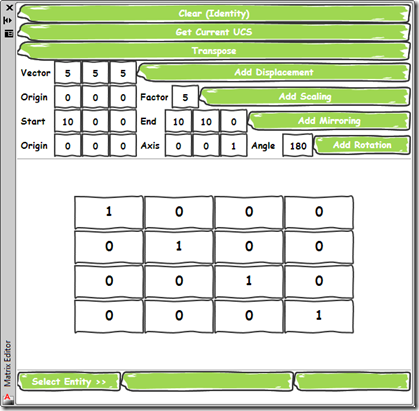
As promised, today's post delivers a simple application that provides a user-interface for the command implemented in this previous post. I chose to implement the UI as a WPF user control which is then hosted by a standard AutoCAD palette. Aside from its core function – to allow composition of transformation matrices to be applied on an AutoCAD object – it demonstrates a couple of handy tips for working with Palettes: Separate the core functionality from our UI, using SendStringToExecute() to call it This will reduce the chance of issues related to Document vs. Session context, document-locking, etc. If you…
-

I was just easing back into post-AU work – dealing with my email backlog and thinking about possible blog posts for the week – when I received a very welcome email from Philippe Leefsma, a member of the DevTech team based in Prague. Philippe had a bit of time to spare during our annual DevDays tour and decided to polish up a sample he'd been working on for posting. It extends a post of mine from four years ago (I can't believe it's been that long, but anyway), which shows how to jig a polyline with keywords. Philippe adjusted the…
-
I spent more time than I wanted tunneling down a rabbit-hole, today. Thankfully I really didn't have a great deal of time to focus on the problem at hand, otherwise I might have spent even more time down there. But perhaps the time wasn't all wasted – at least I've made a blog post out of it, even if it's mainly to vent my frustration. 🙂 I started – on a positive note – by fixing the focus issues when certain uses of the Clipboard Manager result in AutoCAD not having focus (presumably the palette has it, instead): P/Invoking the…
-
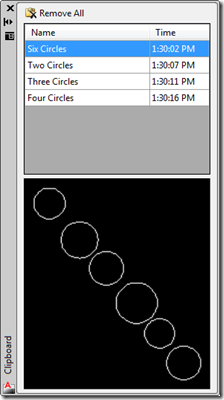
I've made a couple of updates to the Clipboard Manager in this latest version. Firstly I wanted to remove a peculiar situation that occurred in the previous versions when you copy something to the clipboard that isn't AutoCAD geometry: for some reason this act invalidates the ability to access data – such as the preview images – from the items in the Clipboard Manager. The pasting into the drawing still works, as setting an AutoCAD object back onto the clipboard re-enables access to AutoCAD data. You can try this with the previous version by creating a number of entries on…