WPF
-
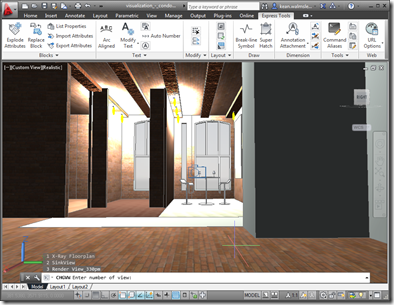
After looking at how the Bindable Object Layer (BOL) in AutoCAD might be used to get information about the current drawing, in today's post we're going to see how it can also be used to manipulate that data (in a fairly limited, albeit useful, way). But first, let's talk a bit about the origins of the BOL. It was first introduced as an architectural feature of AutoCAD when we were looking at delivering AutoCAD for Mac. It's common, these days, for programming frameworks to provide some kind of data-binding facility to simplify the creation of UIs: both WPF and Cocoa…
-
As promised in my last post, I spent some time hacking together a basic application to get a feel for what it's like to develop inside the WinRT sandbox for Windows 8. If you're interested in the source code, here it is. Be warned: the code is really just to prove a concept – there's a lot therein I'd consider sub-optimal for a production application. If you're more interested in seeing the application in action, but haven't yet installed the Windows 8 Consumer Preview, then here's a quick screencast I recorded: A few comments on the experience of developing with…
-
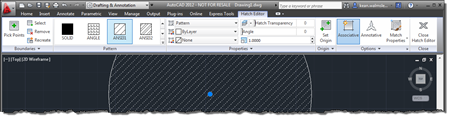
This very interesting feature came to my attention via an internal discussion. Thanks, once again, to George Varghese for providing the base sample used for this post. At various times inside AutoCAD – such as when a block is selected, for instance – a specific ribbon tab is displayed "contextually". As an example, when you select a Hatch object inside the AutoCAD editor, you should see a hatch-related contextual tab displayed: It's possible to implement your own, comparable behaviour inside the AutoCAD editor using a combination of a simple .NET module, a XAML file and some CUI editing (or a…
-
Given the fact AU 2011 is quickly approaching, I decided it was time to dust off my Kinect-related code and getting it working with the Beta SDK from Microsoft Research. Part of the reason I haven't been able to do this sooner is that my primary work machine is currently a MacBook Pro running Windows 7 via Parallels, and the Microsoft Kinect driver currently does not support working inside a Virtual Machine. I did start to try to get my previous implementation using OpenNI + NITE to work on this system, but as it uses the nKinect component that is…
-
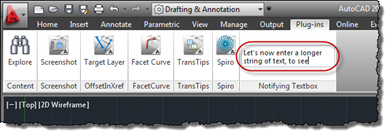
In the last post, we saw a great little sample for adding a textbox to AutoCAD's ribbon which notifies your application of the "commands" entered into it (however you choose to interpret them in your code). In this post, we'll take that further and have that textbox expand vertically as text gets entered, wrapping the contents across multiple lines (only breaking the text at the ends of words, too). Here's the updated C# code, with modified lines in red. You can get the original file here. 1 using Autodesk.AutoCAD.ApplicationServices; 2 using Autodesk.AutoCAD.EditorInput; 3 using Autodesk.AutoCAD.Runtime; 4 using Autodesk.Windows; 5 using System.Windows.Media; 6 using System.Windows.Controls; 7 using System.Windows.Input;…
-
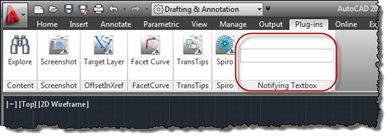
This is a really cool little sample put together by Philippe Leefsma, from our DevTech team in Europe, with the help of George Varghese from the AutoCAD Engineering team. Thanks, Philippe and George! 🙂 This question came up, recently: an ADN member wanted to be able to add an editable textbox to the ribbon inside AutoCAD and then be notified of the data entered into it, as well as being notified when the control gained and lost focus. Here's some simple C# code that does just this: using Autodesk.AutoCAD.ApplicationServices; using Autodesk.AutoCAD.EditorInput; using Autodesk.AutoCAD.Runtime; using Autodesk.Windows; using System.Windows.Controls; using System.Windows.Input; using…
-
Actually, I wish that were true. I'm planning on taking some time off in October, but that seems a long way off, at this stage. What I've actually been doing is working with some REST-based APIs: firstly, I've been finishing up work on September's Plugin of the Month, TransTips for AutoCAD, Revit, Inventor, & 3ds Max (to be posted on Autodesk Labs in the next few days). TransTips makes use of the REST API for Bing Translator, to automatically translate tooltips in various products. Secondly, perhaps more excitingly, I've been coding against a possible future web service API for Project Photofly.…
-
Once again, it turned out to be pretty straightforward to add Inventor support to our TransTips application. We now have a single solution which builds plugins for AutoCAD, Inventor and Revit. The plugins share a common translation and caching engine as well as a WPF graphical user interface for selecting languages. Here's a demonstration of the various plugins in action: I've fixed the right-to-left issue highlighted in the video, incidentally. The next steps are to implement an in-product editing capability and then perhaps to support 3ds Max. One great aspect of this project is that I'm getting to learn a…
-
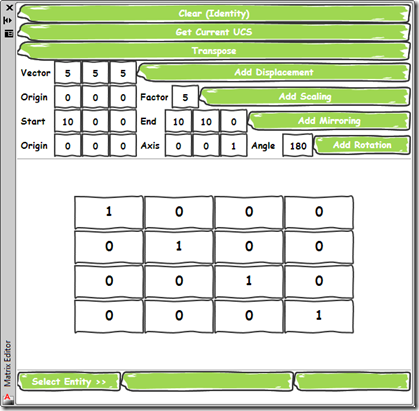
As promised, today's post delivers a simple application that provides a user-interface for the command implemented in this previous post. I chose to implement the UI as a WPF user control which is then hosted by a standard AutoCAD palette. Aside from its core function – to allow composition of transformation matrices to be applied on an AutoCAD object – it demonstrates a couple of handy tips for working with Palettes: Separate the core functionality from our UI, using SendStringToExecute() to call it This will reduce the chance of issues related to Document vs. Session context, document-locking, etc. If you…
-
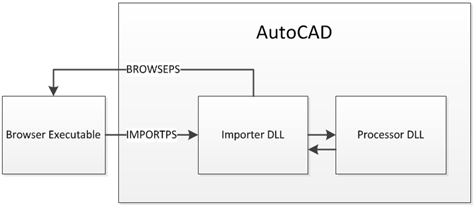
This handout is for the companion class to the one whose handout formed my last post. While that class was user-focused, this one, "CP322-2 - Integrate F# into Your C# or VB.NET Application for an 8x Performance Boost", is more developer-focused and takes the hood off the implementation of the BrowsePhotosynth application. The code for this special version of the application – which imports synchronously via C# and synchronously/asynchronously via F# – is available here for download. Introduction This class takes a look at the implementation of BrowsePhotosynth for AutoCAD, the ADN Plugin of the Month from October 2010 and…